
I have one desk and several clients. Each of them has their own Slack workspace, their own browser profile signed into their own tools, and their own repo I want a Claude terminal already sitting in. The mental cost of “I need to be in client X mode now” was low but constant — click into the right browser window, remember which Slack workspace to switch to, cd a terminal, forget one of them, spend ninety seconds finding my footing.
I tried to build an Electron app to solve it. The plan was a single window with tabbed panes — Slack, browser, terminal — one per client, one hotkey to swap. I got about a day into it before I hit the wall that ends most “let’s embed Slack” projects: Slack cannot be embedded in another window, and it cannot be run more than once. You get one Slack desktop app per machine. That’s the whole rule.
So I stopped trying to clone Slack, and instead made the one Slack I have follow me.
The shape of the fix
Everything runs on top of Hyprland, the Wayland compositor I use on my Omarchy setup. Hyprland has numbered workspaces (1, 2, 3…), and I claimed a range of them — 5, 6, 8, 9 — as “cockpits.” One cockpit per client. Each cockpit is nothing more than a Hyprland workspace plus a config file that says which Slack workspace, which Chromium profile, which directories, and which URL belong there.
The hotkeys are dumb on purpose. Super+5 jumps to cockpit A. Super+6 to B. Super+Shift+S pops a picker to build one if it doesn’t exist yet. Rebuilding a live cockpit reattaches in about 0.4 seconds — it never spawns duplicate windows.
The interesting part isn’t the switching. It’s how Slack ends up in the right place every time.
The daemon that moves Slack
There is a small user-level systemd service called deskd that listens to Hyprland’s event socket. Every time you switch workspaces, Hyprland emits an event on .socket2.sock. deskd reads them and decides one of two things: you just entered a cockpit (move Slack here, switch it to this client’s workspace), or you just left one for a normal workspace (park Slack somewhere out of the way).
That’s it. The whole daemon is 159 lines of bash.
The core loop is a socat connection into Hyprland’s event stream. The tricky bit is that a single workspace change fires a burst of events — workspace, workspacev2, focusedmon, focusedmonv2, sometimes on transient states where a workspace is briefly on the wrong monitor. If you act on each event, Slack thrashes across your screen. The fix is to coalesce: only act once the event stream has been quiet for a fraction of a second.
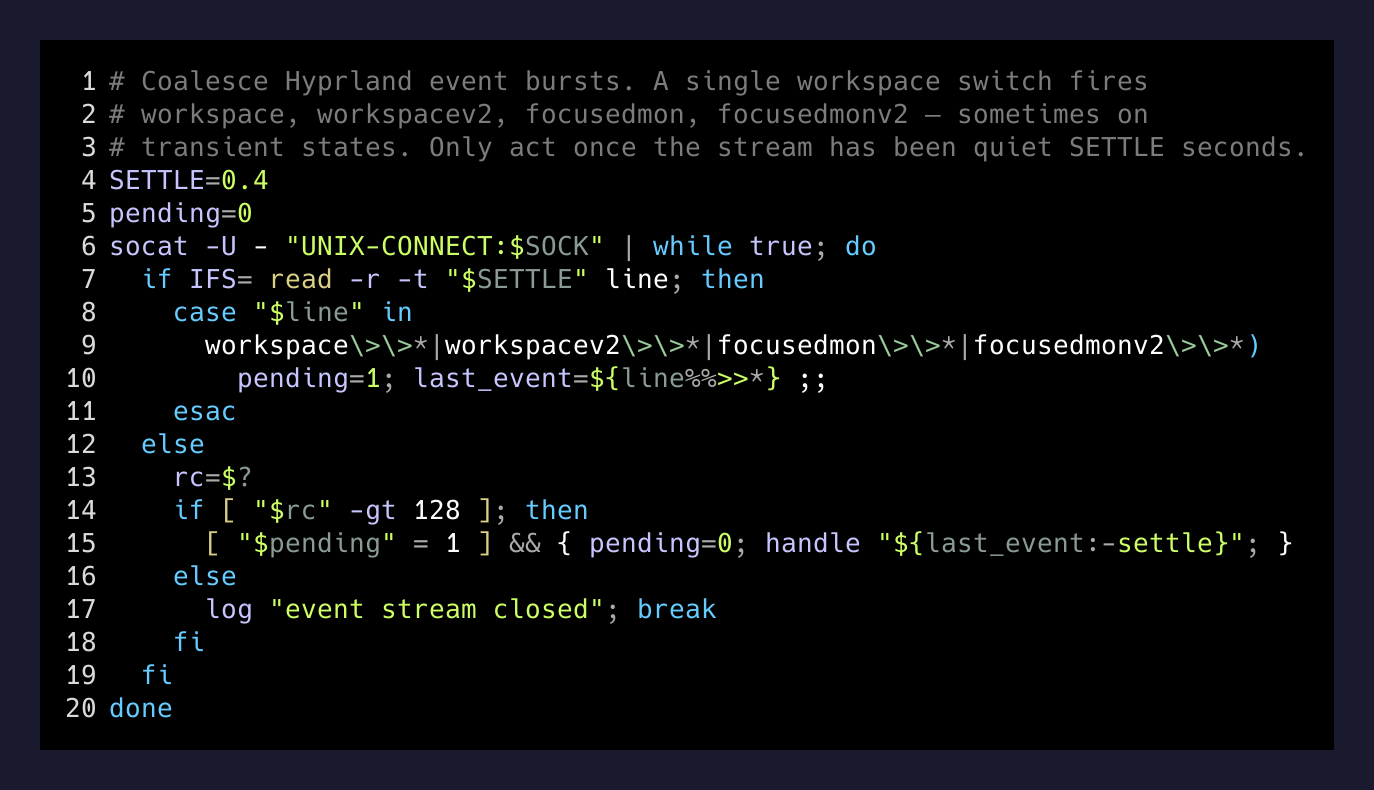
The 0.4-second settle is the whole trick. Below it, events pile up. Above it, the cockpit switch feels sluggish. It landed at 0.4s on the second try and hasn’t moved.
Once the stream settles, deskd calls enter_cockpit, which does three things: finds Slack’s window address by class name, moves it silently onto this cockpit’s paired workspace, and — if this cockpit’s team differs from the last one — fires a slack://open?team=<TEAM_ID> URL so the app switches to the right workspace. Slack takes about five seconds to redraw a team, which is a hard floor set by Slack itself. Nothing I can do about it. Living with it.
Contexts as flat files
Each cockpit is one bash file that gets sourced at build time. Adding a new client is a cp.
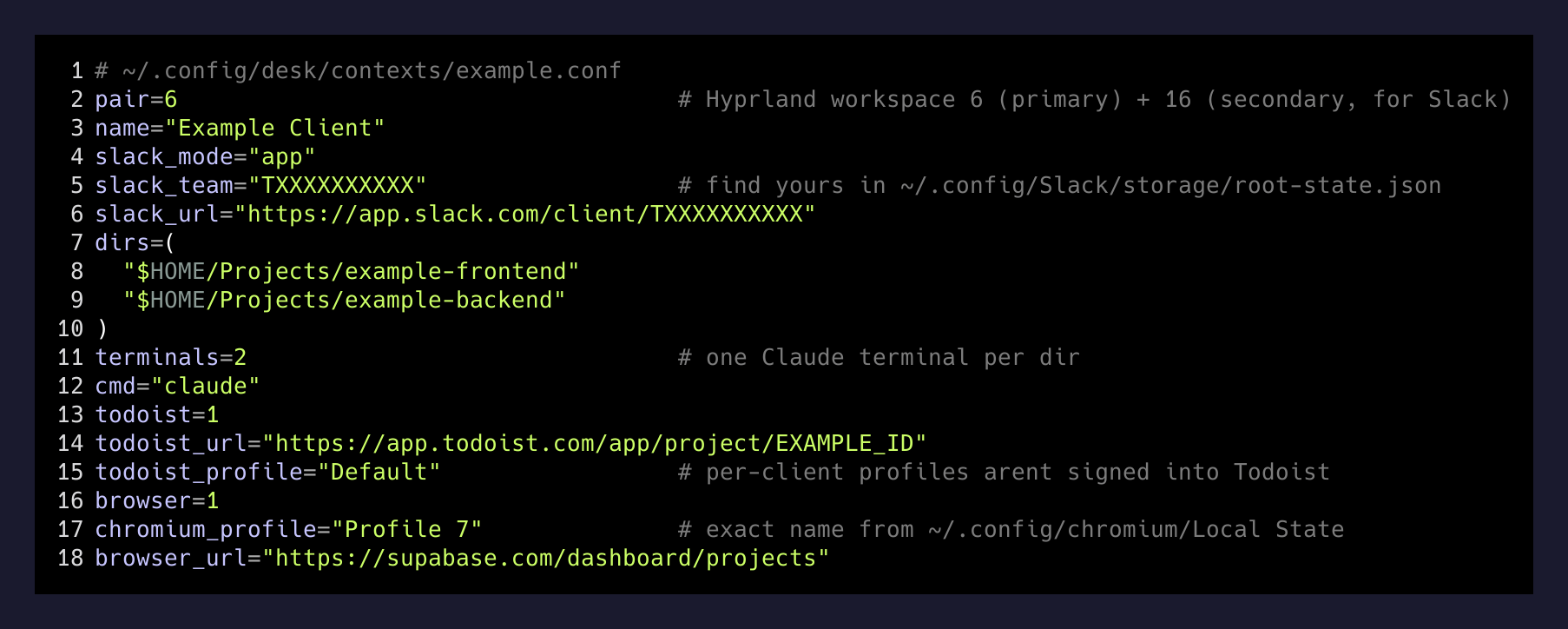
pair=6 claims Hyprland workspace 6 on the primary monitor and workspace 16 on the secondary (that’s where Slack goes, tall and vertical). chromium_profile is the exact profile directory name you’ll find in ~/.config/chromium/Local State. dirs is the list of directories to open a Claude terminal in — one pane per directory.
There’s no build step and no restart. Edit the file, run desk <ctx> -f, and the cockpit rebuilds with the change. Drop a client entirely with rm and a daemon restart.
What I gave up to make this work
None of these are dealbreakers. They’re the price of not building an app.
The part that surprised me
I expected the hard problem to be “how do I embed Slack.” That’s not solvable. The real problem was noticing I’d been asking the wrong question. Slack doesn’t need to be embedded — it needs to be in the right place at the right time. Those are different.
Once I framed it as “make the one Slack I have follow me between contexts,” the whole thing collapsed into two scripts: desk to build a cockpit, deskd to escort Slack around. No Electron, no wrapper, no fragile embed. Just a compositor that emits events and a daemon small enough to read in one sitting.
The Electron app is deleted. The cockpit has been running for a couple of days across four clients. The hotkeys are already in muscle memory. When something feels like it needs an app, it’s worth asking whether it actually needs a daemon.