
A laptop sits on the right side of my desk. A Linux desktop drives the two monitors in front of me. The keyboard and mouse are plugged into the desktop. When I slide the cursor past the right edge of my rightmost monitor, it reappears on the laptop and the keyboard starts typing there. No cable. No KVM switch. No USB hub.
Super+Shift+K toggles the whole thing on and off. A tiny chain-link icon in the top bar flips between connected and broken. When it’s off, nothing is running on the laptop, so it burns no battery when I’m not at the desk.
I love this setup. I also almost gave up on it, twice, because of a single file descriptor.
The internet thinks this is impossible
Half the guides I read while building this say the same thing: Hyprland can’t do Synergy-style KVMs because it doesn’t implement the InputCapture portal. There’s an entire project called styx whose README leads with that limitation. Reddit threads from a year ago give up and tell you to use Barrier on Xorg.
That is out of date. On the current Omarchy build:
- Hyprland 0.56.2 implements
hyprland_input_capture_manager_v1 xdg-desktop-portal-hyprland1.4.1 implementsorg.freedesktop.impl.portal.InputCapture- libei 1.6.0 is installed
lan-mouse0.11.0 reportsusing capture backend: input-capture-portalin its daemon log — the good path, not the layer-shell fallback
The whole thing is thirty lines of config: lan-mouse on Linux, the macOS build in /Applications/Lan Mouse.app, each one pinned to the other’s 192.168.1.x address with cross-authorized DTLS fingerprints. I don’t want the right edge of my monitor to be a live portal to a laptop that could be miles away, so there’s a ping gate on the LAN IP before the toggle will even start. If the Mac isn’t physically on the home network, the keybind does nothing.
That part worked on the first evening. The toggle is where it got weird.
The symptom
Here’s what happened for two days before I understood it:
- Evening 1Setup works perfectlyKeybind on, keybind off, bar icon flips, cursor crosses the edge. Ship it.
- Evening 1 + 30 minKeybind stops respondingSuper+Shift+K does nothing. Bar icon still says 'on'. Clicking it does nothing either.
- Evening 1 + 35 minReboot the desktopWorks again. For about twenty minutes.
- Evening 2Second reboot. Same pattern.I start suspecting the lan-mouse daemon, Hyprland, the Mac side, the DTLS cert, the Wi-Fi.
- Evening 2 + 2 hoursI find the real culpritIt is none of those. It is one line of Bash.
The toggle script that Super+Shift+K fires is ~/.local/bin/mackvm. It’s a Bash file that starts and stops lan-mouse on both the desktop and (over SSH) the Mac. Because I’m nervous about two concurrent presses doing something weird — the keybind can fire from the keyboard, from a click on the bar widget, and from a shortcut on the phone — the script serializes itself with flock:
exec 9>"$LOCKFILE"
flock -n 9 || { echo "already switching"; exit 1; }
# ...do the toggle...
That’s a textbook pattern. Open the lock file on fd 9, non-blocking flock on 9, do the work, let the shell exit, kernel releases the lock. I’d written variations of this a hundred times.
And every single click after the first was dropping to already switching.
The actual bug
flock isn’t a lock on a process. It’s a lock on an open file description. The kernel releases it when every file descriptor pointing to that description closes — not when the shell that opened it exits.
My toggle script, after acquiring the lock, spawned the lan-mouse daemon as a long-lived background process. Which inherited every open fd its parent had. Which included fd 9. Pointing at the lock file. With flock still active on it.
The parent shell exited cleanly. The lock didn’t release, because fd 9 was still open — inside the daemon, which was going to run forever as long as the KVM was “on.”
Every subsequent click of Super+Shift+K opened its own fd 9, tried flock -n, failed because the old lock was still held by the daemon’s inherited fd, and bailed out with already switching. Including the click that was supposed to turn it OFF. Which is why only a reboot cleared it: killing the daemon finally closed the leaked fd and dropped the lock.
The patched spawn looks like this:
# Before — leaks fd 9 into the daemon forever
nohup lan-mouse --daemon >>"$LOG" 2>&1 &

# After — daemon starts with fd 9 explicitly closed
nohup lan-mouse --daemon >>"$LOG" 2>&1 9>&- &
You can verify the fix at runtime by poking at the daemon’s open file descriptors directly:
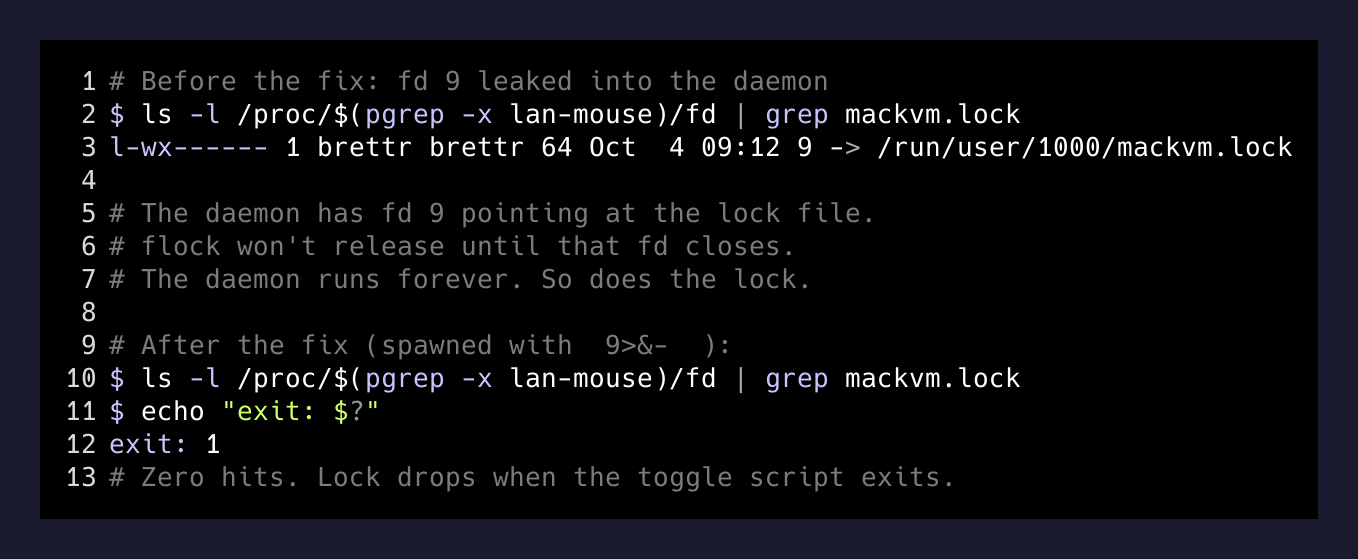
If anything references mackvm.lock in that /proc/<pid>/fd listing, you’re going to get wedged again the next time someone clicks the bar.
A lock isn’t held by a process. It’s held by whatever file descriptors you leaked.
— A lesson I keep re-learning
Why I think it’s worth writing down
Every long-lived agent I’ve built has eventually bitten me on the same shape of mistake: something inherited state it shouldn’t have. A subprocess that got the parent’s env. A child that kept the parent’s socket. A daemon that silently captured a lock file nobody wrote open() on. None of those bugs look like bugs. They look like “the thing stopped working for no reason.”
The whole appeal of running your own tools instead of buying them is that when they break you can actually fix them. The whole cost of running your own tools is that bugs like this one are going to find you, and you’d better learn to read /proc/<pid>/fd instead of just rebooting.
Super+Shift+K works every time now. The chain-link icon flips in about a second. The Mac burns zero battery when I’m not sitting at the desk. And I’ll never write exec N> file under a daemon again without explicitly closing N on the way into the child.