
BookJack 1.0.2 was ready to ship. Folder rename fixed, reorder fixed, MP3 import fixed, all committed on top of 637c4c9. Build number bumped. The whole edit-and-verify loop happened over SSH from my Linux desktop to the MacBook that holds the Xcode project — the pattern I’ve been running for months. Last command in the pipeline was supposed to be xcodebuild archive, then altool to hand the archive to App Store Connect. Zero touching of macOS.
Then codesign refused. And I finally understood exactly where the remote iOS workflow stops working.
The command that fails
Here is the exact shape of the failure, verbatim from the terminal:
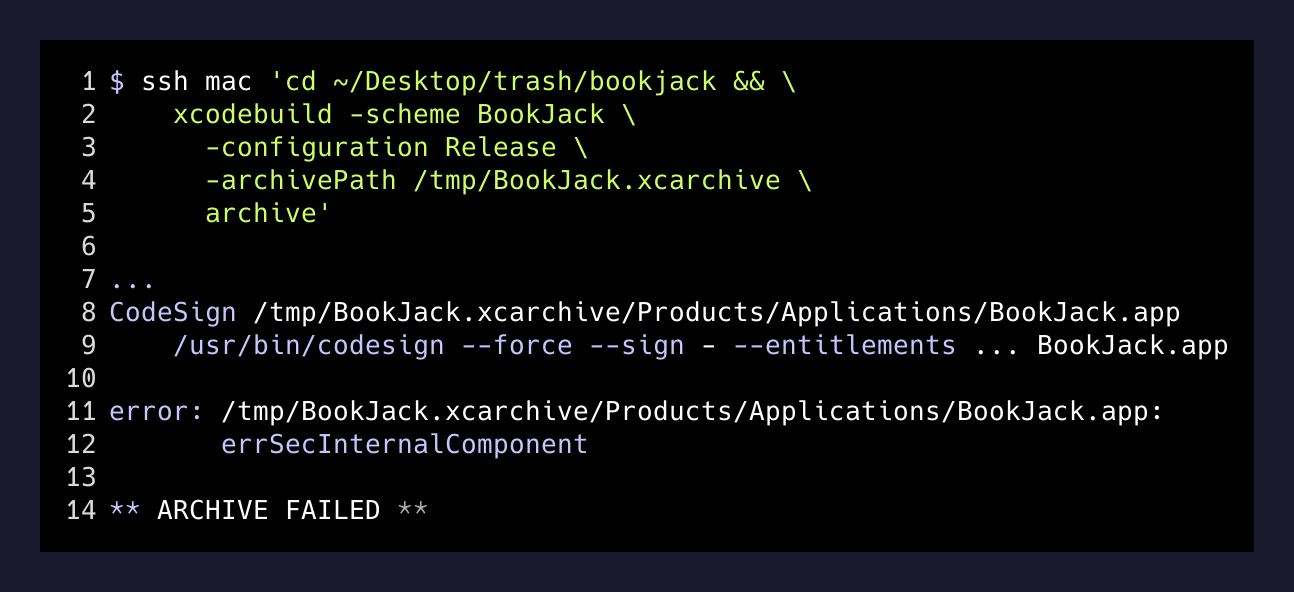
errSecInternalComponent is one of those errors where the name tells you nothing until you know what it means, and then it tells you everything. It’s what codesign returns when it asks the Security framework for your signing identity’s private key and the framework says no. Not “no such key” — the key is right there in the login keychain, indexed by the certificate that Xcode manages. The refusal is: I have the key, and I am not going to give it to a process that isn’t running inside an interactive user session.
Everything else in my Xcode workflow is text and processes. The signing step is not. It is explicitly, by design, gated on the presence of a user who is logged in with a UI session and has decided the keychain is unlocked.
Why this specific step is different from every other step
The rest of the pipeline is stable because it is boring. xcodebuild -scheme BookJack build on the simulator just needs the compiler and the SDK. xcrun simctl streams simulator logs. nvim edits Swift files. Git pushes commits. None of these care whether the shell was spawned by sshd or by a Terminal window a human clicked.
codesign cares. It goes through the Security framework, which reads a Keychain Services ACL on the private key, and the ACL says something like “always prompt” or “any app can use this if the keychain is unlocked.” When the keychain is locked, no ACL matters. And when the Mac boots without anyone logging in — which is what happens when I only ever reach it via ssh and Tailscale — the login keychain never unlocks. My SSH session inherits a locked keychain. Codesign asks for a key it cannot get to. The build fails with the internal-component error, which is the Security framework’s way of saying “I refuse, and I am not going to explain why.”
Three ways out
There are exactly three answers I have found for this. They are ranked by how much of your macOS security posture you are willing to give up.
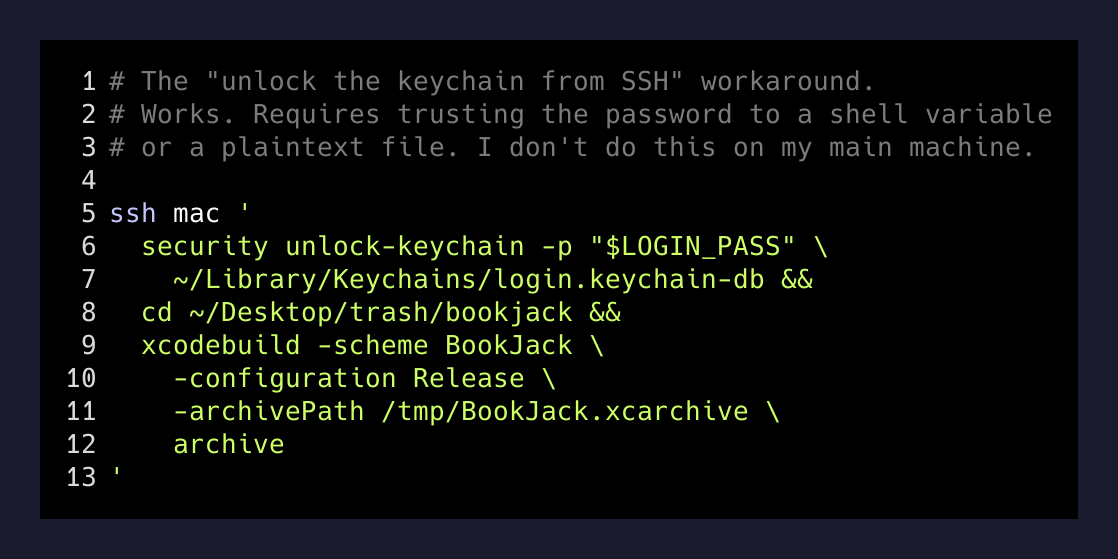
One: unlock the keychain from your SSH session. security unlock-keychain -p <password> ~/Library/Keychains/login.keychain-db will do it. Now codesign succeeds. The catch is that your login password now lives in an environment variable, or a script, or a file, or your shell history — pick your poison. On a machine that also holds your email, your browser sessions, and your source tree, that is not a small delegation.
Two: hand codesign a partition list that trusts the specific tool. security set-key-partition-list -S apple-tool:,apple:,codesign: -s -k <password> login.keychain-db says “these tools can use these keys without prompting.” It is a slightly narrower version of option one and still requires typing your password. It is what most CI setups do.
Three: put the archive step in a real CI system with a dedicated keychain. Xcode Cloud, GitHub Actions with a MACOSX_DEPLOYMENT_TARGET runner, Bitrise. Now the keychain lives on a machine whose only job is to hold that keychain, the password lives in a secret store, and my daily-driver Mac never has to be trusted with the release. This is the right answer for a team. It is complete overkill for a solo indie shipping an audiobook player once a month.
What I actually do
For BookJack I take option four, which isn’t really an option so much as an admission: I walk to the Mac, open Xcode, hit Product → Archive, then use Xcode’s Organizer to upload. Total time cost is under two minutes for a release that ships once a fortnight at best. The prompt for the keychain shows up on the Mac’s screen, I click Always Allow because I trust the interactive Xcode process the same way Apple’s security model wants me to, and the archive is done.
That two minutes is the boundary. Everything before it — the edit loop, the simulator, the log streaming, the unit tests, the actual commit that gets tagged as v1.0.2 — happens over SSH from Arch, with the keyboard I actually think in. The last two minutes happen at the Mac, because that is what Apple asks for in exchange for signing something with my Developer ID.
You can code an iOS app from Linux. You just have to stand up once a month to ship it.
— the honest boundary
The wider lesson
Every tool has a place where its abstractions break. For remote iOS development that place is codesign, and the reason it breaks is a defensible security decision that I would not want reversed. If I could sign builds from any shell on the machine, so could anything else that had grabbed a shell on the machine. The friction is the feature.
The mistake I made was expecting a smooth pipeline all the way from git commit to App Store upload. That expectation came from working in ecosystems — Vercel, Cloudflare, GitHub Actions — where the deploy step is genuinely just another script. iOS is not that ecosystem. Codesign is the specific point where Apple’s model diverges from web tooling, and the way to work with iOS is to accept that divergence and route around it, not to fight it with keychain-unlock hacks I would regret the first time this Mac gets compromised.
So the setup I run today has one physical dependency: on release day, I sit at the Mac for two minutes. Everything else is ssh mac, xcodebuild, and xcrun. It is 98% of the developer experience of shipping an iOS app remotely, and the 2% that remains is exactly the 2% Apple explicitly designed to require a human at the keyboard.
That is not a broken workflow. That is a workflow that respects where the tool draws its line.