 Self-Hosted Systems
A marketing agency I’m working with doesn’t want their team paying for ChatGPT Plus seats and doesn’t want client account data flowing through anyone’s personal account. Reasonable. The fix is well-known: self-host OpenWebUI, point it at OpenRouter, expose it only to their devices. Three hundred-plus models, one bill, no per-seat tax, no random browser tabs leaking prompts into vendor logs.
I figured this for a fifteen-minute job. It ended up being closer to forty, and the interesting part wasn’t the setup — it was the silent-drop bug that made me throw out the obvious config and use one I’d never reached for before.
The obvious config
OpenWebUI runs in Docker. OpenRouter is OpenAI-compatible, so you point OPENAI_API_BASE_URL at it and every model — Claude, GPT, Gemini, Llama, Qwen — shows up in the picker automatically. Tailscale is already running on my box and on the client’s MacBooks. The first instinct is just: bind the container to the Tailscale IP, set unless-stopped, done.
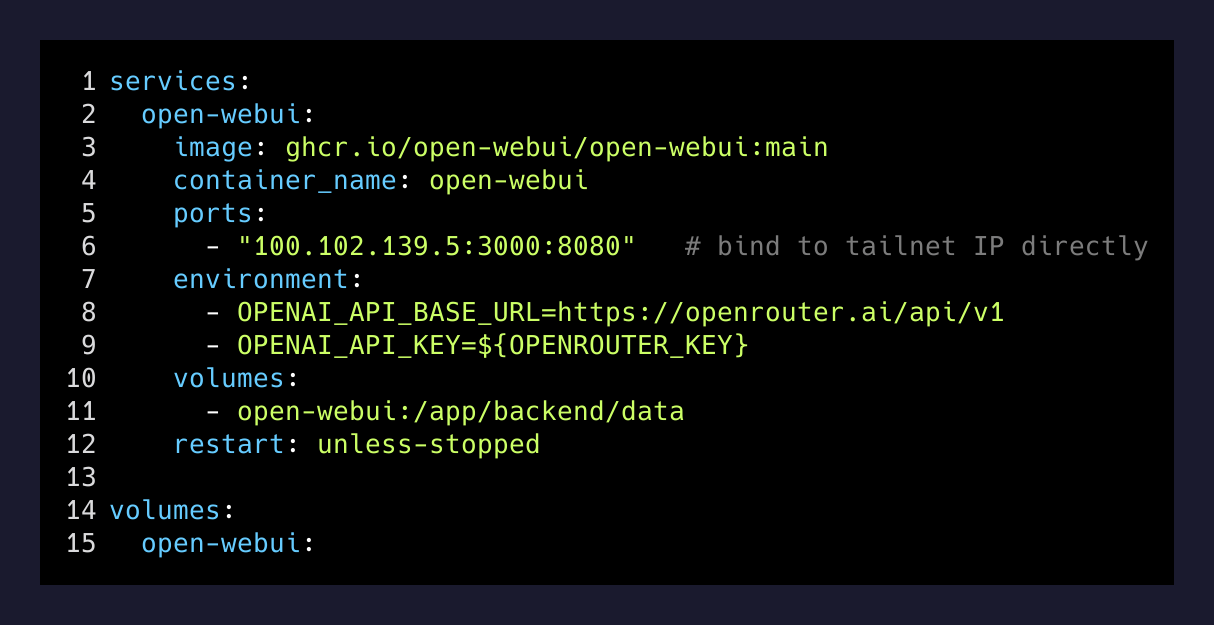
That came up clean. The OpenRouter key validated (200 OK, $5 of credit on it). curl from the box itself returned the OpenWebUI signup page. Container healthy. restart: unless-stopped. Ship it.
Then the MacBook timed out.
Not refused — timed out. Which is the worst flavor of “broken” because it tells you nothing. A refused connection is honest. A timeout is something dropping a packet on purpose.
The wrong suspect
UFW was the obvious culprit. Default-DROP policy, only Tailscale’s UDP port explicitly allowed. So I opened TCP 3000 on the tailscale0 interface only — kept it off the LAN, off the public internet. Restarted. Same timeout.
Then I checked the packet counters on UFW’s tailscale-input chain and the ACCEPT-everything-on-tailscale0 rule had logged 23,000 packets. Tailnet traffic was being accepted. So why was the OpenWebUI port silently dying?
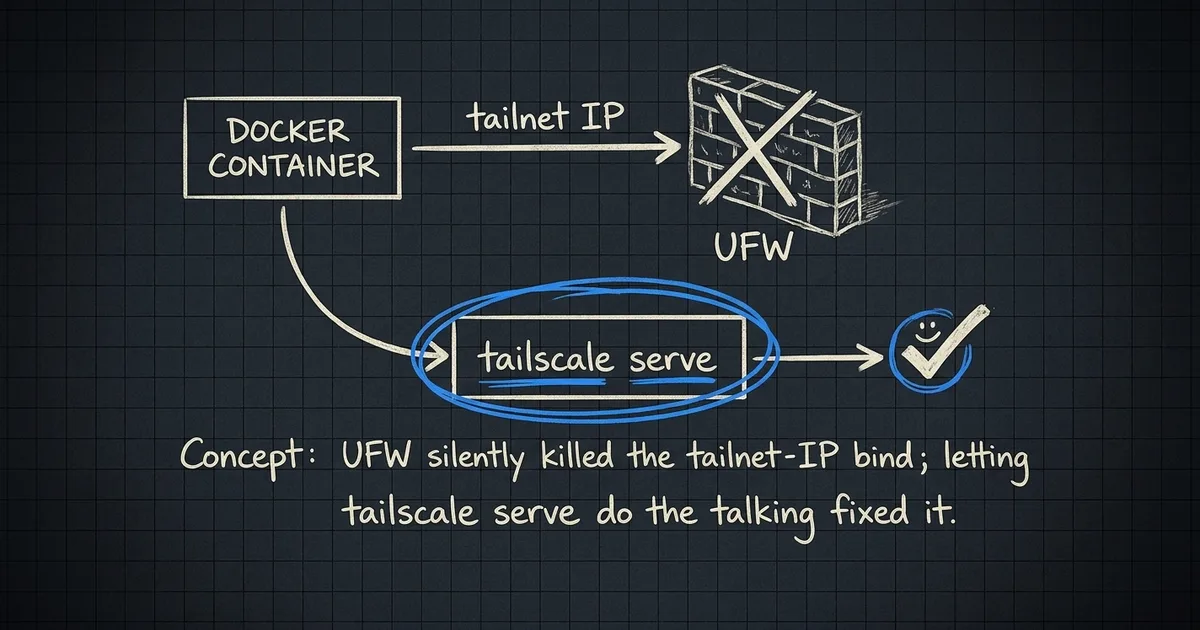
The honest answer: somewhere between UFW’s forward chain and Docker’s own NAT chain, cross-tailnet TCP to a published Docker port was getting eaten. I could have spent another hour with iptables -L -n -v walking the chain. I’ve done that song before. The packets get traced, the bug gets named, the fix is a custom rule that you forget about until you reinstall Tailscale or upgrade Docker and the rule rots.
I stopped digging and switched approaches.
What worked
tailscale serve. The piece I’d half-known about but never used in anger.
Instead of asking Docker to bind to the tailnet IP, you bind the container to 127.0.0.1 — invisible to anything but the host — and let tailscaled itself reverse-proxy from the tailnet into localhost. The connection terminates inside Tailscale’s userspace daemon and never traverses the Docker NAT or UFW’s forward chain. It just sidesteps the whole mess.
services:
open-webui:
  image: ghcr.io/open-webui/open-webui:main
  ports:
    - "100.102.139.5:3000:8080"
restart: unless-stoppedservices:
open-webui:
image: ghcr.io/open-webui/open-webui:main
ports:
- "127.0.0.1:3000:8080"
restart: unless-stoppedThen one line outside Docker:
tailscale serve --bg --https=9000 http://127.0.0.1:3000That asks tailscaled to terminate HTTPS on port 9000 on the device’s tailnet hostname and forward to the OpenWebUI container on localhost. You get a real Let’s Encrypt cert for free, no --insecure, no self-signed warning. The URL becomes https://brett.tailfa0379.ts.net:9000.
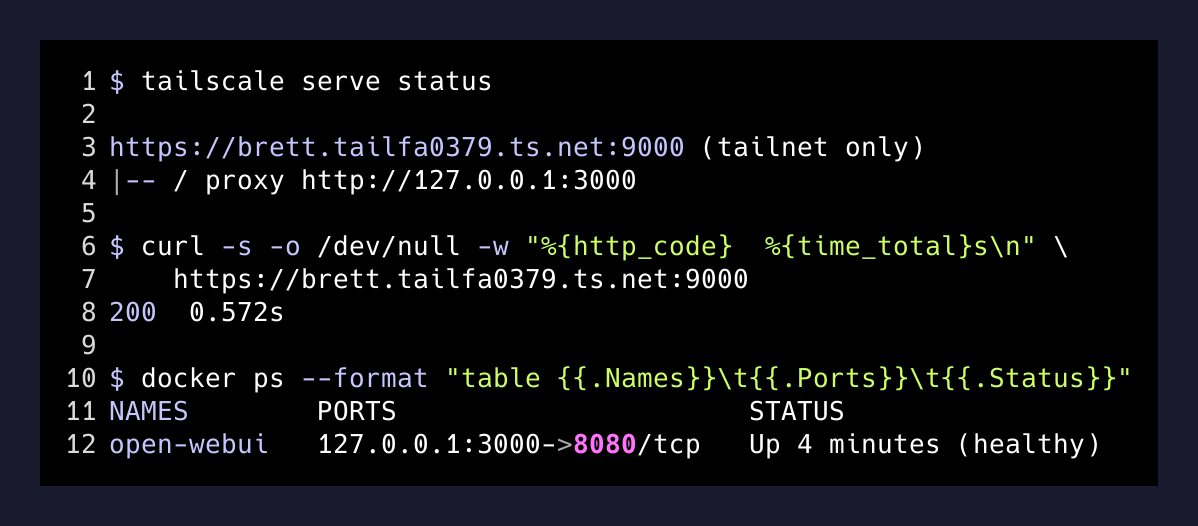
curl from the MacBook: 200 OK in 0.57 seconds. Done.
The privacy boundary I actually had to verify
The client’s first question, before I’d even finished writing up the URL, was whether this thing could see their data. Fair. The answer matters a lot more than the marketing claim “self-hosted = private,” and the boundary is more subtle than people assume.
Here’s what OpenWebUI in a Docker container can actually reach:
- One Docker volume holding its own SQLite database — accounts, chat history. That’s it.
- Outbound HTTPS to OpenRouter for the LLM call.
- Nothing else on the host filesystem. The vault I keep my client’s docs in is invisible to the container. Verified with a shell into the container —
ls /home/brettr/Documents/...returns “no such file or directory.” - None of my MCP tools, Gmail credentials, Slack tokens, Supabase keys. Those live in Claude Code’s config under my user account, not anywhere a containerized chat UI can read.
So the box is sealed. But the real boundary isn’t the filesystem — it’s the chat input.
It can’t reach into your data. But anything you paste into it leaves the machine.
— The actual privacy rule
When a user types into OpenWebUI, the message goes to OpenRouter, then on to whichever provider serves the request — OpenAI, Anthropic, Google, Together. OpenRouter’s default routing may include providers that log prompts. So if you want a private LLM stack that actually means private, you have one of two switches to flip:
- Set OpenRouter’s data policy to no-logging / no-training routing. That filters out providers that retain prompts.
- Point OpenWebUI at a local model via Ollama. Now nothing leaves the box at all, full stop. You trade off model quality and speed for hard isolation.
For a marketing agency that mostly wants to stop pasting client briefs into personal ChatGPT accounts, option one is plenty. For anything regulated, option two.
The actual takeaway
- 0:00Docker upOpenWebUI + OpenRouter compose, bound to tailnet IP. Curl from the box returns 200.
- 0:12Mac times outNot refused. Timed out. Silent packet drop.
- 0:20UFW opened on tailscale0TCP 3000 allowed on the tailnet interface only. Same timeout.
- 0:28Counters lietailscale0 ACCEPT rule has 23k packets. Tailnet traffic is being accepted. UFW is not the lone problem.
- 0:35Switched to tailscale serveContainer bound to 127.0.0.1. `tailscale serve --https=9000` reverse-proxies in userspace.
- 0:37Mac gets 200 OK in 0.57sClean HTTPS cert. Resolves on the tailnet hostname. Persists across reboots.
The reason I’m writing this up isn’t the OpenWebUI part — that recipe is everywhere. It’s the order I should have done things in. The default I’ll reach for from now on:
Bind containers to 127.0.0.1. Expose them with tailscale serve. Never fight Docker’s NAT chain when you don’t have to.
Direct port binds to a tailnet IP look like the cleaner config until they aren’t, and then you’re an hour into iptables. The userspace reverse proxy that ships in tailscaled is the answer for ninety percent of “expose this to my devices over Tailscale” cases. It gives you HTTPS, a hostname, and a config that survives reboots without depending on the container’s restart policy.
A private ChatGPT for a small team is a great starter project for this pattern — low stakes, immediate user feedback, one Docker container, one OpenRouter key. But the same shape works for anything you want on your tailnet: a Plausible analytics instance, an n8n self-host, a Supabase studio for a dev project, an internal dashboard.
The win isn’t OpenWebUI. The win is realizing the tailnet IP isn’t where your services should listen. Localhost is. Let Tailscale be the door.