 Building & Shipping
A client clicks a typo in your homepage hero. They leave a comment. They hit submit.
Ten years ago that comment landed in a screenshot in your inbox. Five years ago it landed as a pin on a tool like Markup.io. Today it lands as a Trello card or a Linear ticket. The bottleneck moved, but the shape didn’t change — at the end of the chain, a human had to translate the comment into a change.
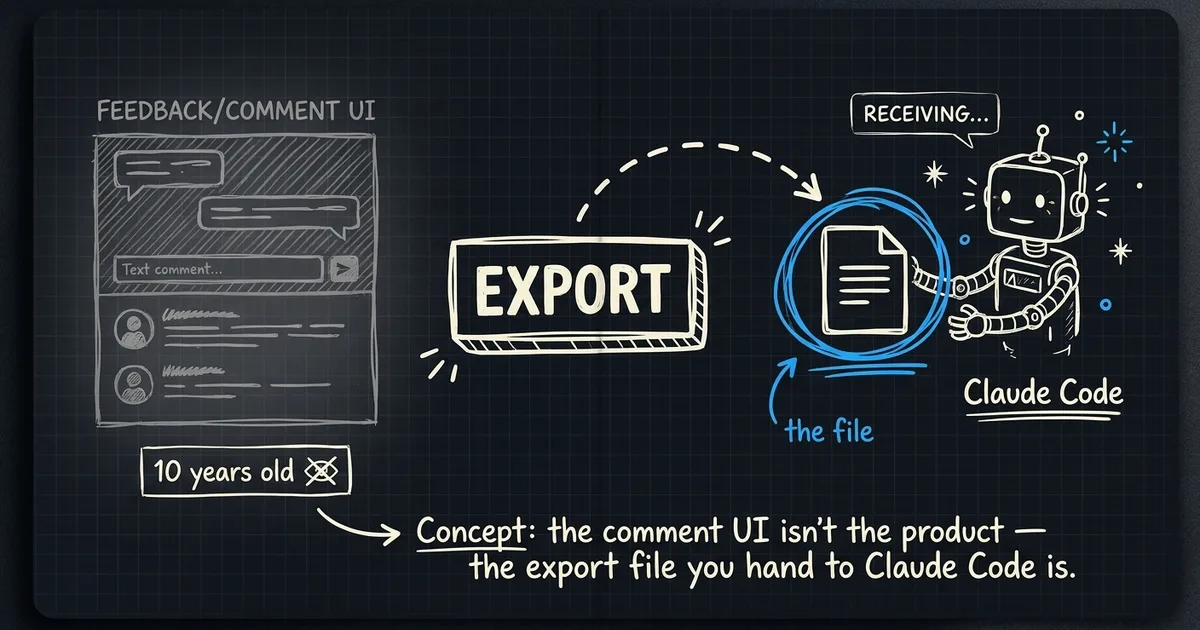
I’ve been building siterevisions.com for a few weeks. From the outside it looks like every other “click anywhere on the site to leave a pin” tool, and that’s fine — that part isn’t the product. The product is what happens after the owner clicks Export.
The shape of the export
When a reviewer drops a pin, the overlay captures four things at the exact moment of the click:
- The text of the comment
- A CSS selector and an XPath for the element they clicked
- The outer HTML of that element at the time of the click
- Viewport dimensions, browser, OS, plus a screenshot of what they were looking at
Almost every modern feedback tool stores at least the selector. What’s different is what comes out the other side. The owner hits Export → Markdown, and /v1/sites/:id/export?format=md returns a file that looks like this:
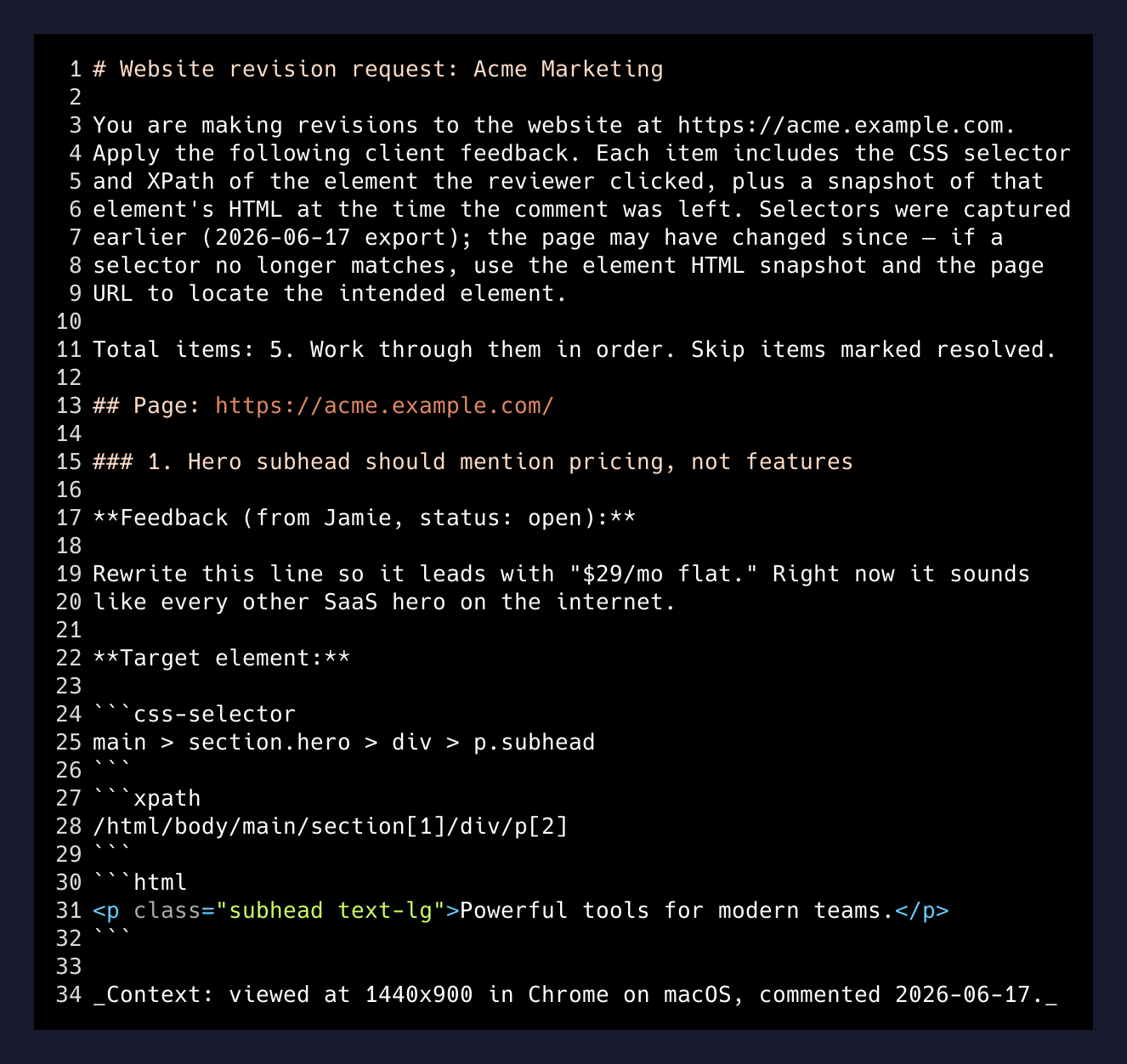
That file isn’t documentation. It’s a prompt. It’s pre-shaped for Claude Code, Cursor, or whatever agent you’re already running.
The first paragraph is an instruction header. It tells the model the site URL, that the file is a revision request, what the selectors mean, and how to recover when a selector has gone stale: “if a selector no longer matches, use the element HTML snapshot and the page URL to locate the intended element.” The model gets context before it gets work.
Then comments are grouped by page URL. Each item gets a numbered H3, the feedback body, the thread of replies, the selectors, the element HTML, and a context line at the bottom — viewport, browser, OS, screenshot URL. The model knows where to look, what to look for, and what it should look like when it gets there.
Why the export is the product
Markup.io exports to CSV. Pastel emails you a summary. BugHerd integrates with Jira. They’re all great tools — they just predate the thing that changed.
What changed is that the developer on the other side of the feedback isn’t necessarily a developer anymore. They’re a developer plus an agent. The bottleneck used to be “did the dev understand the feedback?” Now it’s “can the dev paste the feedback into Claude Code in a shape the agent can act on without ten clarifying questions?”
A CSV doesn’t do that. A Trello card doesn’t do that. A markdown file with selectors and an instruction header does.
The submit button is the same as it ever was. The export button is the whole product.
—
I’ve started using it on my own sites. Reviewer drops five pins on a marketing page. I export to markdown. I open the file in Claude Code. I say “do these.” The agent walks the list, edits the files, opens a PR. Five comments, twelve minutes, no Slack.
The boring details that make it work
Selectors degrade. CSS selectors break the moment someone reorders a div. XPath breaks the moment someone wraps something in a new parent. So the export ships with all three locators — selector, XPath, and an HTML snapshot — and an instruction telling the model what to do when one of them fails.
That instruction line lives in the markdown header, not buried in metadata, because agents read top to bottom and the instruction has to land before the data does.
The export is also deterministic. Same comments in, same markdown out, byte for byte. Two reasons: agents diff better against deterministic input, and I want to regenerate the export in CI when comments change without worrying about ordering noise.
// apps/api/src/lib/export.ts
export function toMarkdown(
  siteUrl: string,
  siteName: string,
  items: ExportItem[],
): string {
  const lines: string[] = [];
  lines.push(`# Website revision request: ${siteName}`);
  lines.push("");
  lines.push(
    `You are making revisions to the website at ${siteUrl}. ` +
    `Apply the following client feedback. Each item includes ` +
    `the CSS selector and XPath of the element the reviewer clicked...`,
  );
  // ...group by page URL, emit per-item blocks in stable order
}
The CSV format is still there for people who want a spreadsheet. The JSON is there for people who want to script against it. But the markdown is the one that matters, and it’s the one I’m spending the most time on.
What I’m still figuring out
A few open questions:
Will agents trip over the HTML snapshots? If the snapshot is a 1,000-line <div> carrying a whole component tree, the agent might lock onto the snapshot instead of the live page. I’m capping snapshot length and thinking about whether to truncate aggressively or include nothing and trust the selectors.
How much instruction is too much? The header instruction is currently one paragraph. I’ve watched agents do better with longer instructions and also ignore long instructions completely. There’s a sweet spot somewhere.
Will reviewers learn to write better comments? “Make this pop” used to be a developer’s problem. With the export, it becomes the agent’s problem, and the agent is worse at vague briefs than a developer is. The quality bar for feedback might go up on its own, just because the new reader can’t fake it.
The bigger pattern
The interesting move in any tool right now isn’t the feature — it’s the export. The shape of the file you hand to the next step in the chain is doing more work than the UI that produced it.
Email clients, calendars, CRMs, ticket systems, feedback tools — they all used to optimize for the human reading them on the other end. Now there’s a second reader, and that reader has different needs. Wider context, structured cues, instruction up front, deterministic ordering.
Look at the products you use. Then look at what they let you export, and how. That tells you whether the team building them has noticed yet.