 Self-Hosted Systems
I opened a terminal, hit push-to-talk, and started talking to Claude. Nothing landed. No transcription, no words on screen, no error. Just my breath echoing back at me from the Elgato.
This was on Omarchy — my Arch/Hyprland setup — with a Wave 3 hanging off USB and voice mode wired through Voxtype. Everything was supposed to Just Work. I’ve done this a hundred times.
I spent the next forty minutes convinced my sound stack was cursed. It wasn’t. Two processes were holding the mic open at the same time and one of them shouldn’t have been there in months.
Ruling out the obvious first
The reflex on Linux audio issues is to blame PipeWire. I checked anyway.
pactl list sources short70 alsa_output.pci-0000_06_00.6.analog-stereo.monitor RUNNING
71 alsa_input.pci-0000_06_00.6.analog-stereo SUSPENDED
117 alsa_input.usb-046d_C270_HD_WEBCAM...mono-fallback SUSPENDED
383 alsa_input.usb-Elgato_Systems_Elgato_Wave_3... RUNNINGThe Elgato was there. It was running, not suspended. That’s already unusual — an idle mic normally sits SUSPENDED until something opens it. Something had it open.
Was it the right default?
pactl get-default-source
# alsa_input.usb-Elgato_Systems_Elgato_Wave_3_A011A41910O3R6-00.mono-fallback
Yes. So PipeWire saw the Wave 3, the Wave 3 was the default, and it was in the RUNNING state. On paper this is a working system. In practice I still couldn’t get a single word into voice mode.
The command that actually helps
pactl tells you what devices exist and what state they’re in. It does not tell you who is talking to them right now. For that you want wpctl — the WirePlumber CLI. This is the command I should reach for first on any “audio device is fine but something isn’t working” problem.
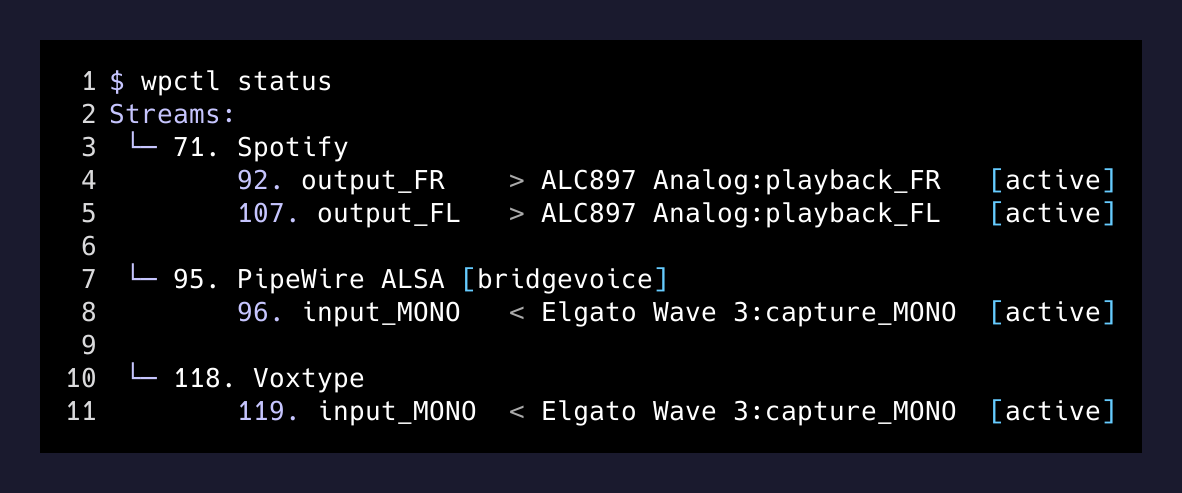
wpctl statusThe Streams section is what matters:
└─ Streams:
   71. Spotify
       92. output_FR  > ALC897 Analog:playback_FR   [active]
       107. output_FL > ALC897 Analog:playback_FL   [active]
   95. PipeWire ALSA [bridgevoice]
       96. input_MONO < Elgato Wave 3:capture_MONO  [active]
   ... Voxtype
       ... input_MONO < Elgato Wave 3:capture_MONO  [active]
There it is. Spotify was playing to the speakers, fine. But two separate processes were both actively capturing from Elgato Wave 3:capture_MONO at the same time. One was Voxtype, my actual push-to-talk daemon. The other was something called bridgevoice that I had absolutely no memory of installing.
Chasing the ghost
I had no memory of installing bridgevoice, but there it was in the process table.
ps -p 5644 -o pid,ppid,user,cmd --no-headers
#   5644     970 brettr   bridgevoice --autostart

readlink -f /proc/5644/exe
# /tmp/.mount_BridgeBkOMNG/usr/bin/bridgevoice
/tmp/.mount_... gave it away instantly — that’s an AppImage’s runtime mount point. So this was something installed as a single-file AppImage, not through pacman, which is why it didn’t show up in any package I owned.
The autostart entry sealed it:
cat ~/.config/autostart/BridgeVoice.desktop[Desktop Entry]
Type=Application
Name=BridgeVoice
Exec=/home/brettr/.local/bin/BridgeVoice.AppImage --autostart
Hidden=trueBridgeVoice is the desktop dictation app from bridgemind.ai. I had tried it months ago, decided it wasn’t for me, and moved on to Voxtype for push-to-talk. What I never did was uninstall it, because AppImages don’t really have an uninstall — you just delete the file. The autostart entry it had dropped into ~/.config/autostart/ at first launch was still there, dutifully re-launching a daemon on every login that grabbed my mic and did nothing visible with it.
The one-command fix
I didn’t want to nuke the binary in case I ever wanted to try it again. Just stop the running process and rename the autostart entry so it doesn’t come back:
systemctl --user stop "app-BridgeVoice*@autostart.service"
mv ~/.config/autostart/BridgeVoice.desktop \
   ~/.config/autostart/BridgeVoice.desktop.disabled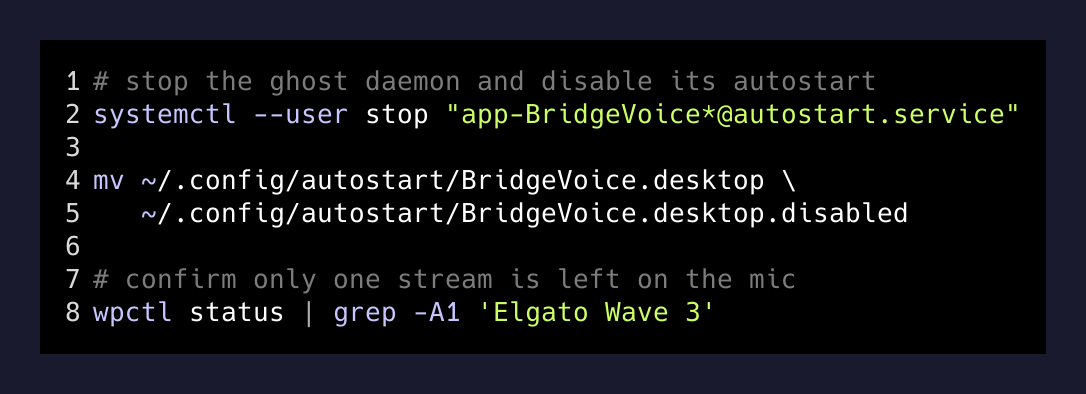
wpctl status after that showed one stream on the Wave 3, from Voxtype only. Push-to-talk started working the next time I pressed it. Total fix time once I ran the right diagnostic: about ninety seconds. The forty minutes before that was me refusing to run wpctl status.
The takeaway I keep re-learning
When a Linux audio app “isn’t hearing you,” the interesting question is almost never is the device configured correctly. It’s who else is holding it open. pactl will tell you the device is fine — the device usually is. wpctl status will tell you why the app you actually care about is getting garbage.
The broader lesson is about AppImages and other install-outside-your-package-manager tools. Pacman, apt, and brew all have an uninstall step because someone thought about the cleanup. AppImages assume you’ll remember what you dropped in ~/.local/bin/ and what autostart entries it created. You won’t. Six months later a daemon you don’t remember is running on every boot and quietly eating whatever resource it grabs.
I now have a note in my Omarchy vault called things-that-autostart.md. Every time I install anything outside pacman, it goes on the list, along with the desktop file that runs it. Next time voice mode goes quiet I’ll check that list before I check anything else.