
The Omarchy weather widget shows a temperature and a cloud glyph. That’s fine for Portland. It’s not fine for Austin in August, where the useful question is not “how warm is it” (hot) but “will my skin be legally distinct from beef jerky if I walk to the coffee shop right now” (yes).
So I added two things to the Omarchy shell bar: a UV index pill next to the sun icon, and an hourly forecast that appears when I hover the widget. Both live in a small plugin at ~/.config/omarchy/plugins/brettr.weather/, and both piggyback on Open-Meteo’s free API — no key, no rate limit worth worrying about.
Here’s what it looks like now: ☀ 92° UV 11, and hovering pops a three-column monospace table of the next twelve hours.
The UV pill
Open-Meteo already returns uv_index on the current block if you ask for it. The trick was mapping the value to the WHO exposure bands so the number has meaning at a glance. I don’t want to see UV 11 and have to remember what that means. I want the number and, if I look at the tooltip, the word EXTREME.
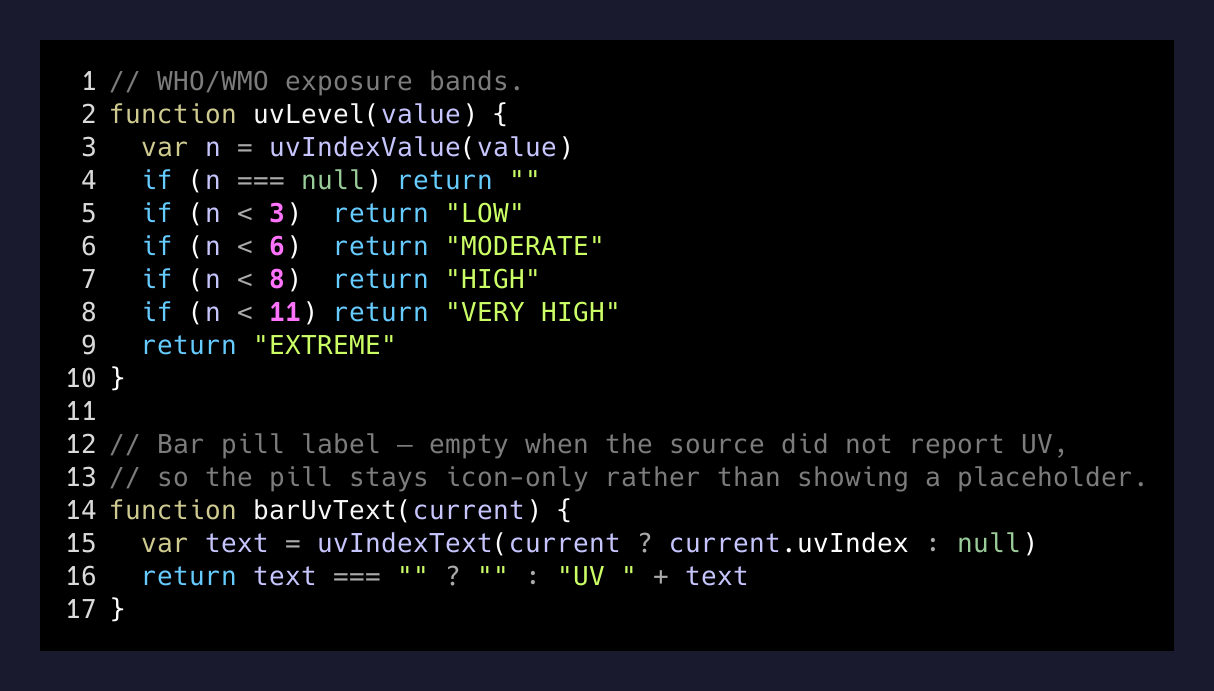
Those thresholds come from the WHO/WMO guidance — 0–2 low, 3–5 moderate, 6–7 high, 8–10 very high, 11+ extreme. Anything at 8 or above and I stop being casual about sunscreen. Anything at 11 and my brain reroutes around the outdoors entirely.
The barUvText(current) function returns "" when the source didn’t hand back a UV index, which matters — I don’t want the pill to render UV — and take up bar space for no reason. If it’s blank, the pill collapses.
Hourly on hover
The bar pill is the fast glance. The hover tooltip is the “should I move the dog walk to 7am” answer. I wanted:
- Next twelve hours
- Temperature, UV, chance of rain, and a glyph
- All of it aligned in a monospace column, because ragged data in a hover tip is a war crime
The Omarchy bar renders tooltips in the shell’s monospace font and centers the whole block. That means every row has to be the same width or the centering makes the columns wobble one character left or right per row. The fix is padLeft:
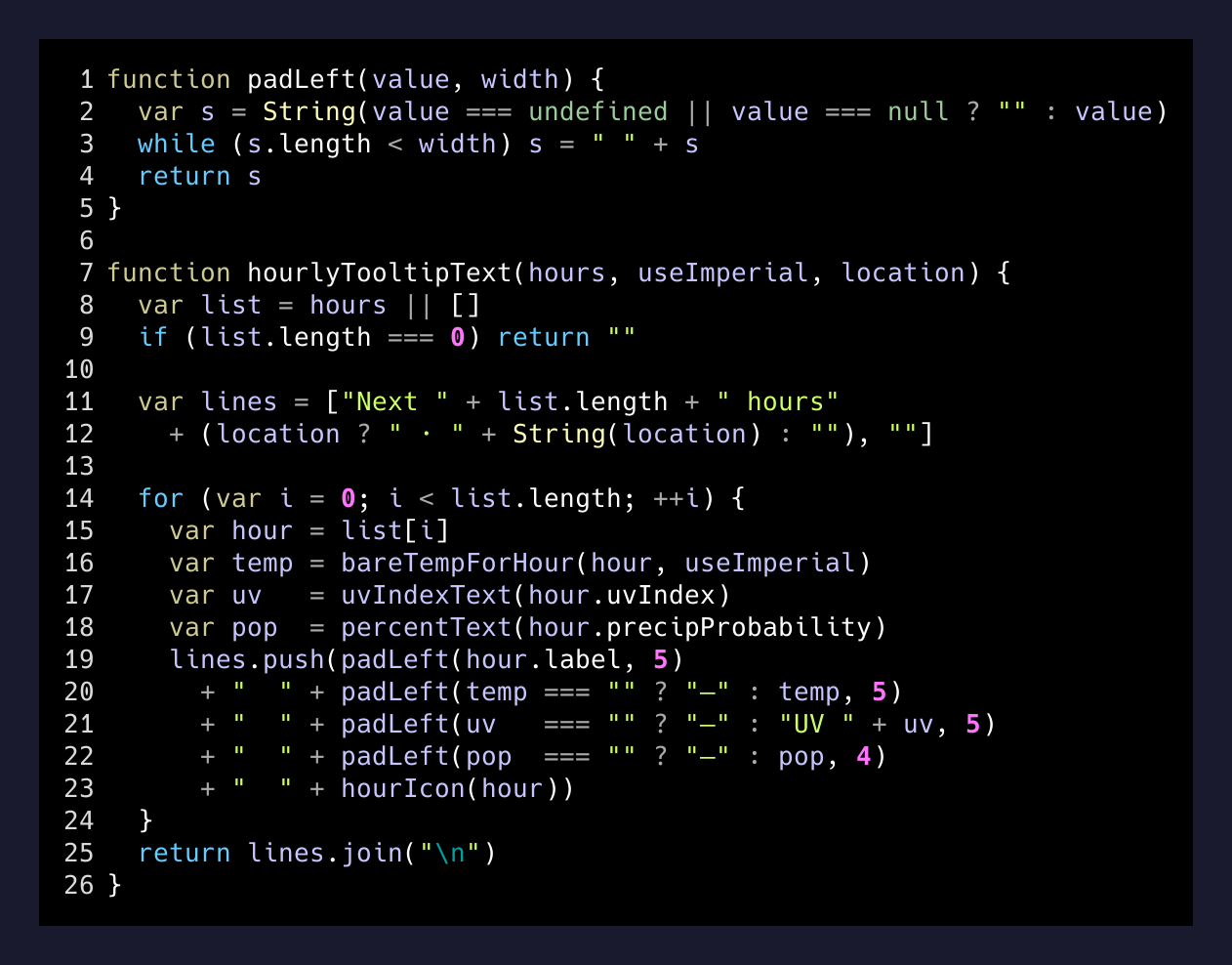
padLeft is dumb by design — space-pad from the left to a target width. The rows come out looking like this in the tooltip:
Next 12 hours · Austin

12:00   92°   UV 11    5%   ☀
13:00   94°   UV 11    5%   ☀
14:00   95°   UV 10   10%   ☀
15:00   96°   UV  8   20%   ⛅
16:00   95°   UV  6   30%   ⛅
17:00   93°   UV  4   40%   🌦
18:00   90°   UV  2   50%   🌦
19:00   87°   UV  1   40%   ☁
20:00   84°   UV  0   30%   🌙
21:00   82°   UV  0   20%   🌙
22:00   80°   UV  0   10%   🌙
23:00   78°   UV  0    5%   🌙
The condition glyph goes last on purpose. Some of the weather emoji are double-width, and if you put them in the middle of a row, every row after that gets pushed a half-column left. Last column, alignment stays clean.
The plugin shape
If you’ve never written an Omarchy shell plugin, the structure is minimal: a Model.js with pure functions and a View.qml with the presentation. Mine looks like this:
~/.config/omarchy/plugins/brettr.weather/
├── Model.js       # data fetching + shape
└── View.qml       # bar pill + tooltip
The bar layout in ~/.config/omarchy/shell.json references it by id:
{
  "center": [
    { "id": "omarchy.indicators" },
    { "id": "omarchy.clock", "format": "dddd HH:mm" },
    { "id": "omarchy.keyboard-layout" },
    { "id": "omarchy.system-update" },
    { "id": "brettr.weather" }
  ]
}
After editing, Super+Ctrl+R reloads the shell in place. No restart, no logout. That reload speed is what makes bar widgets fun to iterate on — you can tune the width of a padded column and see it live in half a second.
The small joy of a well-fit status bar
There’s a certain kind of person for whom the phrase “status bar” quickens the pulse. That is me. My bar has focus-music controls, a Todoist scratchpad button, a Cal.com link picker, a Slack toggle, and now a WHO-banded UV pill with an aligned hourly forecast. None of it is important. All of it removes small friction from the day.
If you’re on Omarchy or Hyprland with a similar shell, the whole change was about 40 lines of Model.js plus a small View.qml tweak. Open-Meteo is free. The WHO band mapping is public. And the payoff is that on a Wednesday afternoon in Austin, I glance at my bar, see UV 11 EXTREME, and decide the walk can wait until 7pm.
That’s the real thesis of tinkering with your desktop: the goal isn’t the widget. The goal is the small daily nudge from a tool you built yourself, telling you exactly what you’d tell a friend.