 Self-Hosted Systems
I tried to go live on Twitch for the first time this week. Just a “does the pipe work” test — OBS on my Linux desktop, stream key pasted in, a browser window I planned to code in. Started streaming. Everything looked fine. Switched to another workspace to open a file. Came back. My stream was a still image of the workspace I’d left.
Same thing on Google Meet earlier this month, in a call I actually cared about. I shared my screen, then hit Super+2 to check a note. The person on the other end saw the frozen tab I was on when I clicked “Share.” I switched back. Still frozen. I stopped and re-shared. Fine for thirty seconds. Switched workspaces. Frozen again.
It looked like Hyprland was broken. It wasn’t. The problem is that the portal picker on Wayland asks you a question with three answers, and two of them are the wrong answer for a tiling window manager.
The picker
When any app on Wayland asks to record your screen — Chrome for Meet, OBS via PipeWire, anything — it doesn’t talk to the compositor directly. It talks to xdg-desktop-portal, which pops up a picker asking what you want to share. You get three choices:
- Window — one specific window
- Region — a rectangle you draw
- Screen — a whole monitor
The picker looks the same on GNOME, KDE, and Hyprland. It behaves differently on each, and the “which portal implementation is actually handling this” step is invisible.
On Hyprland, if you pick Window, the portal captures that window’s surface. When you switch workspaces, that window is still there in memory, but on many portal + compositor combinations the frame callbacks stop firing for surfaces that aren’t visible. Your stream freezes on the last frame the window rendered.
If you pick Region, it captures a rectangle of pixels on a specific output. Same failure mode with a different flavor — you get the rectangle, but if the workspace change hides what was under it, you get a stale rectangle.
If you pick Screen, it captures a monitor. And here is the part I did not know: on Hyprland, when you switch workspaces, you are not switching what the monitor is showing to something new — you are asking the compositor to display a different workspace on that same output. The output keeps producing frames. Screen capture keeps working.
The “workspace freeze bug” is really “you picked Window when you should have picked Screen.”
The fix, minus the drama
Two things had to be true before it worked reliably:
xdg-desktop-portal-hyprlandhad to be the portal actually handling the request — notxdg-desktop-portal-gtk, which will happily install itself as the default on an Arch/Hyprland setup and then screen-share like it’s still on GNOME.- In the picker, I had to click Screen and pick my monitor, not Window and pick Chrome.
Checking which portal is winning the race:
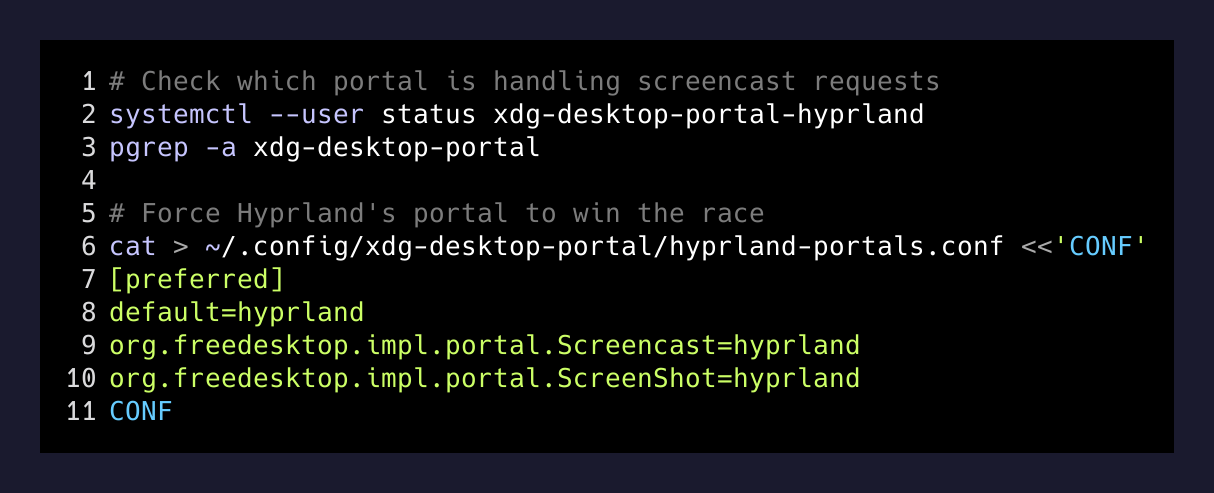
systemctl --user status xdg-desktop-portal-hyprland
pgrep -a xdg-desktop-portal
If you see xdg-desktop-portal-gtk handling screencast requests, force Hyprland to win by writing this to ~/.config/xdg-desktop-portal/hyprland-portals.conf:
[preferred]
default=hyprland
org.freedesktop.impl.portal.Screencast=hyprland
org.freedesktop.impl.portal.ScreenShot=hyprland
Log out, log back in. Now the picker you see is the Hyprland one, and its “Screen” option maps to wlr-screencopy bound to a monitor output. Workspaces come and go on that output. The output keeps streaming.
Why “Window” is the tempting wrong answer
On macOS and Windows, “share this window” is the answer you want in almost every meeting. It hides your notifications, your Slack, your other tabs. Sharing your whole screen feels leaky.
On a tiling WM, that instinct is a trap. Tilers are built around the assumption that windows come and go on workspaces constantly. You do not have “one window I sit inside for an hour” the way you do on macOS. You have “a workspace full of terminals and Chrome that I rearrange every twenty seconds.” “Share this window” is picking one frame out of a movie and asking the projectionist to keep showing it.
What OBS wants specifically
OBS on Wayland uses a PipeWire capture source, not the X11 window capture you might remember from a few years ago. When you add the source, it pops the same portal picker. Same rule applies: pick Screen, pick a monitor.
If you plan to stream regularly, one useful shape:
- One monitor is your “on-air” monitor. OBS captures that monitor. You leave one workspace on it and keep everything you want on-stream there.
- Your other monitor is your “backstage.” Slack, notes, the OBS control window itself. Nobody watching sees it.
That is closer to how OBS is designed to work anyway. The single-monitor version — share the whole thing, don’t switch workspaces on it while live — works too, it’s just harder to be disciplined about.
What I actually did in the moment
I was already streaming when I figured this out. I stopped the stream, deleted the OBS source I had (which was a Window capture of Chrome), added a new PipeWire source, and picked my primary monitor. Restarted the stream. Switched workspaces. The stream kept updating. That was the whole fix.
For the Google Meet case, same thing — when the “Share screen” dialog comes up next time, pick “Entire screen” and choose the monitor. Not “A tab.” Not “A window.” The tab option freezes for the same reason: Chrome asks the portal for a surface, the portal binds to something that stops updating when it’s not on top.
The takeaway
There is a whole class of “Wayland is broken” complaints that are actually “the app asked you a question and the picker didn’t tell you which answer works on your compositor.” The compositor is fine. PipeWire is fine. xdg-desktop-portal-hyprland is fine. The picker is a lowest-common-denominator UI that treats tiling WMs like they’re floating ones with weird animations.
Once you know that Screen = output = keeps streaming, and Window/Region = surface = freezes when you leave, all of this stops being confusing. And you can stream from Hyprland the same way you would from anywhere else.
Now I just need something worth streaming.