 Self-Hosted Systems
The Freebo iOS build was booting to a white screen. Not a crash, not an error, not a spinner — just white. The app opened, sat there, and did nothing.
The Xcode project lives on my MacBook. I don’t work at my MacBook. I work at a Linux desktop running Arch, Hyprland, and a keyboard I’ve spent two years bending to my brain. Every time an iOS bug pushes me back to the Mac I lose an hour to the context switch — different shortcuts, different terminal, different everything.
So I didn’t switch. I fixed the white screen from the Linux desktop over SSH, and it turned out to be almost pleasant.
Screen sharing is the wrong shape
The default answer to “your project is on a different machine” is screen sharing. VNC, Screens, Apple Screen Sharing, Parsec, whatever. I’ve tried all of them and they all have the same flaw: they treat your remote machine as a place you visit rather than a thing you compose with.
If I VNC into the Mac, I can’t paste from my Linux clipboard cleanly. I can’t grep across the codebase from my terminal. I can’t run a script that touches both my Freebo backend and the iOS project. I’m just a mouse cursor in a window inside another window, and every keybinding I know is now a keybinding for the wrong OS.
The other answer is Tailscale plus plain SSH, and it’s the answer I already had installed.
ssh macmac is an alias in my ~/.ssh/config that resolves to my MacBook’s Tailscale hostname. Tailscale is doing exactly one thing here: making sure the two machines can find each other from anywhere without me touching a router. Once I’m on the Mac’s shell, everything is just files and processes, which is what a project actually is.
The white screen has a small shortlist of causes
SwiftUI apps that boot to white are usually one of four things:
- The
@mainstruct isn’t returning aScene— you deleted aWindowGroupwhile refactoring and it silently compiles. - The root view is returning
EmptyView()because a conditional collapsed. - A
.task { }or.onAppear { }is throwing before the first frame renders and swallowing the error. - Your
LaunchScreenstoryboard is being served forever because the app never signals it’s ready.
None of those require Xcode to diagnose. All of them are visible in the source. So the first move from Linux is grep, not GUI:
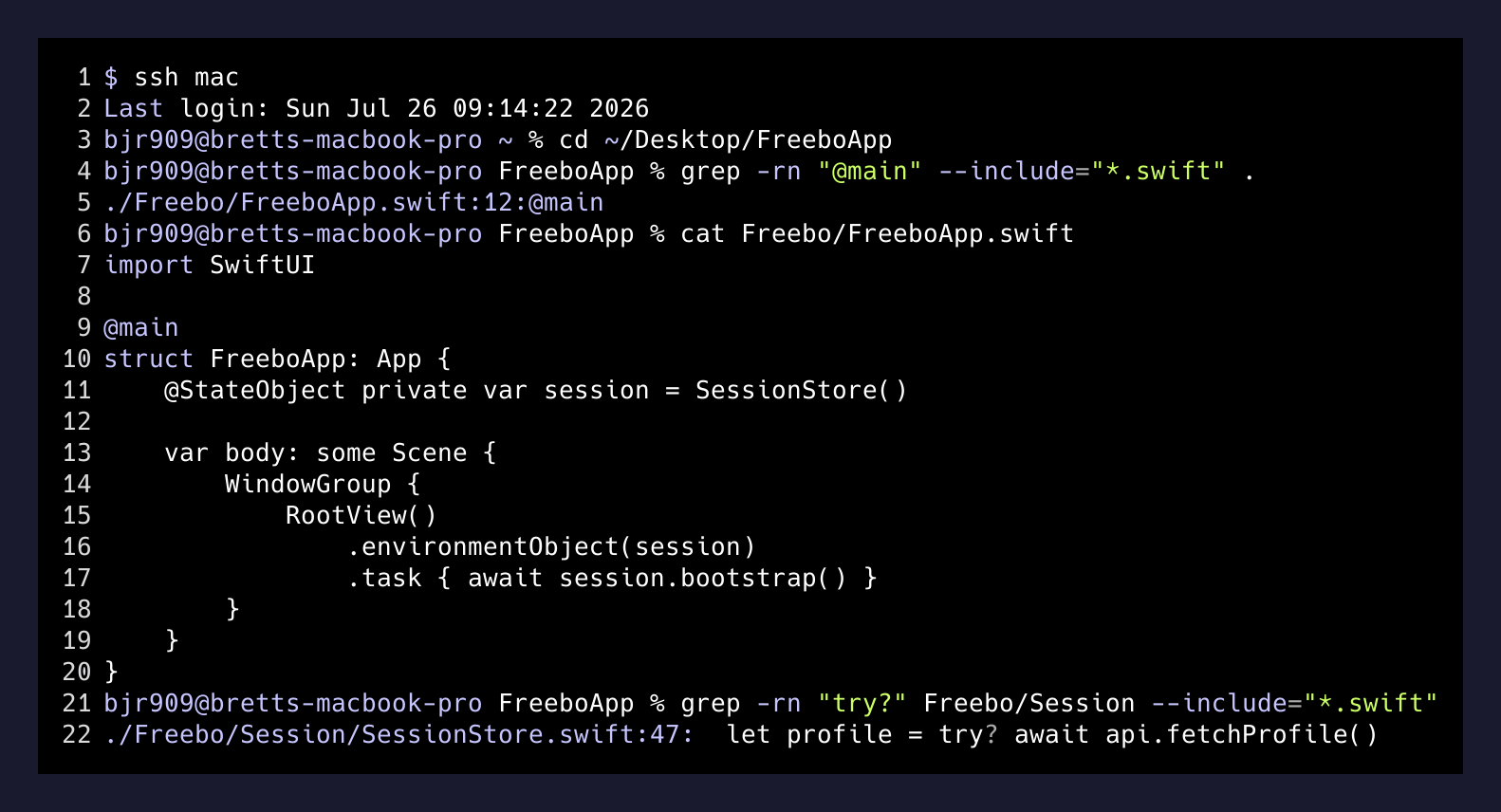
Two minutes of grep and reading the two dozen Swift files that actually matter told me more than opening Xcode would have. The @main App struct was fine. The root view was returning something. The suspect was a .task block that fetches the operator profile at launch — if it throws, the view stays in its initial state, which happens to render as nothing.
xcodebuild is the whole reason this works
The unlock is that Apple ships a fully-featured command-line build tool. Everything Xcode.app does when you hit Cmd-R, xcodebuild will also do — build, run tests, archive, spit logs at your terminal. Which means from Linux, over SSH, I can drive a real iOS build on the Mac without opening the IDE.
ssh mac 'cd ~/Desktop/FreeboApp && \
  xcodebuild -scheme Freebo \
    -destination "platform=iOS Simulator,name=iPhone 15" \
    build 2>&1 | tail -80'
That’s the whole loop. Edit a file with nvim over SSH (or edit locally and rsync, if you prefer), run the build, read the last 80 lines of output, repeat. The 3,000 lines of build noise Xcode hides behind a green checkmark are all right there in stdout when you want them, and you almost never do.
For the white screen specifically, the build wasn’t the interesting part — the runtime was. And the runtime logs also don’t require the IDE:
ssh mac 'xcrun simctl spawn booted log stream \
  --predicate "processImagePath contains \"Freebo\"" \
  --level debug'
That streams the iOS simulator’s log for anything with “Freebo” in the process name straight into my Linux terminal. The exact line I needed was in there: the profile fetch was failing on a staging URL that had been rotated the day before, the error was silently caught in a try?, and the view was sitting on its initial nil state waiting for a profile that would never arrive. A one-line fallback fixed it.
The IDE is a lie. Most projects are text files with a fancy visualizer.
— what I actually learned
What you actually lose
I’m not going to pretend this is a perfect setup. There are three things you genuinely give up:
Interface Builder. If you live in storyboards and drag connections between UI elements, you need Xcode. Modern SwiftUI apps mostly don’t. Freebo’s iOS app is 100% SwiftUI, so this cost is zero for me.
The Xcode debugger UI. lldb works fine over SSH — you can attach to the simulator, set breakpoints, print variables — but you’re doing it in a terminal, not a nice pane with syntax-highlighted stack frames. For 90% of debugging, log stream and print statements are faster anyway.
Instruments. The profiler is genuinely GUI-bound. If I need to profile memory or CPU, I walk over to the Mac. Which is fine, because profiling is a scheduled activity, not the middle of a debug loop.
That’s it. That’s the loss column. In exchange, I stay in the environment where I actually think, my clipboard works, my keybindings work, my shell aliases work, and I can compose the iOS project into the same pipeline as everything else I build.
The setup, if you want to steal it
The whole thing is four things:
- Tailscale on both machines. Free personal tier is enough. It gives you a stable hostname for the Mac that works from anywhere.
- SSH keys, not passwords. Drop your Linux public key into
~/.ssh/authorized_keyson the Mac and add an alias in~/.ssh/config. ssh mac should be the entire command. - Remote Login enabled on the Mac. System Settings → General → Sharing → Remote Login on. That’s the only Mac config change required.
- Learn two commands.
xcodebuildfor the build.xcrun simctlfor the simulator. Both are documented, both are stable, both have existed for a decade.
That’s it. No custom tooling. No VNC. No screen recording. No paid apps. The whole “remote iOS development environment” is one SSH alias and two command-line utilities that Apple has been shipping the whole time.
The takeaway
Every developer tool company is trying to sell you a cloud IDE right now — a browser tab that pretends to be VS Code, running on a container in someone’s datacenter, billing you monthly for the privilege of typing into it. The pitch is always “code from anywhere.” I already code from anywhere. My anywhere is a Linux desktop with ssh installed, talking to whatever machine happens to hold the files I need. That was already possible in 1995 and it’s still the best answer.
The next time you catch yourself dreading a context switch to a different machine to touch a different stack, ask what you actually need from that machine. Nine times out of ten it’s build, test, and logs — and every one of those is a shell command away, from wherever you’re already sitting.