 Building & Shipping
Back in July, we rebuilt Freebo’s booking confirmation email. It went from a hand-rolled payload of about five fields to a canonical “notification context” — one service that pulls every fact about a reservation (product, dates, guests, money, waiver link, operator branding) and hands it to the template as one big, well-typed object. Templates got prettier. Sections that had no data just quietly self-omitted. The confirmation email started looking like something a real company would send.
Three of its cousins did not get the upgrade. Reschedule, cancellation, and modification emails were explicitly out of scope in that PR. They kept sending the old five-field payload.
If you had told me on July 15 that the reschedule email in production was silently rendering as a mostly-blank page, I’d have said “no, we would have noticed.” We did not notice. Customers noticed. Operators noticed. And then someone rescheduled a real reservation in front of me and I finally saw the email.
What the email actually said
Here is what a rescheduled customer got, verbatim:
Your booking has been rescheduled. Your reservation details are below.
[activity location]
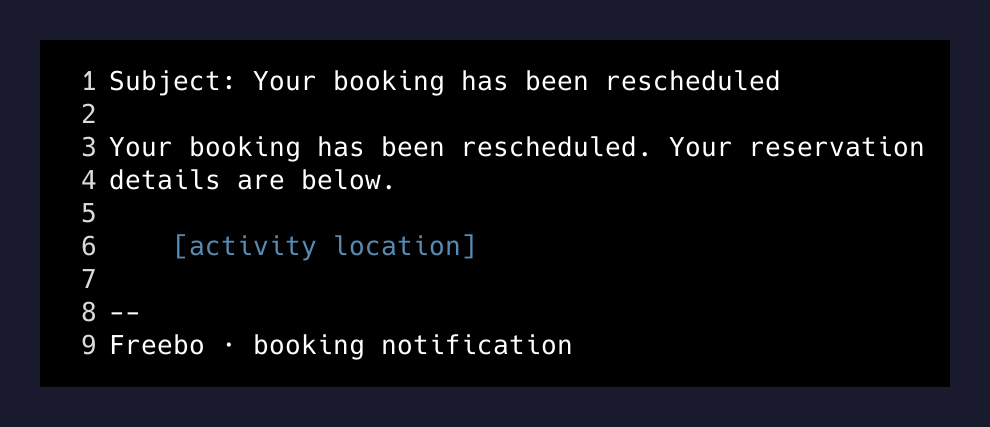
That’s the whole email. A sentence, a location name, and a footer. The subject line said “Your booking has been rescheduled.” The body did not tell you the new date. It did not tell you the old date. It did not tell you the time. It did not tell you the boat, the price, the guest count, the operator’s phone number, anything.
The template had a “New date & time” panel. It had a money panel. It had a full change-summary component. All of them checked “do I have any data to render?” and, finding none, correctly rendered nothing. The route that fired the notification only ever sent five fields, and newReservationDate was not one of them. So the panel that was designed to display the new date & time faithfully displayed nothing at all, and the email around it faithfully rendered around the nothing.
Why it survived so long
Three reasons, roughly ordered by how embarrassed I am about each.
- Reschedule is a low-volume event. Confirmations fire on every booking. Reschedules fire on the small percentage of bookings that get moved. If a bug is 100x rarer than another bug, you find the other bug 100x faster.
- The subject line was correct. “Your booking has been rescheduled.” That’s what the customer was expecting to see, so most of them probably skimmed the body, saw the location name, and figured “OK, still on for the sail.” Confirmation bias is a hell of a QA layer.
- The out-of-scope PR closed cleanly. The confirmation-only refactor had its own tracking issue (#328) that said, right in the description, that cancellation and modification emails were deferred. When you write it down explicitly, you feel like you handled it. You didn’t. You wrote it down.
The trigger for actually catching this was a production reschedule — a real reservation, on a real operator’s calendar. I looked at the outbound email in the notification log. Sentence, location name, footer. That’s when I stopped what I was doing.
The fix
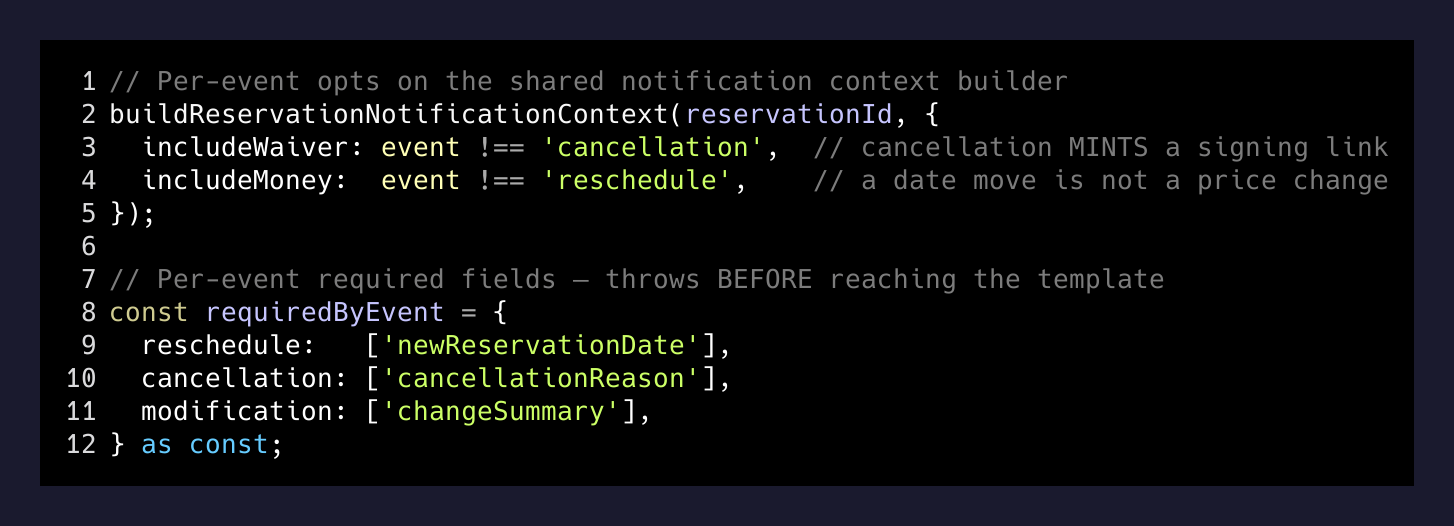
The confirmation-context service was already event-agnostic — it took a reservation ID and returned facts. It just happened to be named reservation-confirmation-context.service. Renaming it to reservation-notification-context.service was step one. Step two was adding two toggles for the events that need to opt out of parts of the payload:
includeWaiver. Cancellation opts out. The waiver lookup mints a signing link for the customer if none exists yet. Minting a fresh signing link inside a “sorry, your booking is canceled” email is exactly the kind of thing that ends up in a screenshot on Twitter.includeMoney. Reschedule opts out. A pure date move is not a price change. The rebook route sends no money fields, the template has no money component, and the two facts enforce each other from opposite ends of the pipeline.
Promo codes are the interesting middle case: a promo is a price change, so a promo-triggered modification carries money like a fresh booking. The event-type flags are per-event, not per-category.
Then there’s a new ChangeSummary email component that owns the “Previous → New date & time” panel. It degrades gracefully to a new-only panel when the old value is missing (rebook-from-scratch), and renders nothing when there is no new value at all (which, given the fix, now only happens in tests).
The invariant that would have caught this earlier
The whole class of bug reduces to: a template with no data renders a valid but useless email. You cannot fix that by writing more tests for the template. The template is doing what it was told. You fix it by asserting, per event type, that certain sections must have data.
We now have a per-event schema for what the notification context is required to include. Reschedule must include newReservationDate. Cancellation must include a reason. Modification must include at least one change. The context builder throws before it hands anything to the template if a required field is missing. The email either fires with real content or the workflow fails loudly enough that Sentry pages me.
One other detail worth calling out: transaction IDs for the notification are now deterministic on the new quote version. Novu deduplicates by transaction ID, so a webhook retry can’t fire the same reschedule email twice — but a second, genuine reschedule of the same booking bumps the quote version and gets a fresh transaction ID, so it still sends. Deduping is only useful if it distinguishes “the network is flaky” from “the customer changed their mind again.”
The lesson I already knew and needed to relearn
If you rebuild one member of a family of templates, put the other members on the same schedule. Not “later.” Not “next slice.” The exact same PR, or the very next one. The gap between “confirmation is now beautiful” and “reschedule now looks equivalently beautiful” was about two weeks. That’s two weeks of production emails that made Freebo look like a company that couldn’t be bothered to say when your rescheduled booking actually was.
There is no cleaner way to look sloppy in front of a customer than sending them a blank-ish email with their name at the top. Fix the whole family.