
Garner State Park has no cell service in the Rio Frio loop. I was in campsite 471 for three days. Phone was a brick. Laptop stayed in a dry bag the whole time. When I got back last night and plugged a monitor into my desk, I was genuinely curious whether any of my stuff still worked.
It did. All of it. The vault had kept merging between devices. The morning brief had landed in the inbox every day. The nightly encrypted backup had hit Google Drive three times. A dialog had popped up on my screen at 10 AM asking my roommate if he was awake, which he dutifully clicked through while I was watching bats under a bridge.
The real test of any self-hosted setup is being away from it. If you have to be there for it to work, you don’t have a system — you have a hobby.
What was actually running
$ systemctl --user list-timers --all | wc -l
25
Twenty-five timers on a single Linux desktop. Most of them are small. A couple do real work. None of them need me.
The anatomy of a timer on Linux is almost rude in how little it is. Two files. Something like six lines each. Here is literally all it takes to run a thing every day at 5 AM:
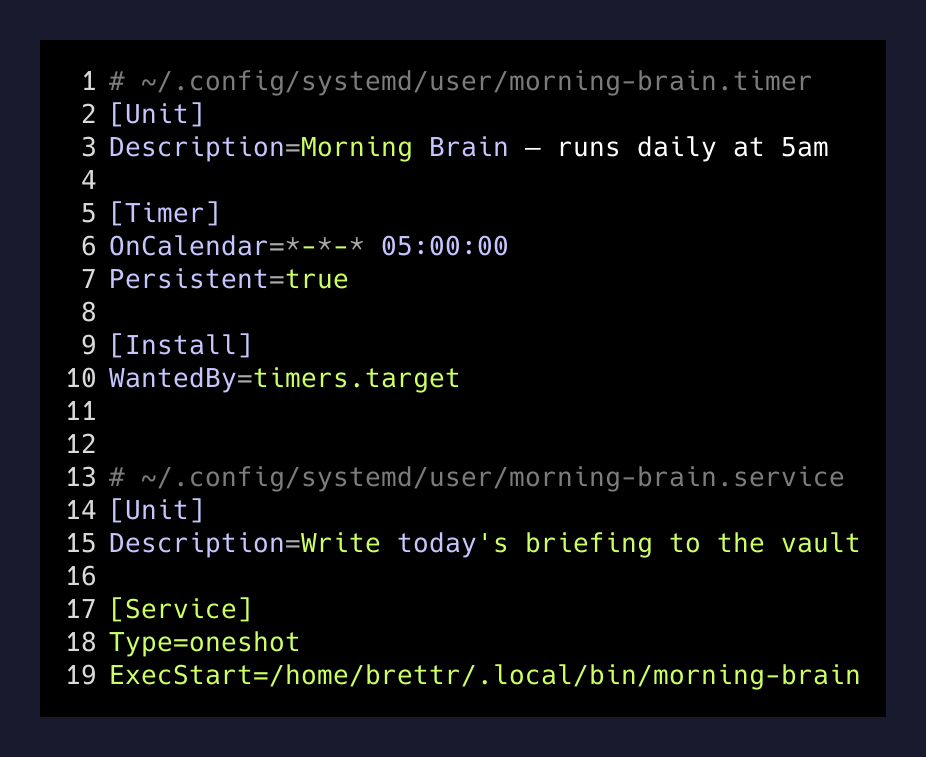
That’s the “morning brain” job that writes my daily briefing — calendar, email, tasks, anything the day needs me to notice. OnCalendar=*-*-* 05:00:00 is the whole schedule. Persistent=true means if the machine was asleep at 5, it runs the job the moment it wakes up. I was asleep in a tent. The desktop was not. It ran all three days without caring.
Four jobs that earned their keep
The vault sync. Every fifteen minutes, vault-sync.timer reaches into my Obsidian vault on this machine and on my laptop, resolves anything that moved, and rsyncs media the merge tool refuses to touch. The merge is custom and boring — union on frontmatter, three-way on body, keep both on conflict. It fires on a cron on both machines, so whichever side is “ahead” quietly becomes the truth. I made two edits on my phone through a cached Obsidian sync before I lost signal. Both of them were on my desktop when I opened Obsidian last night, in the right files, with the right tags.
The nightly backup. brain-backup.timer at 3:30 AM, every day. Full vault, encrypted, pushed to a cold corner of Google Drive. If my desk catches fire tomorrow, the loss is a monitor. The vault is five minutes of rclone copy away on any machine I can authenticate from.
The PR health check. freebo-pr-health.timer at 8 AM every morning. It looks at the open pull requests on my main product, posts a tiny summary to my notifications file, and tells me which ones have stalled, which are passing CI, which have unresolved review threads. Thursday morning I was 150 miles away eating cold pizza by a river. Thursday afternoon the summary was waiting.
The desktop watchdog. hypr-fd-watch.timer every half hour. Hyprland has a specific failure mode where an electron-adjacent app can leak file descriptors until the compositor runs out and the entire session dies. I hit this once in August and lost everything that wasn’t on disk. The fix is embarrassingly simple: count open FDs, and if the number is climbing in a way it shouldn’t, flag it loudly before anything breaks. The timer ran six times a day while I was gone. Nothing climbed. Nothing broke.
What going away revealed
I also learned, when I got back, which jobs were lying.
One timer had not fired in seven days. It’s a monitor for a side project, not a core system, and the failure didn’t matter. But it did tell me something: I had assumed the thing was running. I would have kept assuming it was running. The only reason I noticed is that I came back to a mostly-silent machine and read the timer list top to bottom to write this post.
A cron you never check isn’t a cron. It’s a prayer with a timestamp.
— the only real lesson here
The fix is a second, dumber cron: one that watches the first one and screams if it hasn’t run. If a timer’s job is important enough to schedule, it’s important enough to monitor. If it’s not important enough to monitor, it probably shouldn’t exist.
I’m adding a stale-timer-alert to the morning brief this weekend. Any timer that hasn’t fired in over double its expected interval ends up at the top of tomorrow’s briefing. Then I’ll have at most 24 hours of blind spot instead of seven days.
The shape of independence
- Tue 05:00Morning brief landsCalendar, email, task digest written to the vault. I was setting up a tent.
- Tue 10:00Roommate check firesDialog pops on the home desktop. He clicks yes.
- Wed 03:30Encrypted backup to DriveTwo nights in a row, no attention paid.
- Thu 08:00Freebo PR health postedOpen PR list summarized to notifications. Nobody read it until Friday.
- Fri 12:00Vault-sync kept merging288 cycles over three days. Zero conflicts needed me.
- Sat 05:00Last briefing before returnCamping ends at noon. The brief is already waiting in the inbox.
You can see the shape in the timeline. I’m not in it. That’s the point.
For years I thought the goal of automating my day was speed. Get the morning brief faster. Get the vault synced faster. Make the backup take less time. It turns out speed isn’t the point at all. The point is indifference to my presence. A good automation does not care whether I’m at the keyboard, at a campsite, in a plane, asleep, or just not interested today.
The way you find out whether you’ve built that is to leave for a few days with no way to check. Come back. Look at the timer list. The ones that fired while you were gone are the ones that actually belong in your life. The ones that didn’t are either broken, or they were only ever placebos.
Three days, twenty-five timers. Twenty-four of them belong. One of them got added to my morning brief.
Pretty good trip.