
I have a sync script that runs on two machines. Same file, byte for byte. On the Linux desktop it fires from a systemd --user timer every 15 minutes. On the laptop it fires hourly from a LaunchAgent. It walks a short list of knowledge-vault git repos, auto-commits whatever changed, pulls what the other machine pushed, pushes back. The remotes are bare repos in ~/git/ on the desktop, reachable from the laptop over Tailscale.
It had been running fine for months. Then one evening I needed something I remembered writing on the laptop a few weeks earlier and couldn’t find it on the desktop. I grepped. Nothing. I opened the laptop. There it was. Then I ran git log origin/main..HEAD on the vault in question and the number came back: forty-six commits. Thirty-seven days.
The cron had fired every hour of those thirty-seven days. The log said “synced” every single time for the other four repos. The broken repo wasn’t in the log at all.
What the old script did
The old policy was:
git fetch
git rebase origin/main
git push
Linear history is nice. Rebasing keeps the graph clean. For a human developer typing those commands by hand, it’s fine — if a conflict shows up you resolve it, continue the rebase, done.
The problem is what a conflict means to an automation that runs every N minutes.
The first run after the two machines diverge on the same lines, the rebase stops in the middle. The script hits its early-exit, logs an error, moves on. Next tick, 15 minutes later, same thing. The vault has new local commits by then, so the rebase has one more commit to replay — and it hits the same base conflict first and stops in exactly the same place.
Every 15 minutes. For 37 days. Replaying the same five minutes of work, failing on the same two lines, logging the same aborted-rebase line into the same log file.
Why rebase is wrong for an automation
A rebase takes your local commits and replays them, one by one, on top of the remote tip. That’s the right model when there’s a human in the loop who can look at a conflict, make a judgment, and keep going.
For an automation it’s the wrong model for a different reason: it treats your local work as cheaper than the remote’s work. Replaying means “pretend you did this on top of them.” If the two machines are both authoring — which both of mine are, constantly, because the agents on both of them write to the vault — neither side is more canonical than the other. Rebase picks a canonical side anyway.
Merge doesn’t. A merge keeps both parents and only conflicts when the same lines moved on both sides. Which, for a knowledge vault that mostly gets new files appended to it, happens almost never. The 37-day stall came from a single real conflict on a single file. Everything else in the vault was mergeable the whole time. Rebase couldn’t tell the difference, because rebase replays commit by commit, and every one of those replays started from the same conflicted base.
Rebase replays. Merge resolves. An automation can live with a resolve. It cannot live with a replay.
— Lesson from a 37-day silence
The rewrite
New policy, in the same script:
git fetch --quiet origin
git rebase origin/main
git push --quiet origin HEADgit fetch --quiet origin
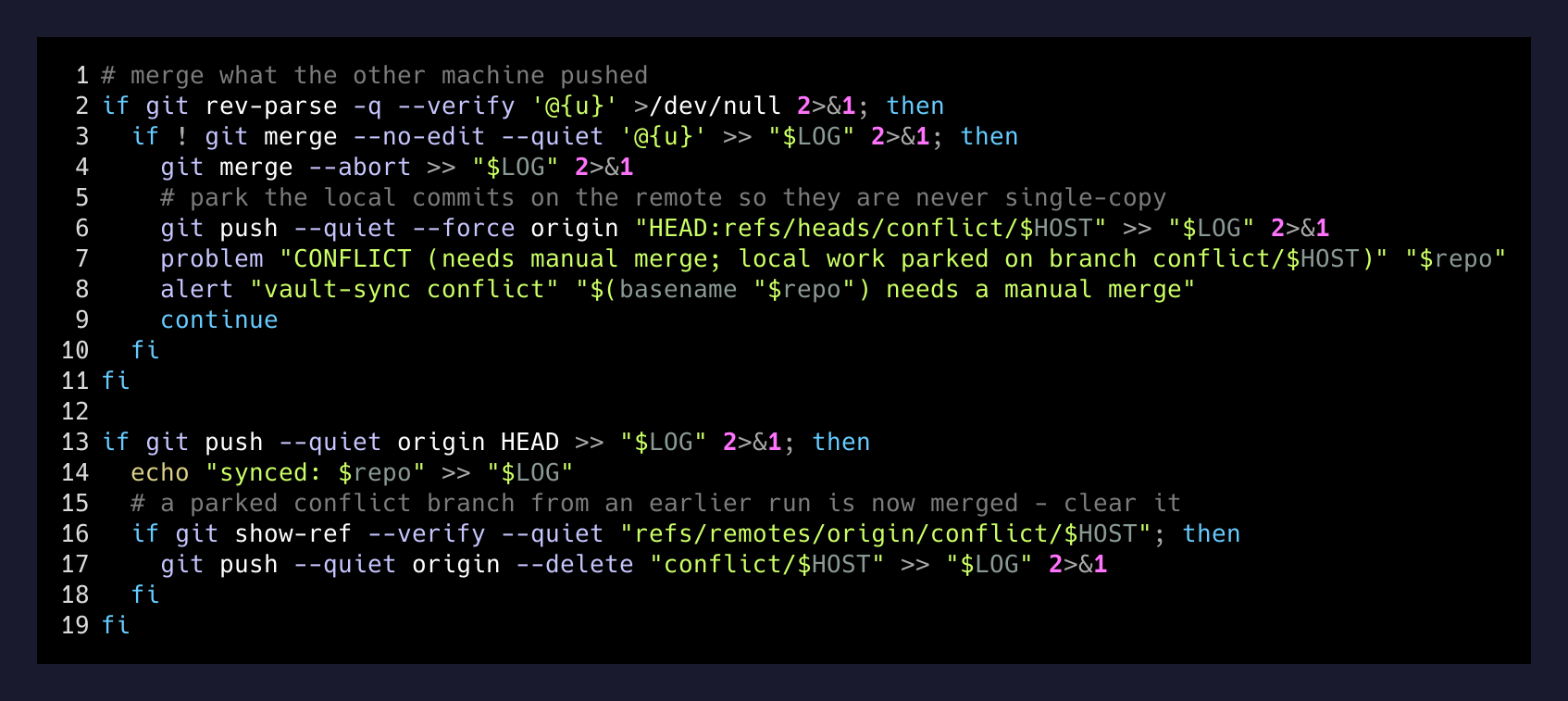
if ! git merge --no-edit --quiet '@{u}'; then
git merge --abort
# park the local commits on the remote so they are never single-copy
git push --quiet --force origin "HEAD:refs/heads/conflict/$HOST"
alert "vault-sync conflict" "$(basename "$repo") needs a manual merge"
continue
fi
git push --quiet origin HEADThree things changed, and the third one is the important one:
- Merge, not rebase. No more commit-by-commit replay. A conflict is a conflict, once, on the real diverged files.
- Abort cleanly on conflict.
git merge --abortleaves the tree in a known state so the next tick doesn’t inherit a half-finished merge. - Park the local commits on the remote. The force-push to
refs/heads/conflict/<host>is the real fix. Before this, if a conflict happened on the laptop, the only copy of those 46 commits was the laptop’s SSD. If that disk had died I would have lost 37 days of writing silently. Now the first thing the script does on conflict is get those commits off the local machine and onto the remote. A branch namedconflict/laptopsitting on the bare repo isn’t pretty, but it’s two copies. That’s the whole bar.
The alert is the last piece. notify-send on Linux, osascript -e 'display notification' on macOS, same shell. A conflict is now a desktop toast on whichever machine hit it. Impossible to miss for a day, let alone five weeks.
The guardrails you only add after it burns
Two more lines went in alongside the merge rewrite, and both were pure scar tissue from the 37-day run:
if [ -d "$(git rev-parse --git-path rebase-merge)" ] || \
   [ -d "$(git rev-parse --git-path rebase-apply)" ]; then
  git rebase --abort
fi
if [ -f "$(git rev-parse --git-path MERGE_HEAD)" ]; then
  problem "MERGE IN PROGRESS (finish or abort it by hand)"
  continue
fi
The first one defends against an old half-finished rebase from the previous policy still being on disk — the script will clear it rather than build on top of it. The second one does the opposite: if a human is in the middle of resolving a merge by hand, the script refuses to touch that repo. Automation stays out of a merge a human is driving.
- Sep 5Divergence beginsBoth machines edit the same file over a weekend. Next vault-sync tick starts an interactive rebase, aborts mid-way.
- Sep 5 – Oct 12The loopEvery 15 min on the desktop, every hour on the laptop: fetch, rebase, abort, log, exit 0. Other repos sync fine, so nothing above the script notices.
- Oct 12NoticedA file I knew I had written was not on the other machine. git log showed 46 commits only on the laptop.
- Oct 12RewriteRebase → merge. Add conflict/<host> parking branch. Add desktop toast. Add the recover-from-interrupted-rebase guard.
- Oct 12 – presentQuietSix days, both machines, every tick. No stalls, no conflicts, no toasts. Status file reads 'run <timestamp> <host>' and nothing else.
The media footnote nobody talks about
The vaults are text, but there’s also image, video, and PDF living in each one. Those are in .gitignore on purpose — git is terrible at binary diffs and I don’t want 20GB of iPhone screenshots in a bare repo. The two machines sync those separately with rsync --ignore-existing in both directions, run from the laptop (which is the one that comes and goes; the desktop is always on and acts as the fixed point).
Additive only. Never overwrite, never delete. If I delete a screenshot on the laptop, the next sync copies it back from the desktop. That sounds like a bug and it isn’t — “deleted on one side” is indistinguishable from “created on the other side” when the two machines are both authoritative. The safe policy when you can’t tell which side is right is to assume both are. If I actually want a file gone, I delete it on both machines. The cost of a few leftover files is nothing compared to the cost of a silent delete propagating across machines.
What I’d tell you if you were about to build one
If you’re writing an automation that syncs anything between two authoritative stores — git repos, Obsidian vaults, note databases, whatever — don’t rebase. Merge. When the merge fails, abort cleanly and get the local work off the local machine before you log anything else. Then make the failure loud. The 37-day stall didn’t happen because the fix was hard. It happened because the failure was quiet.
Rebase is a tool for a human reading commits. Merge is a tool for a machine moving them.