
It was Thursday afternoon. My flight to Raleigh left in nineteen hours, the machine on my desk was about to sit unattended for four days, and a live week of charter reservations had already moved real money through Freebo’s platform and out to a connected operator’s bank. Before I zipped the suitcase I wanted one thing: the ledger and the payment processor to agree, to the cent, on what happened this week.
There is no admin dashboard for this. There is no ops team. There is one founder, three terminal tabs, and the two CLIs that already know how to talk to the systems in question.
The setup
Freebo runs on Railway. Railway hosts the API, the Postgres, and Formance — the open-source double-entry ledger that owns the source of truth for every cent that moves. Every payment webhook, refund, and payout in the system is first written as a Formance transaction, then reflected into Postgres for reads. If Postgres and Formance ever disagree, Formance wins. That is the whole reason it exists.
Stripe sits underneath, in the standard Connect topology: a platform account (Freebo Software Solutions) that hands off to each operator’s connected account. Charter reservations charge on the platform, funds settle to the operator, platform fees settle to Freebo. Three parties, one card, one webhook stream.
Auditing that means asking three questions in three different places and comparing the answers.
One audit pass, three surfaces.
Tab 1: Railway, or how a laptop pretends to be inside prod
Nothing in Freebo’s prod is exposed to the public internet except the API itself. Formance sits on an internal Railway network, and prod Postgres has a private hostname. To hit either from my laptop I use Railway’s built-in proxy — it opens an authenticated tunnel from my terminal to the internal service, and every subsequent tool I run against it just sees localhost:3068 or localhost:5432.
# Formance ledger, proxied
railway service formance
railway run --service formance -- bash -c 'echo $FORMANCE_URL'
railway shell   # for one-offs

# Postgres, proxied — port + creds streamed into psql
railway connect postgres
The trick I always forget on the first try is that railway connect opens a real interactive session, not a background tunnel. If I want psql and a Formance curl to run in the same session, I need two Railway tabs, each attached to its own service. Once that’s done, my laptop is effectively inside the private network for as long as the tabs stay open. When I close them, it isn’t.
That property — that the tunnel dies when I close the terminal — is the entire security model. I do not want a persistent VPN to prod on a machine that also holds my browser sessions.
Tab 2: Formance, or reading a double-entry ledger by hand
Freebo’s ledger names its accounts so a human can walk them without tooling. Every location gets a prefix, and every account under a location is named for what it is, not what it holds.
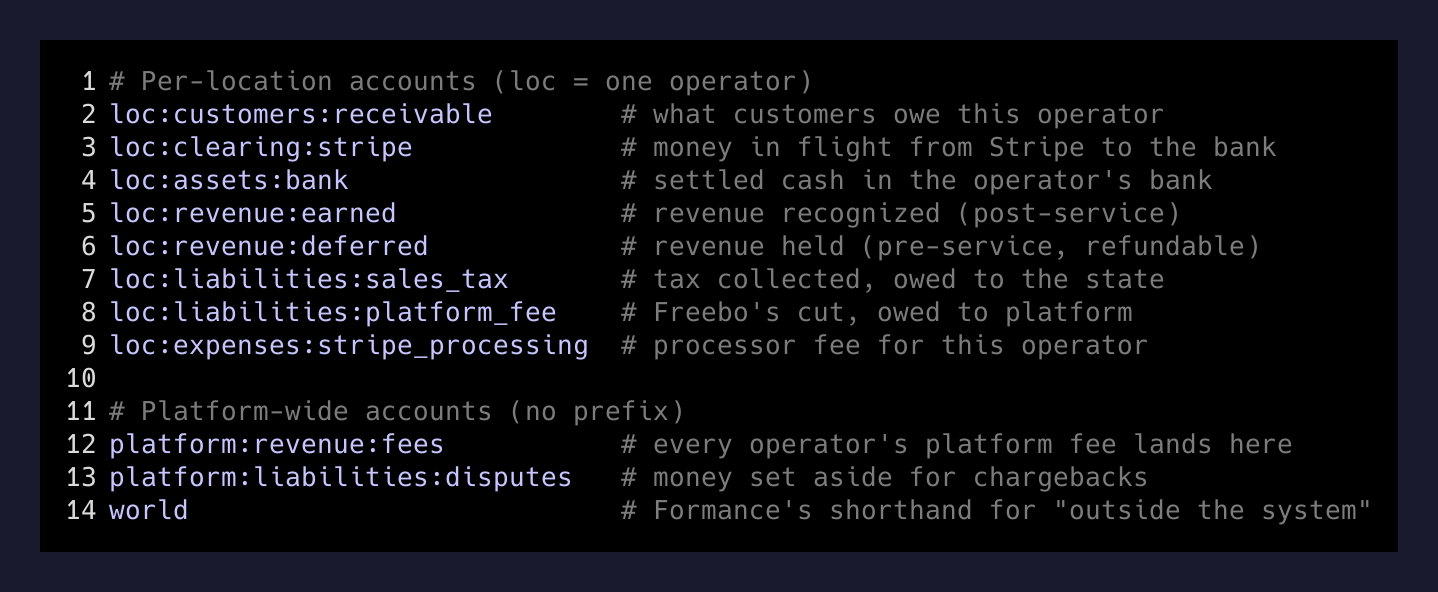
To ask “how much did this operator earn this week?” I don’t run an aggregation. I ask Formance for every posting where the destination was <location>:revenue:earned between two dates, and I sum. To ask “how much is still sitting in the Stripe clearing account waiting to hit the bank?” I ask for the balance of <location>:clearing:stripe. To ask “how much did Freebo take as platform fees?” I ask for postings into platform:revenue:fees filtered by that location’s metadata.
# Balance of one account, right now
curl -s "http://localhost:3068/api/ledger/v2/freebo-ledger/accounts/${LOC}:clearing:stripe" \
  | jq '.data.effectiveVolumes.USD'

# Every transaction that touched this location this week
curl -s "http://localhost:3068/api/ledger/v2/freebo-ledger/transactions?pageSize=100" \
  --data-urlencode "query={\"\$and\":[
    {\"\$match\":{\"metadata[location_id]\":\"${LOC}\"}},
    {\"\$gte\":{\"timestamp\":\"2026-08-08T00:00:00Z\"}}
  ]}" \
  | jq '.cursor.data[] | {ts:.timestamp, ref:.reference, postings:.postings}'
The output is boring on purpose. Every reservation this week produced a small chain: world (Formance’s shorthand for “outside the system”) into customers:receivable, then customers:receivable into a mix of revenue:earned, liabilities:sales_tax, and liabilities:platform_fee. If the chain balanced, the reservation was clean. If any single posting was orphaned — money went out of an account with nothing going in — Formance would have refused to write it in the first place. The ledger will not let you make a mistake that leaves it unbalanced. That is the whole product.
Tab 3: Stripe CLI, twice
The Stripe CLI is the third piece and the part most people don’t realize is doable from a laptop. It logs in against a specific Stripe account, so a Connect platform needs two logins — one for the platform, one for each connected account you want to inspect. You switch with --project-name.
# Platform-side charges this week
stripe --project-name freebo-platform charges list \
  --limit 100 \
  --created gte=$(date -d '2026-08-08' +%s) \
  --created lt=$(date -d '2026-08-15' +%s) \
  | jq '.data[] | {id, amount, application_fee_amount, created}'

# The same week from inside the connected account
stripe --project-name freebo-connected-op-a charges list \
  --limit 100 \
  --created gte=$(date -d '2026-08-08' +%s) \
  --created lt=$(date -d '2026-08-15' +%s) \
  | jq '.data[] | {id, amount, application_fee_amount, transfer, created}'
The reason you need both is that a single reservation shows up differently on each side. On the platform it’s a charge with an application_fee_amount — Freebo’s cut. On the connected account it’s a charge with a transfer linking back to the platform. The two numbers have to reconcile, and if they don’t, the operator paid Freebo the wrong fee.
Then I put the totals next to the Formance numbers. Platform charges this week should equal world → customers:receivable for that location. Application fees should equal the amount that landed in platform:revenue:fees. Sales tax collected on the platform side should equal the balance of <location>:liabilities:sales_tax. If any of those three don’t match, something is wrong upstream — a webhook was missed, a metadata tag was dropped, a Stripe amount was recorded in the wrong currency.
What I actually found
The three sources agreed. Every charter reservation on that operator’s calendar this week had a matched charge, matched postings, and a matched fee split. The one thing that surprised me was that the sales tax posting for one reservation had landed a full minute after the charge webhook — long enough that a naive “check both in the same second” script would have flagged it as missing. The delay was legal — the tax was calculated asynchronously after the charge cleared — but the fact that the reconciliation window is at least a minute on the write path is now written down in a runbook I did not have on Wednesday.
You do not need a DevOps team to run a payments SaaS. You need a ledger that refuses to lie and CLIs for the systems that actually move the money.
— the honest ops reality
The takeaway
If you are building payments and you are alone, three things buy you back a whole ops department:
-
A real double-entry ledger, external to your database. Formance is one option, there are others. What matters is that balances live in a system that will not let you write a transaction that doesn’t sum to zero. Every audit you do afterward is against a source of truth that mathematically cannot be inconsistent with itself.
-
A payment processor with a first-class CLI. Stripe’s CLI turns “let me spot check this week” from a screen-shot exercise in the dashboard into a diffable jq pipeline you can pipe into anything. It works the same against the platform and the connected accounts, which is exactly what a Connect platform needs.
-
A hosting layer that lets you tunnel into prod without leaving a tunnel open. Railway’s proxy does this. Fly does this. Kubernetes port-forward does this. The point is that the connection lives as long as the terminal tab and no longer, and there is no permanent hole in your network to worry about while you’re on a plane.
Nineteen hours before takeoff, all three worked. The suitcase got zipped. The machine is still humming at home, and the ledger is still refusing to lie in my absence.