
At 7:07 PM on a Tuesday I typed one sentence into my terminal: open Chrome, go to the visitor parking site my apartment uses, and register my girlfriend’s truck for tonight. Two minutes later a confirmation email hit my inbox with a booking ID and a 24-hour expiry. I never touched the mouse.
That’s not the part of this story that interested me.
The part that interested me was the last clause of the same sentence: and save this as a skill so you can do it later with the same info. Call it /parkingpass.
Because now the errand is a slash command. Next time she’s coming over I type five characters. And the second run costs approximately zero of my attention — the agent already knows the plate, the make, the model, my unit number, my phone, my email, and the specific DOM ref of the checkbox on the agreement page that refused to accept a coordinate click the first time through.
That’s the shape of the interesting thing. The first errand cost eight minutes of an agent’s time. Every future run costs thirty seconds because the agent wrote its own instructions.
What the first run actually did
The visitor parking form is two steps, seventeen fields, and one checkbox that behaves badly. My agent:
- Loaded the browser automation skill and pulled in the Chrome tools it needed.
- Opened a tab, navigated to the URL, and took a screenshot to see the layout.
- Clicked the apartment search field, typed the name, picked the right result from a dropdown.
- Called
read_pagewithfilter: interactiveto get element references for the plate, plate-confirm, make, model, resident name, unit number, visitor name, phone, and email fields. - Filled all ten with
form_inputcalls, scrolling to reach the ones below the fold. - Verified the form with a screenshot before submitting, because I’d told it it had standing permission to hit submit.
- Hit submit. Got a “Parking Pass Agreement” review page with a required checkbox.
- Tried to left-click the checkbox by coordinate. The click missed — the page had shifted on load.
- Recovered: used
findto locate the checkbox element, thenform_inputwithtrueto check it via the DOM. Confirmed with a screenshot. Clicked the red submit button. - Landed on an “Approved For 24 Hours” modal. Screenshot to disk. Copy to
~/Pictures/parking-passes/. Sent the file back to me in chat with the expiry time and the booking ID.
Twenty-nine tool calls end to end. Sixteen screenshots, ten form fills, two page reads, a couple of scrolls, a nav, and a tab-context call at the start.
The skill it wrote
The other half of the prompt asked the agent to write itself as a reusable skill. It did — one Markdown file under ~/.claude/skills/, thirty lines of front matter and steps, plus a short section for the mistakes it made along the way.
The interesting part isn’t the field table. It’s the “Gotchas” section, which the agent wrote about its own mistakes from the first run:
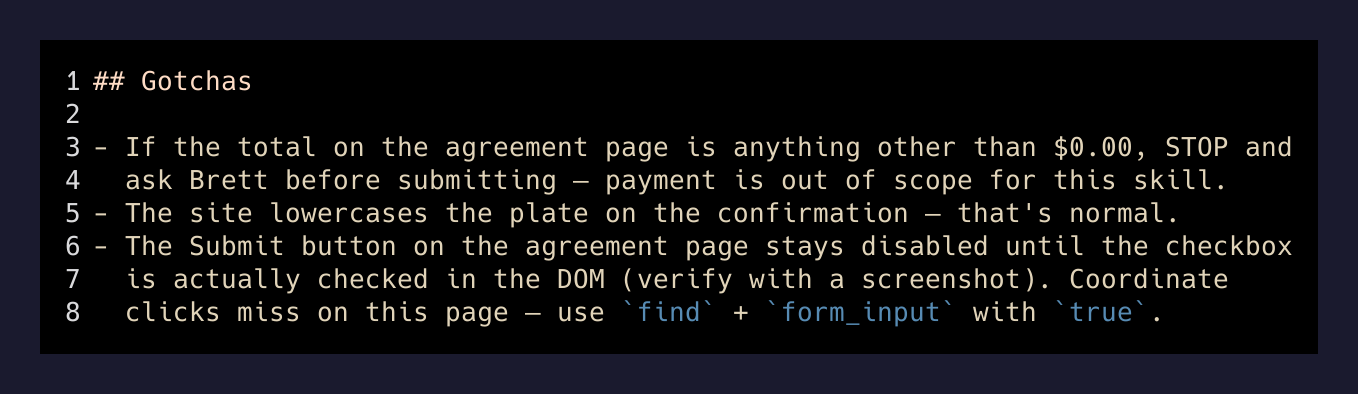
That third bullet is the failure it hit on the first run. It rescued itself on the fly, then wrote the rescue into permanent instructions for the next agent that runs this. The agent that wrote the skill is not the agent that will next execute it — but it left a note.
The agent that solves the problem the first time is the one who owes a note to the one who runs it next.
— What the skill file says between the lines
Why slash commands change the math
I have an ever-growing pile of these on my machine now. Register the car. Register the car for a specific date range. Book a specific type of Cal.com meeting. Push a blog draft. Run a project’s local dev stack against a specific database branch. Each one started life the same way: I did the thing once with an agent watching, and asked it to write down what it just did.
The math changes because the friction moves. Manual errands cost a constant amount of attention every time. LLM-assisted errands cost a lot of attention the first time and near zero the twentieth. When you cross that curve enough times, “do it manually” starts to feel like the expensive option — because the manual version has to be re-remembered by a human on every run, and the slash-command version doesn’t.
The prompt in full
Because the prompt is really the interesting artifact here — this is what got typed once, at 7:07 PM, in a normal terminal:
open chrome go to [the visitor parking site my building uses] and register my girlfriend’s [plate/make/model], my apt is [unit], my apartment name is [complex], and my name is [name] [phone] [email]. you can use my email I give you permission to register her car. hit submit, take screenshots of the confirmation, and save this as a skill so you can do it later with the same info. /parkingpass is what i want the skill to be
Two clauses. First clause: do the thing. Second clause: teach yourself to do the thing. The second clause is the one doing most of the work.
What I keep learning about this pattern
Every time I do this — one-off task, plus “save what you just did as a skill” — I end up with something more useful than either half alone. The one-off is a party trick. The saved skill is a party trick I never have to perform again. The two together are how I build up a personal command line that gets more powerful every week without any planning ceremony.
I don’t sit down to design skills. They happen as a byproduct of asking for something and adding one extra sentence. The pile grows on its own. Some of them I use monthly, some weekly, some once and then forgotten. The forgotten ones cost me nothing to keep. The used ones save the same eight minutes every time.
The lesson isn’t “agents can fill out forms.” The lesson is that the second half of every prompt should be and remember how you did this.