
I needed to give a live product demo. Real signup, real product creation, real waiver flow, no slides, no recording. I wanted it to feel less like a Zoom share and more like the keynote-bar moment from a WWDC stream — figlet headlines on the right, a real browser clicking through the flow on the left, music under the whole thing.
So I wrote it. One command. freebodemo. Three phases, one continuous take, fully reset between runs.
Here’s how it actually works.
The conductor
Everything lives in ~/Documents/FreeboDecember/demo/. The entry point is a bash script called conductor.sh that runs three phases back to back:
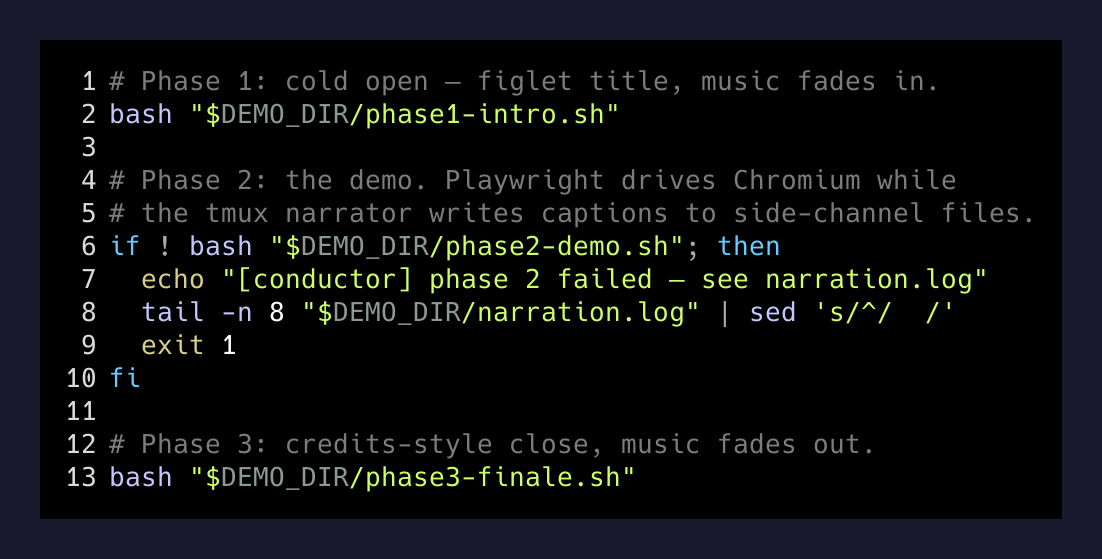
# --- phase 1: intro ---
bash "$DEMO_DIR/phase1-intro.sh"

# --- phase 2: demo ---
if ! bash "$DEMO_DIR/phase2-demo.sh"; then
  echo "[conductor] phase 2 failed — see $DEMO_DIR/narration.log"
  tail -n 8 "$DEMO_DIR/narration.log" | sed 's/^/  /'
  exit 1
fi

# --- phase 3: finale ---
bash "$DEMO_DIR/phase3-finale.sh"
Phase 1 is the cold open — figlet title card, music fades in. Phase 2 is the real demo. Phase 3 is the close — credits-style bullets, music fades out. If phase 2 explodes, the conductor holds for six seconds so I can read the failure on stage instead of cutting to black.
The first thing the conductor does is grab the current Hyprland workspace and monitor and pin every window to it:
WS_INFO="$(hyprctl activeworkspace -j 2>/dev/null)"
export DEMO_WS_NAME="$(echo "$WS_INFO" | jq -r '.name')"
DEMO_MON_NAME="$(echo "$WS_INFO" | jq -r '.monitor')"
read -r DEMO_MON_W DEMO_MON_H DEMO_MON_X DEMO_MON_Y < <(
  hyprctl monitors -j | jq -r --arg m "$DEMO_MON_NAME" \
    '.[] | select(.name==$m) | "\(.width) \(.height) \(.x) \(.y)"'
)
That captures the geometry of one monitor at the start. Every spawned window — Chromium, alacritty, the music player — gets place_window’d into that rectangle. Slack pings, Hyprland animations, accidental super-tabs, none of it can drift across the demo. The viewer sees one frame, fixed, the whole way through.
The split: browser left, narrator right
Phase 2 splits the demo monitor 70/30 — Chromium on the left, an alacritty terminal running tmux on the right. The 70% is deliberate. Tailwind’s xl: breakpoint kicks in at 1280px and Freebo’s sidebar disappears below that. On a 1920px monitor, 70% gives Chromium 1344px — over the line, sidebar visible, no surprise re-flows on stage.
The right pane is a tmux session with three vertical splits:
tmux new-session -d -s "$TMUX_SESSION" -x 220 -y 80 \
  "bash '$DEMO_DIR/headline.sh'"
tmux split-window -t "$TMUX_SESSION":0   -v -p 65 \
  "bash '$DEMO_DIR/narrate.sh'"
tmux split-window -t "$TMUX_SESSION":0.1 -v -p 30 \
  "cava -p '$DEMO_DIR/cava.conf'"
Top: a figlet title card piped through lolcat, polling a one-line file for the current “slide” name. Middle: a tail-style narration log that prints captions as the demo hits each step. Bottom: cava, a terminal audio visualizer, bouncing along to whatever’s playing. The viewer’s eye drifts right when the browser is doing something unsexy (a form post, a redirect) and lands on the headline + bullets just in time for the next beat.
Playwright is the actor
The browser pane isn’t me clicking. It’s Playwright, running an autonomous walkthrough in headed Chromium with the automation banner suppressed:
browser = await chromium.launch({
  headless: false,
  args: [
    '--disable-blink-features=AutomationControlled',
    '--no-first-run',
    '--no-default-browser-check',
    `--window-size=${VIEW_W},${VIEW_H}`,
  ],
});
The script signs up with a fresh randomized email every run (brett.ridenour+demo${slug}@gmail.com) so I never collide with a stale account on stage. Then it creates a product, configures availability, attaches a waiver, runs the booking flow, and lands on a confirmation screen — all without a human touching the trackpad.
It started as a hand-recorded playwright codegen run, then I cleaned up the brittle parts: the date selector chose by .first() instead of a hard-coded timestamp, the time slot matched a regex instead of “3:00 PM 60 min”, and the Stripe popup listener got registered before the submit click instead of after. Recordings are 80% there. The other 20% is what crashes you on stage.
While Playwright drives the browser, it also writes to two side-channel files that the tmux panes are tailing:
function narrate(line) { fs.appendFileSync(NARR, line + '\n'); }
function card(title, bullets = []) {
  fs.writeFileSync(NOW, [title, ...bullets].join('\n'));
}
narration.log is append-only — every step the script takes shows up as a captioned line in the middle pane. now-showing.txt is a single overwrite that the top pane is figlet’ing in real time. So the narrator pane is fully reactive: when the browser moves, the headline changes. No timing glue, no setTimeout choreography. The tmux side reads files, the Playwright side writes them, and the gap between “click happened” and “audience reads what just happened” is a single filesystem flush.
The fake microphone
Here’s the part nobody warns you about. Linux Google Meet only offers “share audio” when you share a single Chrome tab. If you share an entire screen — which is what you have to do for a multi-window demo like this — the audio dropdown disappears. The music plays on your laptop and nobody on the call hears it.
The fix is a virtual microphone built out of PulseAudio null sinks. The topology, drawn out:
mpv ──► [freebo_demo_sink]
            └─ monitor ──► default speakers      (you hear music)
            └─ monitor ──► [freebo_demo_mix]     (Meet hears music)
mic ───────────────────────► [freebo_demo_mix]   (Meet hears voice)

[freebo_demo_mix].monitor ──remap──► virtual source "Freebo Demo Mic"
                                       ↑ Chrome lists this as a mic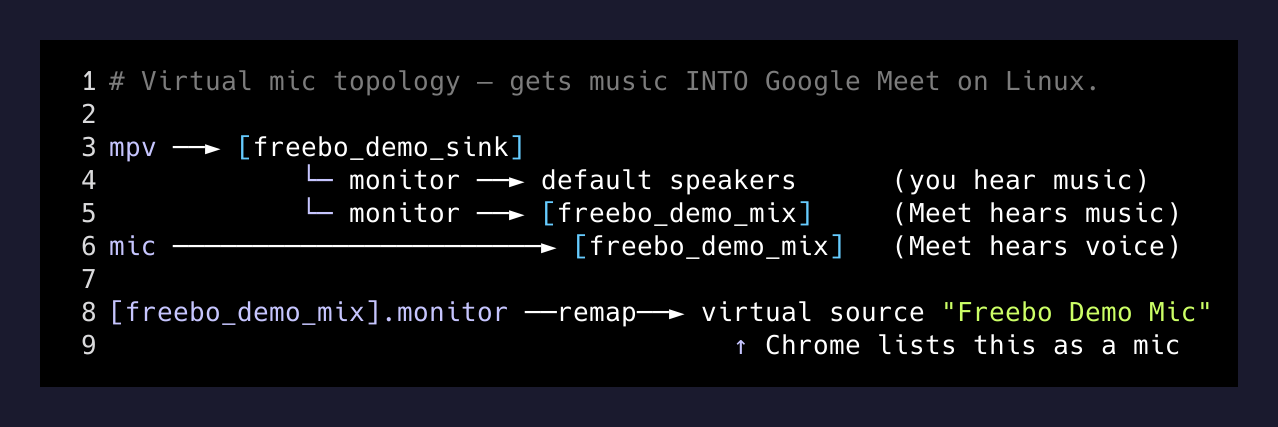
Six pactl load-module calls wire that up. A null sink for the music, a loopback to your real speakers so you still hear it, a second null sink for the mix, two more loopbacks to feed the music monitor and your real mic into the mix, and finally a module-remap-source that exposes the mix’s monitor as a “real” source. That last step matters — Chrome on Linux silently filters monitor sources out of its mic dropdown, but it cheerfully shows remapped sources. So in Meet you pick “Freebo Demo Mic” as your input, and now Meet hears your voice plus the music plus anything else routed through the demo sink. Same effect as Mac’s “share with audio” checkbox, built out of nothing but Pulse modules.
The conductor takes a --share flag. With it, mpv plays into the demo sink and Meet hears the music. Without it, mpv plays straight to your speakers — the local-only mode, for rehearsals.
Why I built it this way
I could have screen-recorded a perfect take, dropped it in a Google Slides deck, and called it done. Recordings don’t break. They also don’t impress anyone. They feel like a recording.
Live demos are different. The viewer can tell. The cursor is too fast to be human, the email is randomized in front of them, the form posts a second after the bullet point about it appears in the right pane. The whole rig is held together with bash, and you can see that, and somehow that makes it more real, not less.
The bigger thing I keep learning: a demo is not a pitch. It’s choreography. You’re directing attention. The 70/30 split is for the audience’s eye. The figlet headlines exist so they always know what they’re looking at. The audio bar is in the bottom-right because empty corners look broken. The reset script wipes everything between runs because the second take has to feel exactly like the first.
freebodemo is one bash command. Behind it is a tmux session, a Playwright script, four PulseAudio modules, two file-based side channels, and a Hyprland workspace that won’t let anything wander in. None of those tools were built for this. They were built for shells and tests and screen sharing. Stacked the right way, they’re a keynote bar.
That’s the bit I wanted to share. If you’re on Linux and you want a demo that feels like a product launch instead of a Zoom share, the pieces are already on your machine. You just have to wire them up.