
Another monthly Ahrefs audit landed in my inbox last night. Health score 69. Forty-three errors. One hundred and thirty-three warnings. One hundred and eighteen slow-page URLs. The kind of report that makes an operator forward it to me with a subject line that just says “yikes.”
There is a natural order of operations you fall into with a report like that. Errors first. They are red. There are fewer of them. Fixing them makes the health score go up the fastest, which makes the next report look better, which makes the client feel better. Warnings can wait. Slow pages can wait.
I have done it that direction. I still do it that direction sometimes when the client is watching me share my screen and wants to see numbers move. But when I am triaging on my own time, trying to actually make organic traffic go up, I do it the opposite way. I ignore the error pile until last.
The errors are almost always cosmetic
Look at what the “errors” bucket usually contains on a mid-sized content site.
- A page missing an H1.
- A canonical tag pointing to the trailing-slash version instead of the non-slash version.
- A 404 on a URL that hasn’t existed in three years and doesn’t have a single external link.
- A meta description over the character limit.
- An image over 100KB.
These are grading against a spec. They are not grading against Google’s ranking behavior. A page missing an H1 that has a strong H2 and a good title tag ranks fine. A canonical mismatch where both versions redirect to the same place ranks fine. A 404 with zero inbound links is a ghost — nothing points at it, nobody asks for it, Google forgot about it two years ago.
You can spend an entire afternoon closing red items and move zero positions.
Where the rankings actually die
Look at the “warnings” pile.
- Duplicate title patterns across category pages (“Charter Boats in [City] | Brand Name” repeating across forty city pages, differentiated only by the city).
- Internal links pointing to redirects.
- Thin content on pages that have search impressions but no clicks.
- Slow pages that also happen to be your money pages.
- Orphan pages — pages with zero internal links pointing to them, which Google interprets as “even the site’s own owner doesn’t think this page is important.”
Every recovery I have ever pulled off — every time an organic curve bent upward on a site I was working on — came out of that pile. Not the errors pile. The warnings pile.
Crawlers grade against a spec. Google grades against a market.
— the crawler bias I try to defeat
The actual order I work in
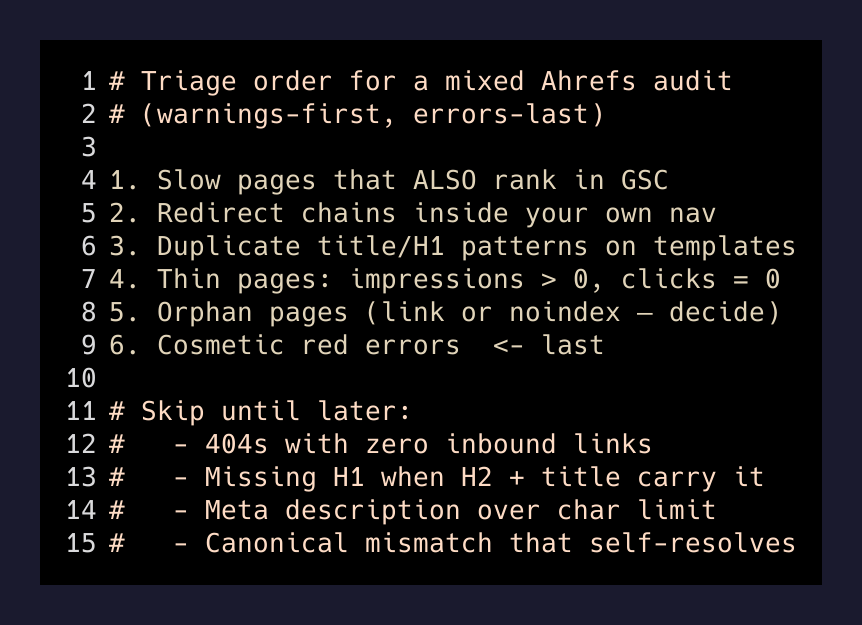
When I sit down with a fresh report, I ignore the severity column entirely. I sort by a different mental axis. My rough order:
- Slow pages that also rank. If a page shows up in Search Console with impressions and clicks, and Ahrefs flags it as slow, that is the fastest way to gain positions. You are not adding a new page. You are just making one Google already trusts respond faster.
- Redirect chains inside your own navigation. Every internal link that points to
/old-pagewhich 301s to/new-pageis a small tax on crawl budget and on user experience. These fix in minutes and compound. - Duplicate title and H1 patterns on template pages. City pages, category pages, tag pages. If the differentiator is one word swapped into a fifty-character template, Google is right to treat them as near-duplicates. Fix the template, differentiate the entities, watch impressions widen.
- Thin pages with impressions but no clicks. Google is showing them. Users are ignoring them. That is a content problem, not a technical one. Rewrite the ones that could actually earn a click. Delete or noindex the ones that can’t.
- Orphan pages. Either link to them from a relevant hub page, or accept that they should not be indexed and mark them accordingly. Sitting in limbo is worse than either decision.
- Then the errors. Missing H1s. Long meta descriptions. All the cosmetic red-badge items. They are a cleanup pass, not a growth pass. Do them last, or when you are on a call with a client and want the health score to move visibly.
That is it. Six steps. The first five live in the warnings and the “info” tiers. The visible reds get done last because they matter least.
Why crawler tools sort backwards
This is not a knock on Ahrefs or Semrush or Screaming Frog. They sort by severity because the tool has no way to know what a specific page’s job is. A 404 with zero links is scored the same as a 404 on your top revenue page — because to the crawler, both are “URL returns 404.” The severity label is the tool’s best guess absent business context.
You are the business context. Your job as the person reading the report is to overlay two data streams the crawler can’t see: which pages actually make money, and which technical issues actually move the needle for Google’s current ranking behavior. The crawler grades against a checklist. You grade against a revenue funnel.
The one exception
There is one class of “error” I do fix immediately: broken internal links to pages that used to exist and had inbound traffic. That is a rare case. It happens after a site migration, or after someone deleted a page without redirecting it, or after a slug changed and nobody updated the internal links. That specific pattern — was ranking, now returns 404, and other pages on the site are still pointing at it — is a red badge worth clearing today.
Everything else in the errors pile can wait.
What I actually do on the client call
I open two tabs. Ahrefs on the left, Search Console on the right. I overlay the two. Every warning that also shows up as a page with real Search Console impressions goes into a “fix this week” list. Every warning on a page with no impressions and no revenue goes into “someday, maybe never.” Every red error goes at the bottom.
Then I look at the health score at the top of the Ahrefs report and note, out loud, that the number does not reflect the order I just described. And I do the work in the order that actually moves organic traffic instead of the order that makes the number look better.
Six months later the number looks better anyway. Because the traffic came in, the crawl budget shifted to the pages that matter, and the small red items got cleaned up along the way.
The crawler sorts against a spec. You get to sort against the market. That is the whole edge.