 Marketing & SEO
I sat in front of a terminal yesterday and drove Chrome from a Claude Code session to click a button on a Google Maps listing. The listing belonged to a small operator I’ve been helping migrate booking platforms. Their primary “Book online” link had been updated. The site load felt clean. The reservation flow worked.
The button I actually clicked wasn’t that one.
It was a second, quieter button — one that shows up on the same Maps card, just below the primary CTA, tucked inside an “Activities” panel. That button was pointed at a URL the operator did not remember setting. It resolved to a booking widget on a platform they’d abandoned in 2022. Availability on that widget: empty. Their calendar, over there, had nothing on it. The button was still shipping customers to a page that told them the business had no availability, ever.
I want to unpack how that button gets there, because it’s not something you can fix from the Google Business Profile dashboard, and every operator I’ve ever helped through a booking-platform migration has some version of it.
What “Activities” actually is
Google Maps renders a business’s card with a primary CTA — usually “Book online,” “Reserve a table,” “Order online,” depending on category. That primary link is what the operator sets from GBP. It’s the one every migration checklist tells you to update.
Underneath that, for certain categories — restaurants, tours, salons, healthcare, home services — Maps also renders a secondary panel of category-specific actions. On a tour operator’s listing that panel is labeled “Activities” and contains one or more “Book” links per bookable product. On a restaurant’s listing it’s usually a “Reservations” strip with a party-size picker. On a spa or salon, a “Book an appointment” chip.
Those secondary buttons are not populated from the same field as the primary “Book online” link. They come from an entirely separate system: Reserve with Google.
The partner backchannel
Reserve with Google is a partnership program. Google does not run those booking widgets itself. Instead, it lets a curated set of booking platforms — OpenTable, Resy, SevenRooms, Booksy, Vagaro, FareHarbor, Bókun, Peek Pro, and a long tail of category-specific ones — write availability and links directly onto a business’s Maps listing.
The way an operator ends up on that partner list is almost always the same: they signed up for the platform at some point, the platform asked for GBP permissions during onboarding, they clicked “connect,” and from that day forward the partner has been publishing action buttons onto their Maps card. Years later, when the operator moves to a new platform, they update the primary “Book online” link and consider the migration done. The Reserve with Google integration keeps running because nobody canceled it. The buttons are still there. The URLs still resolve. The old platform’s calendar quietly answers “no availability” forever.
How I actually find them
The Google Business Profile dashboard will not show you these buttons. The operator’s copy of Maps will render them, but if you’re on a laptop looking at the desktop Google search result, half of them are hidden inside a “See more” expander. The easiest way to enumerate what’s really there is to load the Maps mobile listing and click every action button, one at a time, capturing the outbound URL each time.
You can do that manually. It takes ten minutes per listing and it’s error-prone. Or you can drive Chrome from a terminal.
The workflow I’ve been using is the Playwright MCP plugged into a Claude Code session. Claude opens a real Chrome window on my desktop, navigates to Google Maps, searches the business, snapshots the accessibility tree, clicks the Activities panel, and pulls the href off every button inside it. What comes back is the actual list of URLs Google is currently pointing customers at, with the partner platform in the domain — which is exactly the tell for who has to log in where to fix each one.
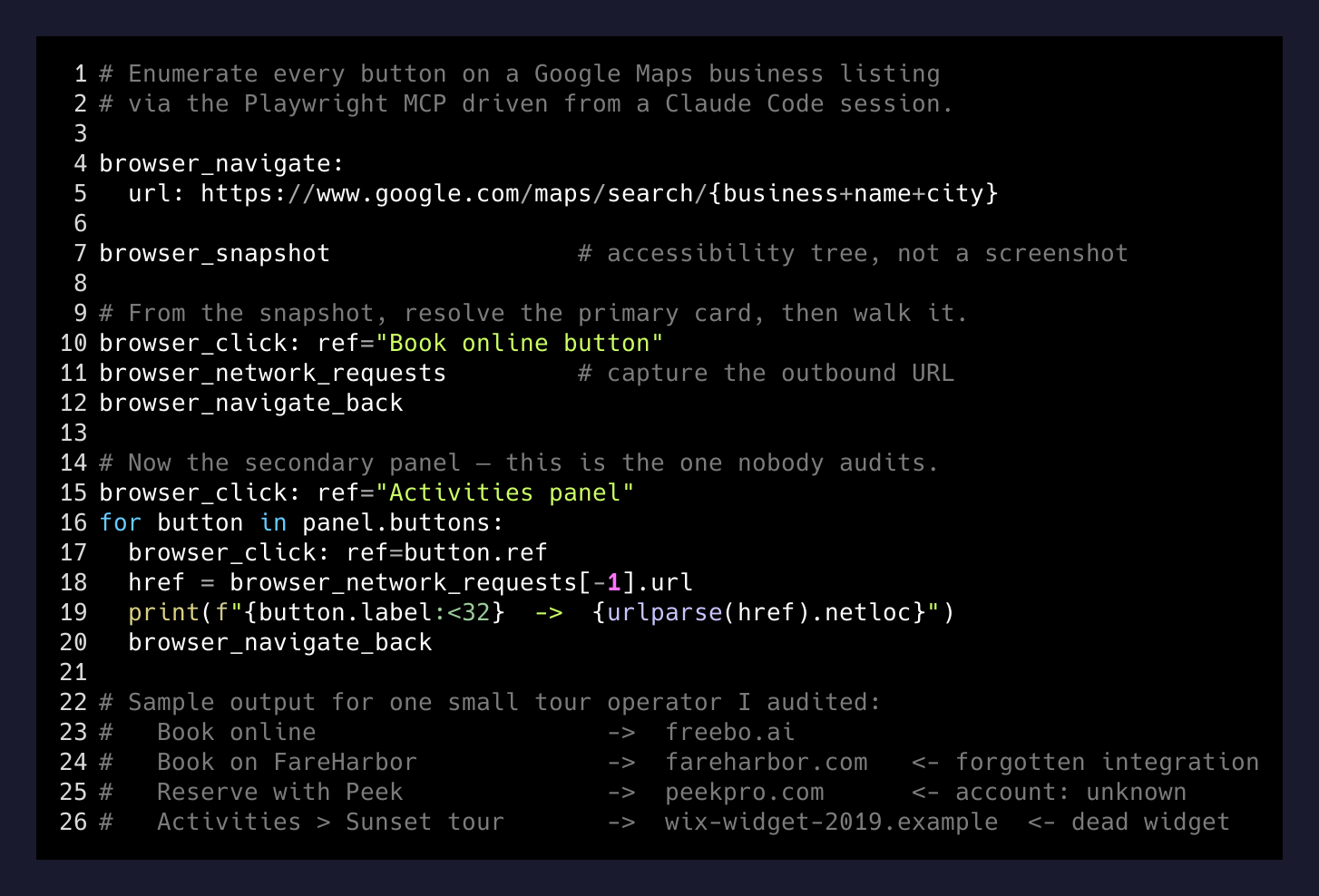
The whole thing takes about forty seconds per business once the browser is warm. Multiply by however many listings the operator has, and it’s a real audit tool built entirely out of “click, wait, read the DOM.” There is no scraping of Google search results, no fragile HTML selectors — just the browser’s own accessibility tree, which is what a screen reader would use, and which is stable across Google’s frequent UI redesigns.
The fix, per partner
Once you’ve enumerated the buttons and identified the partner domain behind each one, the fix is different for every partner and none of them are easy.
- Restaurant partners (OpenTable, Resy, SevenRooms). The URL will point at their booking widget. Fix is inside the partner dashboard: either update the venue’s linked GBP or turn off the Reserve-with-Google integration entirely. If the account owner is a former employee, this becomes a support ticket.
- Salon/spa partners (Booksy, Vagaro, Fresha). Same shape. Log in, disable the Google integration. If nobody has the login, the platform’s support team can force-detach a listing with proof of business ownership.
- Tour/activity partners (FareHarbor, Bókun, Peek Pro, Rezdy). Same again. The integration lives in the partner’s channel manager settings. Sometimes it’s called “Google Things to Do” internally. The disconnect flow is usually two clicks — once you find the right menu.
- The forgotten ones. Every one of these audits I’ve run has surfaced at least one button routing through a platform the operator has completely forgotten they ever used. Those are the hardest, because “forgot they signed up” also means “no active account, no login, no support relationship.” You end up filing a form with Reserve with Google directly to request delisting.
The bigger point
Every partner you’ve ever authorized to write into your GBP is a piece of identity infrastructure you don’t fully own.
— the one-liner
The primary “Book online” link is under your control. Everything else about your Maps listing — the extra buttons, the party-size pickers, the little “Reserve a Table” chip, the category-specific action strip — is a surface you granted a partner permission to write to, at some point, on some laptop, probably in a different decade. Every one of those grants is still active until you explicitly cancel it.
That is a lot of surface for a small business to keep track of. Almost none of them do. The migration checklists don’t include it because the partner-owned buttons are invisible to the operator’s own view of their business — they just render for the customer, on the customer’s phone, on the far side of a Google search.
The only reliable way to catch them is to look at the listing the way a customer does, click every button, and read every URL. Which happens to be a job a terminal-driven browser is very good at, and a marketer eyeballing a Maps screenshot is very bad at.
If you’re moving a business off one booking platform and onto another, don’t consider the migration done until you’ve enumerated the Reserve with Google actions and either updated the partner-side link or torn the integration down. Otherwise you’re leaving a live button on your listing pointing at a booking calendar you don’t own anymore — and every click on it is a customer who won’t come back to try again.