 Building & Shipping
An operator on Freebo pinged me over the weekend with a question I’ve heard some version of a dozen times but never actually chased end-to-end. Their bookings had softened. Same marketing spend, same season, roughly the same traffic in their analytics — but the actual reservations landing in Freebo were noticeably lighter than the season before.
I burned most of a day pulling on that thread. It ended in the same place these threads always end: the customer never made it to the booking system at all.
Where the customer actually starts
If you run any kind of reservation business — tours, charters, activities, salons, restaurants, small clinics — the map is the front door. The person paying you today typed you into Google, saw your card on the right side of the results, glanced at the map pin, and clicked one of maybe three buttons before deciding whether to give you money.
Two of those buttons are “Directions” and “Call.” The third — the one that matters if you want the booking to land inside your booking software — is “Book online” (or “Reserve a table,” or “Make an appointment”). That button is a link on your Google Business Profile. It was set to something once, by somebody, at a specific point in your business’s history. Google keeps rendering it long after everything downstream of that URL has been replaced.
The migration nobody finishes
When a small business switches booking platforms — off one hosted booking widget onto another — there’s a long list of surfaces still pointing at the old system.
The obvious ones get updated first: the website’s /book button, the email signature, the Instagram bio, the Facebook page’s “Book Now” CTA, maybe the Yelp profile. That’s usually where the effort stops. Everything you check by visiting your own brand looks right.
But the surface you don’t visit is your Google Business Profile — because you never go to it. You set it up once, you claim it, you drop in the hours and the photos, and then it just runs. Google Maps pulls the “Book online” button from a URL you configured maybe three years ago, on the platform you were on when you first got serious about taking online bookings. That URL still exists, at least at the DNS level. It resolves. It renders something. And Google keeps rendering the button.
The customer clicks. They land on one of these:
- The old booking widget, disabled, showing no availability for anything.
- A “this page doesn’t exist” from the old platform.
- A “your subscription has ended, please contact the account owner” upsell page.
- The old widget still working — quietly taking bookings on a calendar the operator hasn’t logged into in a year.
In every version of this, the customer bounces. They don’t email. They don’t call. They just close the tab and click the next result. Every one of those closes is a booking that shows up on the operator’s end as “traffic feels a little soft this month.”
Why this is silent
The operator doesn’t see this because nothing errors out.
The old booking platform doesn’t email them saying “someone tried to reach you.” The new booking platform doesn’t email them saying “you lost a booking.” Google doesn’t tell them “the URL you set three years ago is now sending traffic into a black hole.” The analytics on the operator’s new site never hear about it because the customer never got there.
You can only find this problem by looking for it. Nobody looks for a problem they don’t know exists.
The punch list I actually walked
Here’s the concrete surface list I ended up on by the end of the day. This is not a “best practices” list from some SaaS blog. It’s the list of places I found a stale booking URL on this one operator’s public footprint.
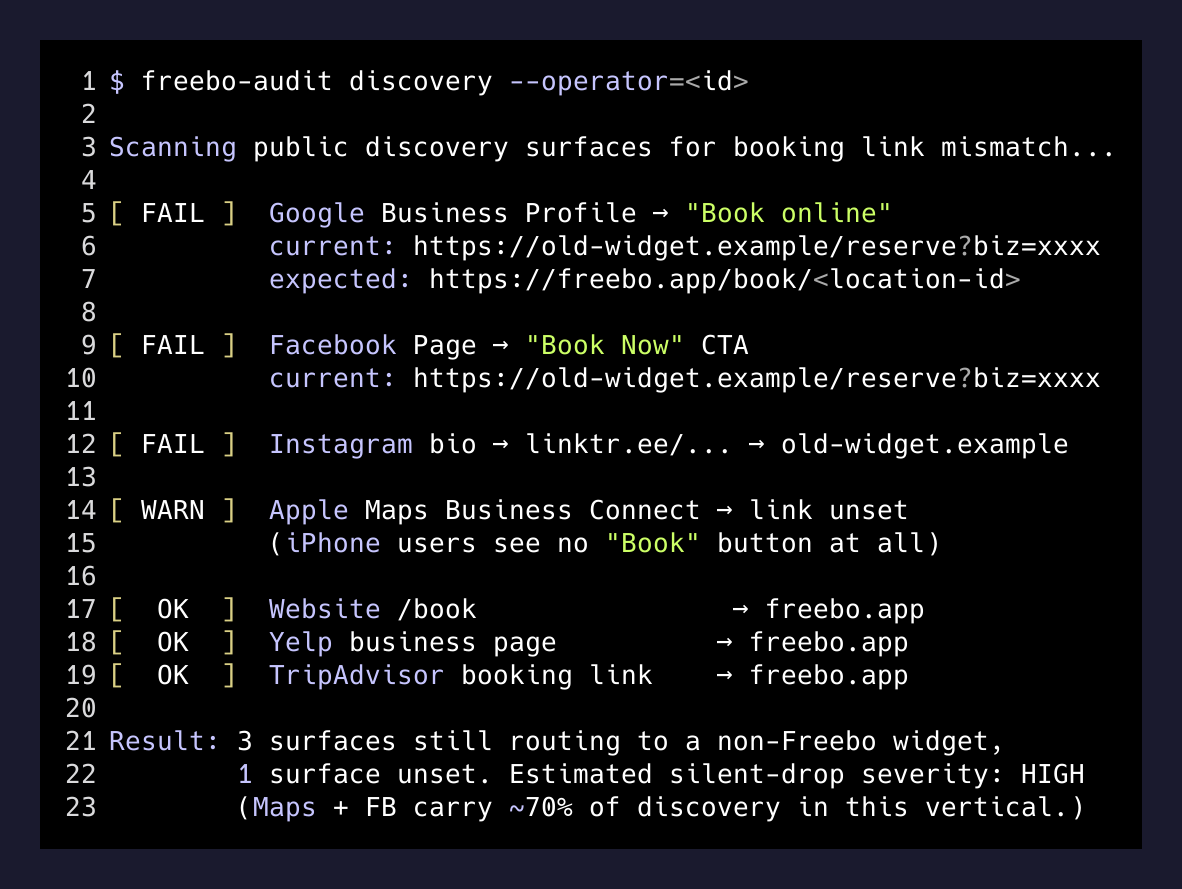
- Google Business Profile → “Book online” link. The single most valuable URL a booking business owns after their homepage. Set through the “Booking link” field in the GBP dashboard.
- GBP → Reservations feature. Some categories (restaurants, salons) have a native reservations integration through a partner. If that partner was set up years ago through a third-party service, it’s still routing.
- Google Search Knowledge Panel actions. Extra “book” and “order” buttons Google can populate from Reserve-with-Google partners that don’t clear when you change your primary GBP link.
- Apple Maps Business Connect. The iPhone equivalent. Different dashboard. Easily forgotten because Android-first founders never open it.
- Bing Places. Small volume, still present, and always wrong on the migrations I audit.
- Every social profile. Instagram bio link, Facebook “Book Now” button (which is a separate CTA from the profile URL), TikTok bio, X bio.
- Every review and directory site. Yelp, TripAdvisor, and every industry-specific directory the operator ever paid to be on.
- Third-party OTAs and marketplaces. If the business was ever listed on Viator, GetYourGuide, Expedia Local Expert, any of the vertical-specific marketplaces — those listings can still exist and still route.
- Old email footers, PDF price sheets, physical business cards, dockside signage, QR codes on menus. Low volume but the most embarrassing, because a customer literally standing in your business is now looking at the wrong URL.
- The old booking platform itself. Log in. Confirm nobody can still book through it. Kill the calendar. Cancel the account. If the domain that hosts its widget is one you own, decide whether to redirect it or let it 404.
Nine of ten of those aren’t the new platform’s problem. They’re a your business ran on the internet for years before you switched problem. But the migration doesn’t feel done until every one of them is either updated or explicitly torn down.
What this actually changed in Freebo
The lazy lesson from a day like this is “add a link cleanup checklist to our docs.” Nobody reads docs. The real lesson is that a booking platform’s onboarding has to make the operator do this — because nobody else is going to.
The step I’m adding, right after “connect your payment account” and before “publish your first product”:
- Ask the operator for their Google Business Profile URL.
- Have them paste (or, if they’ve authorized it, we fetch) the current “Book online” link on their GBP.
- Flag it as “still points to a non-Freebo URL” if it does.
- Generate the exact Freebo booking URL for their location and show them where to paste it.
- Send a nudge on day 3 and day 7 if the GBP link still hasn’t been updated.
There is no elegant “just fix it for them” API here. Updating a business’s GBP link programmatically requires OAuth against Google’s Business Profile API with the operator as the verified owner, and even then only for certain categories. What onboarding can do is make the step unmissable, tell the operator exactly what to paste and where, and refuse to let the onboarding wizard show “all done” until that box is checked.
Not glamorous. Not the feature anyone was going to ask for. It just happens to be the single biggest silent drop between “customer is looking for you” and “reservation lands in your account.”
The general pattern
The shape shows up everywhere a business’s identity is fragmented across surfaces the business owner doesn’t operate.
The booking link. The MX record for the domain email. The DNS for that one subdomain used for a launch six years ago. The Zapier zaps a former assistant set up. Every field a marketer typed once and never checked again is a candidate for silent, invisible failure the day the underlying system changes.
If a URL is answering, nobody will tell you it’s answering wrong.
— the one-liner
Every migration project has a “cutover” checklist that lists the servers, the code, the DNS, the databases. Almost none of them list the surfaces the outside world sees you through. And those are exactly the ones where a broken pointer costs real revenue you will never, ever be able to trace back to the missing update.
The next time a customer of yours says “traffic is soft,” don’t start with the ads. Start with the map.