
The hero on freebo.ai said “Launch May 2026.” It was June 3rd. The CTA underneath said “Join the movement” and dropped people into a waitlist form. Meanwhile, in another tab, I had an email from a real tour operator asking when I could walk him through the platform.
The site was a graveyard. A launch date that had already passed, a waitlist for a product that was now live, and a button labeled like a Kickstarter campaign instead of a sales call. The whole top of the page was lying to anyone who landed on it.
I gave myself a thirty-minute box to fix it.
The graveyard checklist
Before touching the code, I made a list of the dead furniture. It was longer than I wanted it to be.
- Hero subtitle: “Launch May 2026.” Sitting right under the headline like a tombstone.
- Hero CTA: “Join the movement” linking to an email-capture section called
#invite. - Navbar CTA: Same “Join the movement” string, same anchor link.
- Page meta description: Still said “Launching May 2026.” on the OG card and Twitter card.
- Waitlist section: Still there, still collecting emails for a thing that no longer needed waiting on.
Some of those were one-word fixes. The navbar and hero CTAs were the interesting one, because “Book a demo call” isn’t really a button — it’s a calendar.
The on-site scheduling problem
I use Google Calendar’s appointment scheduling for demo calls. The default flow is ugly: you link to a calendar.google.com URL, the user gets bounced to a Google-branded page, and the whole momentum of your landing page evaporates into someone else’s UI.
Google ships a “scheduling button” script that’s supposed to fix this. You drop a <script> tag, point it at your appointment URL, and it injects a button onto your page that opens the booking flow in a popover without leaving your site. Great in theory.
In practice, it injects a button styled like Google. Blue, rounded, with their wordmark. Which would defeat the entire point of having a designed marketing site.
The first version of the fix did something clever, or so I thought. I built a wrapper component called BookDemoButton that rendered my site-styled button on top of a hidden div, loaded Google’s script into the hidden div, and forwarded clicks from my button into Google’s button. The user sees my button. The popover behavior is Google’s. Best of both worlds.
const handleClick = useCallback(() => {
  const googleButton = targetRef.current?.querySelector("button");
  if (googleButton) {
    googleButton.click();
  } else {
    window.open(SCHEDULING_URL, "_blank", "noopener,noreferrer");
  }
}, []);
The else branch was the fallback for users with script blockers — if Google’s script never loaded, the click just opens the scheduling URL in a new tab. Degrade, don’t break. I shipped it, refreshed the production site, and immediately saw the bug.
Four buttons where there should be two
The navbar has one demo CTA. The hero has one demo CTA. The page rendered four.
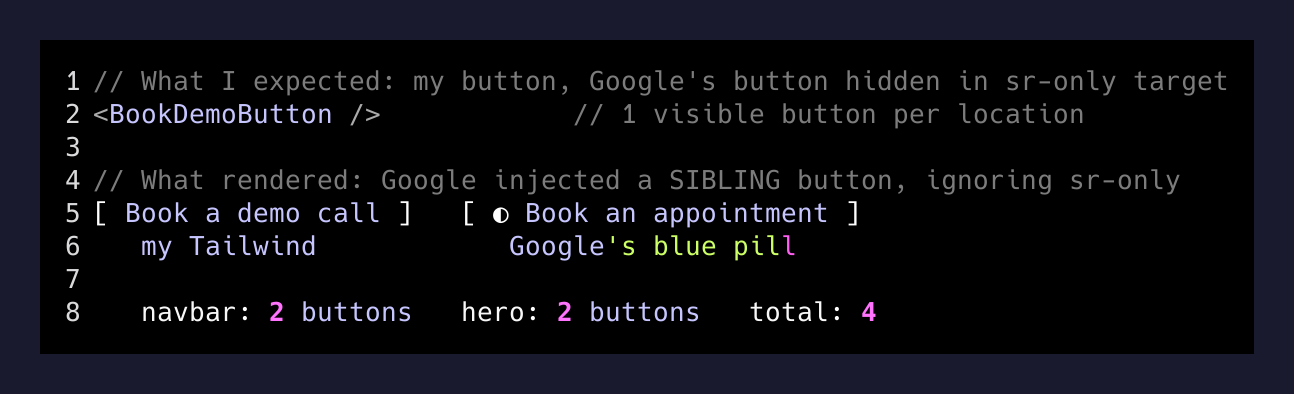
Google’s script does not actually respect the target element I gave it the way I expected. Or rather, it respects it for the anchor it uses to figure out where in the DOM to inject, but the button it creates is a sibling of that target, not a child — and a visible one, regardless of how hard the target is hidden with sr-only or aria-hidden. Two mount points, four buttons.
I had two options. Wrestle with Google’s script and try to suppress the injected sibling. Or scrap the script entirely and build my own modal.
The script-wrestling path is the kind of path that looks short and turns long. Their script is minified, their CSS is global, and any fix I shipped today would break the next time they pushed a release. The modal path is finite. They officially support iframing the appointment URL. I already have a design system. A modal is a <div> with a backdrop and an Escape listener.
I scrapped the script.
The replacement
const openModal = () => setOpen(true);
const closeModal = () => setOpen(false);

useEffect(() => {
  if (!open) return;
  const onKey = (e: KeyboardEvent) => {
    if (e.key === "Escape") closeModal();
  };
  document.addEventListener("keydown", onKey);
  document.body.style.overflow = "hidden";
  return () => {
    document.removeEventListener("keydown", onKey);
    document.body.style.overflow = "";
  };
}, [open]);
The modal portals to document.body, locks background scroll while it’s open, closes on Esc, on backdrop click, and on the corner X. Inside, it iframes the same Google appointment URL the script was wrapping. Same booking flow, none of the duplicated-button mess, fully under my own CSS.
Exactly one site-styled button per location. Click it, modal opens, demo gets booked, modal closes. No round-trip to a Google domain.
What the page actually says now
Headline:  Run your tours the way you want to.
Subtitle:  Why Freebo →
Hero CTA:  Book a demo call →
Navbar:    Book a demo call
That’s it. No launch date. No movement to join. No promise of a future thing — just a way to talk to me about the current thing. The OG and Twitter meta descriptions got the same surgery so anything sharing the URL stops re-broadcasting last quarter’s countdown.
The thirty minutes in order
- 15:24Started the edit sessionListed every place 'Launch May 2026' appeared. Five locations.
- 15:29First commit shippedReplaced launch-date copy + wired the Google scheduling script wrapper.
- 15:36Spotted the duplicate buttons in prodNavbar showed two CTAs. Hero showed two. Four total.
- 15:48Second commit shippedSwapped the script wrapper for a self-controlled modal that iframes the scheduling URL.
- 15:54DoneOne button per location, real demo flow on-site, no Google chrome leaking through.
Thirty minutes, two commits, one detour. The detour was the interesting part.
The lesson, such as it is
The launch date had been wrong for a month. I knew it was wrong for a month. The reason it didn’t get fixed for a month is the same reason every landing page in the world has a <p> somewhere claiming the company was founded in the year of the last redesign: marketing copy isn’t load-bearing until the day a customer reads it.
The day someone is about to email you is the day the dead copy stops being invisible.
— Rule for any marketing page you control
If you have a side project with a hero that says “coming soon,” go check it. It probably already came. The replacement doesn’t have to be clever — mine is one button that opens a calendar. The point is that it’s not lying.
The other lesson, the one I keep relearning: third-party widgets are great until they need to look like they belong on your site, and then they’re a renovation project. Google’s scheduling script wanted to inject its own button next to mine, regardless of how politely I asked it not to. The modal-with-iframe version is twenty fewer lines of code and zero externally-loaded scripts. It also can’t be silently restyled by a Google release next Tuesday.
Demote what you don’t need. Replace what’s lying. And when a vendor’s widget fights your design system, the widget usually loses.