
I got back from a wedding last night. Coffee this morning, phone in my hand, and two Todoist notifications land within a minute of each other. Both were follow-ups I’d scheduled sixteen days ago and then completely forgotten about. Both were about partner integrations for Freebo — cold outreach I’d sent to two of the big tour marketplaces, the ones every operator asks whether we plug into.
The old version of me would have spent the first thirty minutes of the day doing archaeology. Which thread did I send? What did I ask for? What’s the next step if they replied? What’s the next step if they didn’t? By the time I’d reconstructed the state, I’d have burned the good coffee window and probably still gotten the wrong next action.
The new version tapped the first notification and just did the thing. The task title said what to check. The task description was a runbook.
The pattern is dumb-simple
Every time I write a task now — especially anything asynchronous, anything I’m parking for future-me to pick up — I paste the entire next action into the description. Not a hint. Not a link back to some doc. The literal steps, with the literal URL, the literal contact name if there is one, the literal fallback if the first path is blocked.
Here’s the shape, sanitized. Real one is longer.
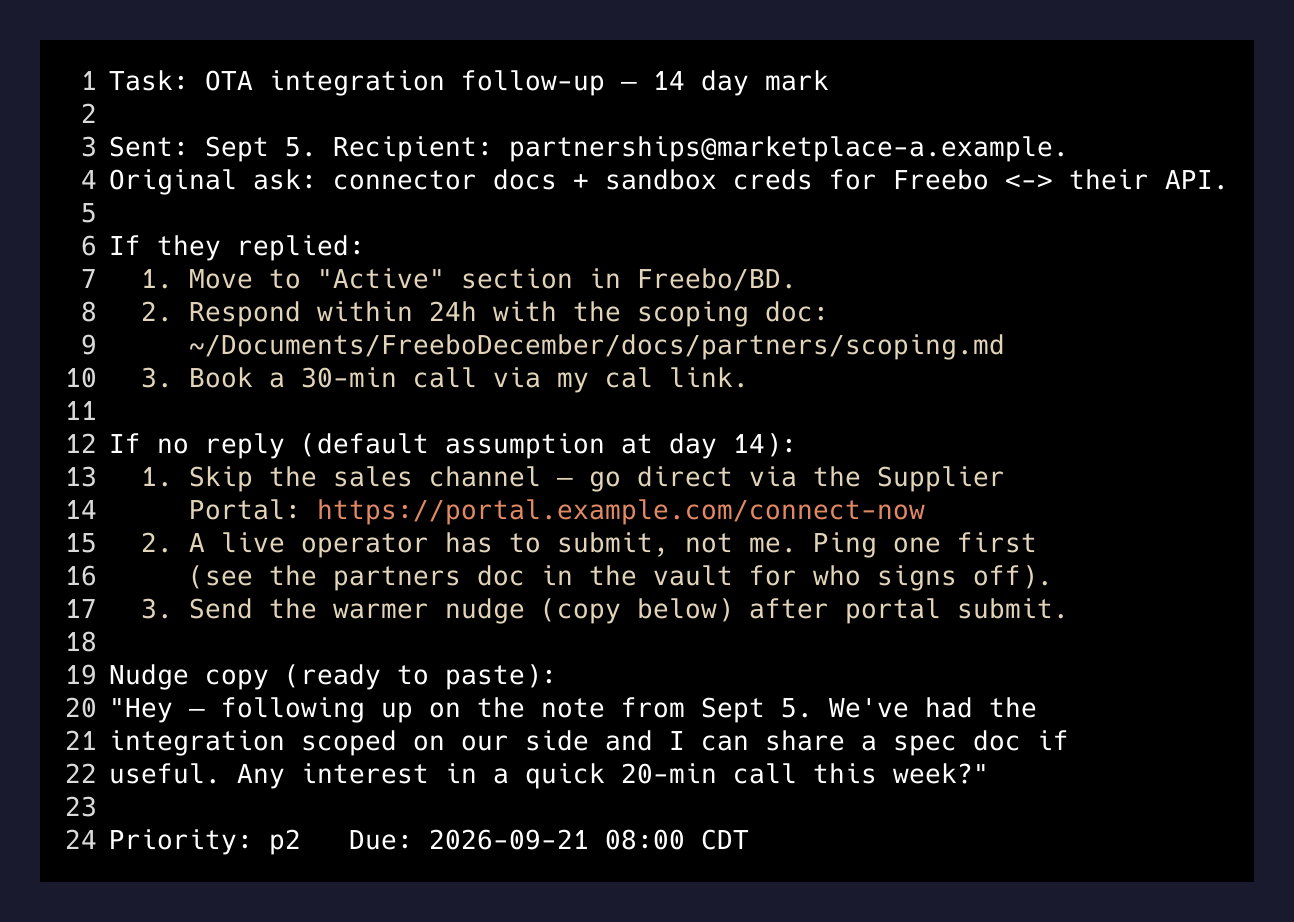
That is the whole trick. When the notification fires, I don’t tap through to a doc. I don’t open a folder in the vault. I don’t grep an email thread. I read four lines and I go.
Why terse titles were quietly killing me
For a long time my tasks looked like this:
- “Follow up with OTA A”
- “Ping OTA B”
- “Review insurance quote”
Terse. Clean. Fits on one line in the inbox. Great engineering aesthetics, absolutely useless when the reminder fired three weeks after I wrote it. Every fire meant a mini-investigation, which meant most of the time I’d just snooze the task another day. Snooze once, snooze forever.
A vague task at 8am becomes a snoozed task by 8:03am becomes a dead task by end of week.
— the actual failure mode
Rich descriptions kill the snooze loop because the friction to execute is now lower than the friction to postpone. I’ve measured it, informally, on myself: a task with a real runbook in the description gets done within an hour of firing something like 80% of the time. A task with just a title gets done maybe 30%. The rest snowball into the next month’s “I have to do a cleanup pass” avalanche.
Where Claude fits, and where it doesn’t
The temptation is to say “Claude writes these for me.” Half true. Here’s the split.
Claude does not decide what the follow-up should be. That’s my judgment. I know the shape of the relationship, whether we’re pushing or waiting, what a friendly nudge looks like versus a “this is dead, close it” nudge. That decision costs me maybe fifteen seconds.
Claude does write the runbook. Once I’ve said “schedule a fourteen-day follow-up on this cold outreach, and here’s the outreach thread,” it generates a task with:
- A specific due date and time
- A description that includes the recipient, the ask, the fallback if no reply, the URL of any portal I need to touch, and the exact copy for the follow-up email if I have to send one
- A priority that reflects how important the relationship is
I read the draft. I edit maybe one line. It goes into Todoist. Done. The entire flow takes under a minute, and future-me pays zero cognitive cost when the alarm fires.
The reason this works well with an agent is not intelligence, it’s transcription. I know what the next steps are while the current step is fresh. I just don’t want to type them out. Claude is a fast typist that reads context and hits the “capture the follow-up” button for me while my brain is still hot on the topic.
What made this morning different
Sixteen days ago I sent two cold emails. That was one Claude session — I drafted the notes, generated two tailored openings, sent them from Gmail, and asked Claude to schedule the follow-up. It wrote two Todoist tasks with fat descriptions and due dates timed to a working-day two weeks out. Then I closed the laptop.
I did not think about those emails again. I flew to Raleigh, went to a rehearsal dinner, danced badly at a wedding, ate barbecue, flew home. Somewhere in a data center a task fired, my phone buzzed, and the runbook was right there.
One of the follow-ups was “no reply — do the fallback path, which is to submit the connector application via the portal instead of waiting for the sales side to route it.” The description had the portal URL, the exact form fields, and a note that the client-facing operator I’d be integrating for had to approve the submission first (with a link back to the vault doc I’d need to reference when I asked them). Ten minutes of work when the fire arrived. Zero minutes of archaeology.
The other was “if they replied, respond within 24 hours with the technical scoping doc; if not, send this warmer, less needy nudge.” The follow-up copy was in the description as a code block. Copy, paste, send, close.
The wider point
There is a whole class of productivity advice that says the point of a task manager is to hold titles. Titles as pointers, and the “real content” lives somewhere else — a doc, an email, a wiki page, a Notion database. The idea is that titles keep your inbox skimmable.
I think that’s exactly backwards for a solo founder. The cost of context-switching from a task list to a document is enormous when you’re switching every seventy-three seconds. The cost of scrolling past a longer task description is nothing. I’d rather see a task once, read its runbook, and execute — than see a title, open two other apps, and forget what I was doing.
So the tip is: stop protecting the aesthetics of your task list. Fatten up the descriptions. Paste in the URLs. Paste in the draft email copy. Write the runbook while the context is hot, and let your future self coast.
The reason people say AI hasn’t landed for them in productivity is that they’re still writing 2010-shaped tasks. The unlock isn’t that Claude does the work — it’s that Claude cheerfully writes down all the boring context you’d never bother writing down yourself. And that context is what makes the reminder actually fireable when it lands two weeks later, at 8am, on a Monday, right after a wedding.