 AI Agents & Automation
I have not opened the Google Ads UI in about three weeks. I run paid media for a small performance shop, and that interface used to be the first thing I’d load every morning — squint at the date picker, set custom range, click into a campaign, switch to the keyword tab, lose the filter, click back. The kind of clicking that feels productive and is not.
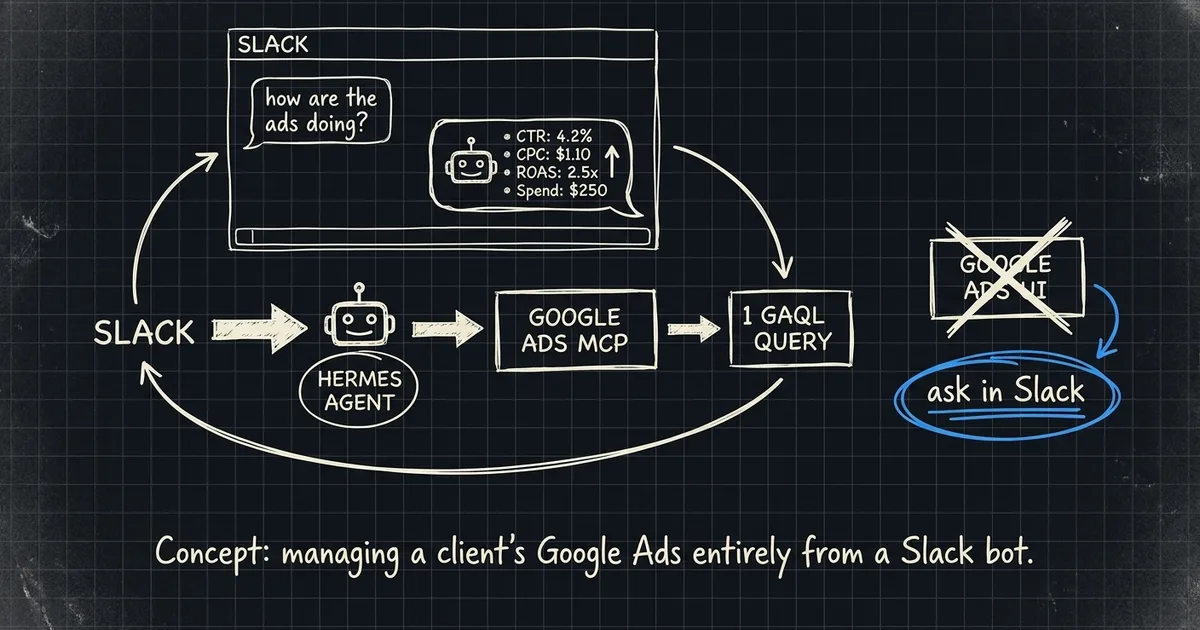
The team asks the bot in Slack now. “What did the prospecting campaign do yesterday?” The bot answers in the thread with the actual numbers. The owner can ask it from his phone in the truck. I can ask it from a tmux pane without leaving my editor. There is no dashboard tab. There is no screenshot Slack channel. There is one place the team already lives, and the numbers come to it.
This post is the wire-up.
The shape
Four boxes, one direction:
Hermes is the always-on agent runtime from NousResearch — I wrote about standing it up locally a few weeks ago. The Slack delivery channel and the MCP loadout are what changed. The Google Ads side is the official googleads/google-ads-mcp server, run on demand by pipx. Read-only on purpose. I’ll explain why in a minute.
The MCP, isolated on purpose
The MCP itself is three tools: list accessible customers, fetch resource metadata, and search — which takes raw GAQL. That’s it. No mutate. No “pause this campaign for me.” If you want to change anything, you do it in the UI like a grown-up.
What took the actual work was the isolation. I was already running Google Search Console wired into Claude Code, plus a separate Google Tasks integration, plus Drive for a different client. All three want Google credentials, all three want to hit ~/.config/gcloud/, all three step on each other if you let them. And I learned the hard way last month that one agent install per identity is the rule — not a suggestion. So Google Ads gets its own corner of the disk:
"google-ads-mcp": {
  "command": "pipx",
  "args": ["run", "--spec",
    "git+https://github.com/googleads/google-ads-mcp.git",
    "google-ads-mcp"],
  "env": {
    "GOOGLE_APPLICATION_CREDENTIALS":
      "/home/brettr/.config/google-ads/gcloud/application_default_credentials.json",
    "GOOGLE_ADS_LOGIN_CUSTOMER_ID": "5602432609",
    "GOOGLE_ADS_DEVELOPER_TOKEN": "...",
    "GOOGLE_ADS_USE_PROTO_PLUS": "true"
  }
}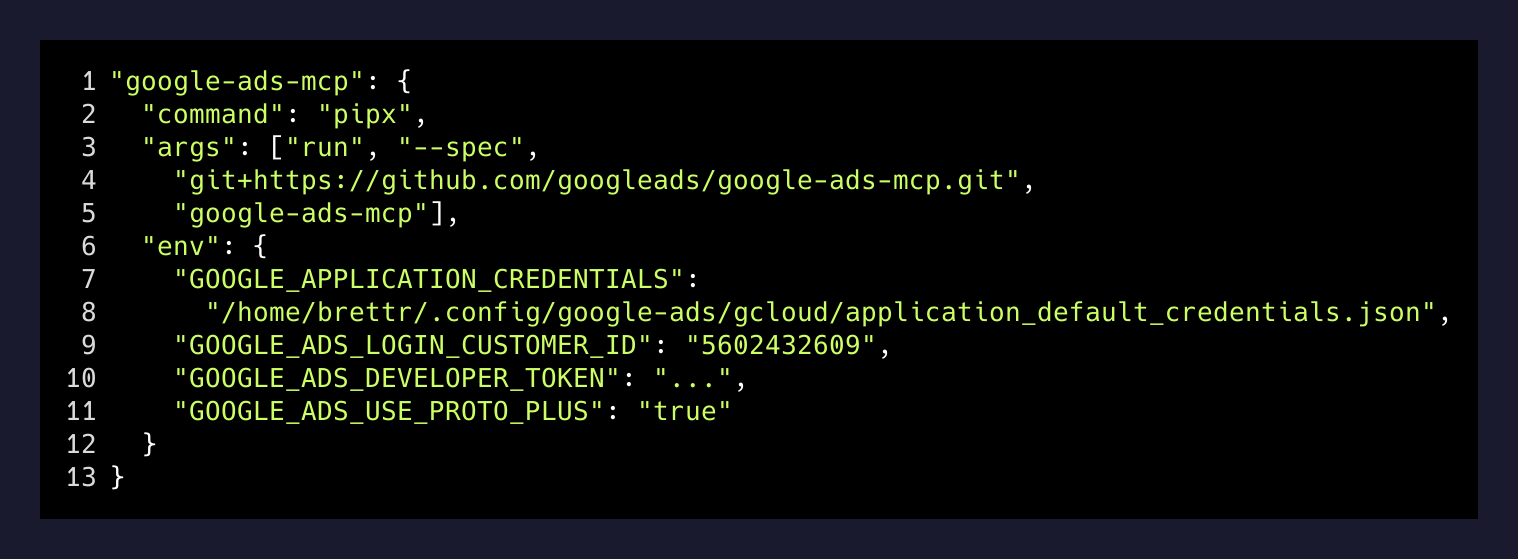
The GOOGLE_APPLICATION_CREDENTIALS path is the trick. By default, gcloud auth application-default login writes to ~/.config/gcloud/application_default_credentials.json, and every Google SDK on the machine reads from there. If I had used the default, this client’s ad data would share an ADC file with my personal Search Console, my Google Tasks, and a third client’s Drive. One token, four jobs. Bad.
Instead, I gave Google Ads its own CLOUDSDK_CONFIG directory when I did the login:
CLOUDSDK_CONFIG="$HOME/.config/google-ads/gcloud" \
  gcloud auth application-default login \
    --client-id-file=~/.config/google-ads/oauth_client.json \
    --scopes=https://www.googleapis.com/auth/adwords,\
https://www.googleapis.com/auth/cloud-platform
The credentials land in their own folder, the MCP env points at that folder, and the rest of the machine has no idea this OAuth session exists. If I ever need to revoke it I delete one directory and the blast radius is one client.
The one query that does most of the work
Most “how did the account do” questions collapse into the same GAQL with different filters. The bot doesn’t have a tool per metric — it has one tool that takes raw GAQL, and the agent translates English into a query.
Here is what it runs when somebody asks “what did the prospecting campaign do yesterday”:
SELECT
  campaign.name,
  metrics.impressions,
  metrics.clicks,
  metrics.cost_micros,
  metrics.conversions,
  metrics.conversions_value
FROM campaign
WHERE segments.date DURING YESTERDAY
  AND campaign.name LIKE '%prospect%'
ORDER BY metrics.cost_micros DESC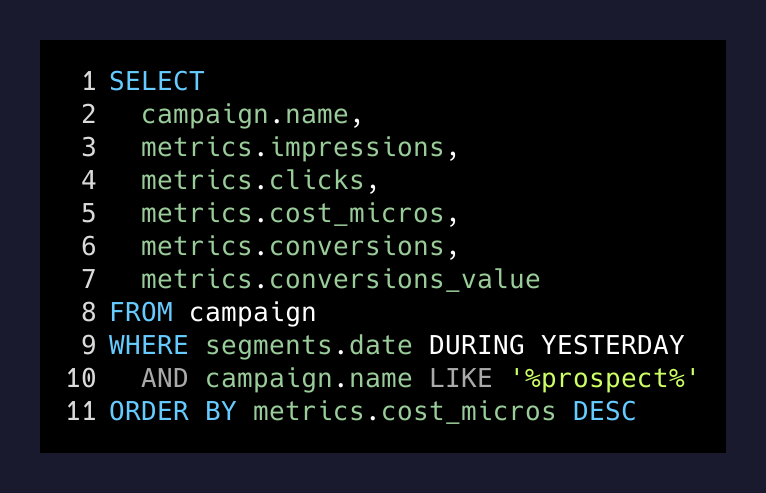
The agent then divides cost_micros by a million (Google’s billing unit, because of course it is), computes ROAS as conversions_value / cost, and posts a four-line summary back into the Slack thread. If somebody asks a follow-up — “what about for the week?” — the same query runs with DURING LAST_7_DAYS. No new tool. No new code. Same GAQL shape, different WHERE clause.
This is the part I want to underline: the MCP doesn’t ship with a “get campaign performance” tool. It ships with search, and search takes any query the Google Ads API will accept. The agent is doing the English-to-GAQL translation. Which means anything the API exposes — keyword performance, audience segments, geo breakdowns, search term reports — is one prompt away. I didn’t have to write a tool for it. Google already did the work and the MCP exposes the whole surface.
Read-only on purpose
The MCP supports zero mutating tools. No pause campaign, no edit budget, no add keyword. That was a deliberate pick, not a limitation.
Two reasons.
First, the failure mode of a write tool is a campaign that pauses itself at 3 a.m. because the agent misread “pause for the weekend” as “pause immediately.” Reads can be wrong without being expensive. Writes can be wrong and burn a Saturday’s spend.
Second, the team trusts a read bot in a way they would never trust a write bot. The owner can hand the Slack workspace to anyone — a freelancer, a new media buyer, an intern — and the worst they can do is run a query. The principle of least privilege gets you exactly as far as you need to go for a status-question bot, and no further.
If I ever do want to mutate, I’ll add it as a separate tool with its own confirmation step and a per-action audit log. But “status questions in Slack” doesn’t need mutate, and 80 percent of what the team actually asks is a status question.
Why this beats a dashboard
A dashboard is a place you go. Slack is a place you already are. The whole win of this setup is removing the “go check the dashboard” step. The data finds you.
It also collapses the question chain. Old flow: somebody asks in Slack, I open Ads UI, set the date range, take a screenshot, paste it back into the thread, get a follow-up question, repeat. New flow: somebody asks in Slack, the bot replies, the follow-up gets answered too. The thread itself becomes the dashboard, with the questions and the answers in the order somebody actually wanted to know them. That is a better artifact than a dashboard. A dashboard is a frozen snapshot. A Slack thread is a conversation about the numbers, and conversation is what marketing reviews actually are.
The takeaway
You do not need a custom integration to put your ad data in Slack. The official Google Ads MCP exists. An always-on agent runtime exists. Slack has a perfectly good API and most agent frameworks already speak it. The only thing you need to do yourself is the part nobody writes a tutorial about: give each agent identity its own credential directory so the next one you spin up doesn’t quietly inherit access to data it has no business seeing.
Get that right and the dashboard goes away. Which is the actual goal. Nobody loves a dashboard. They love knowing the answer.