
I had a Hermes agent running for a client last month. It worked, sort of. It forgot what we were talking about between messages, it dumped its own thinking into Slack like it was paid by the word, and a 400 error from Anthropic about third-party usage caps broke it in the middle of a demo. Not a great look.
So this week I tore the client setup out and built one for myself. Different goals: local-first, terminal-native, and — the part that actually matters — give it real memory.
Here is how the stack came together and what I learned wiring it up.
The pieces
Three projects, one box (my always-on Omarchy desktop, on Tailscale, reachable from my phone and laptop):
- Hermes Agent — the agent runtime from NousResearch. Cron jobs, webhooks, MCP, multi-platform delivery (Slack, Telegram, terminal). Think Claude Code Routines, but it shipped two months earlier and runs on my hardware.
- Honcho — memory infrastructure from Plastic Labs. Stateful peer representations across sessions. The thing your chatbot is missing when it asks your name for the fourth time today.
- A terminal UI gateway — Hermes ships a
tui_gatewaymodule that exposes the agent as a websocket and renders sessions in a Rich-style TUI instead of yet another Electron chat window.
The three of them talk to each other like this:
Hermes as a systemd service
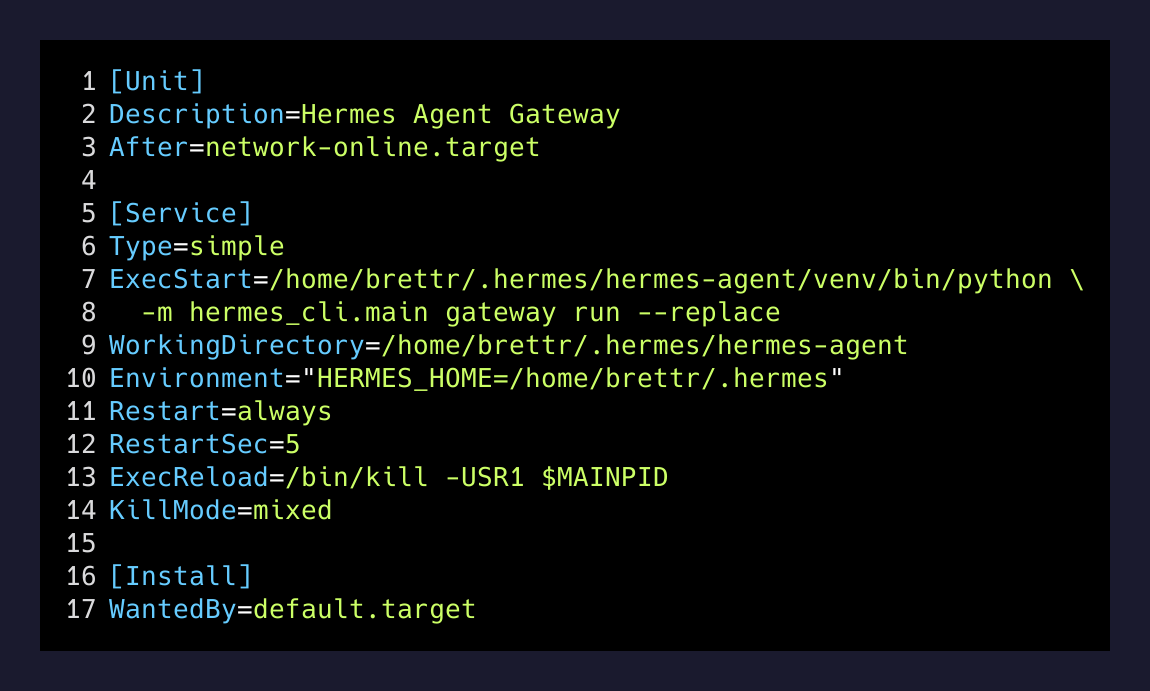
Hermes wants to be always-on. That is the whole point — cron jobs, webhook subscriptions, “ping me when the issue tracker has a new bug.” On Omarchy that means a user systemd unit, not a tmux session I forget to restart.
[Unit]
Description=Hermes Agent Gateway - Messaging Platform Integration
After=network-online.target
Wants=network-online.target

[Service]
Type=simple
ExecStart=/home/brettr/.hermes/hermes-agent/venv/bin/python -m hermes_cli.main gateway run --replace
WorkingDirectory=/home/brettr/.hermes/hermes-agent
Environment="HERMES_HOME=/home/brettr/.hermes"
Restart=always
RestartSec=5
ExecReload=/bin/kill -USR1 $MAINPID
KillMode=mixed
TimeoutStopSec=210

[Install]
WantedBy=default.target
The --replace flag is the one I want to call out. If a stale gateway is bound to the port from a previous run (say, I killed claude mid-session and forgot the gateway was a child of it), --replace evicts the old process instead of exiting. Without it, every restart needed me to pkill -f hermes first.
The ExecReload line maps systemctl --user reload hermes-gateway to a SIGUSR1, which Hermes catches to reload skills and prompts without dropping the websocket connection. That is the difference between “rebooting my agent” and “telling it to read a new file.”
A shell wrapper that protects the venv
Hermes lives in its own Python venv. If I call it from a shell that has PYTHONPATH set for something else (Claude Code, my JSONL parser, anything), I get the world’s most confusing import errors. So the entrypoint on $PATH is dumb on purpose:
#!/usr/bin/env bash
unset PYTHONPATH
unset PYTHONHOME
exec "/home/brettr/.hermes/hermes-agent/venv/bin/hermes" "$@"
Three lines. Worth more than three lines of debugging.
Honcho is where the magic is
You can run Hermes without Honcho. It will work. It will also feel like talking to a goldfish — context dies at the end of every session and the agent learns nothing about you between runs.
Honcho fixes that by sitting between the agent and “memory” as a real service. You write messages and events to it, it does background reasoning on those messages to build peer representations (its term for “what does the agent know about this person”), and then any session can query natural-language insights or session-aware context on the way in.
The Honcho repo describes itself well:
Store messages and events, let Honcho reason in the background, then query peer representations, session context, search results, or natural-language insights from any model or framework.
The practical difference: Hermes-only, my agent has to be told every session that I live in Austin, that “Skip” is a yacht client and not a song queue command, and that my Freebo project is in a pricing-decision stall. With Honcho in the loop, those are facts the agent already has. I told it once.
Hermes vs my PA system
I asked my Hermes agent how it compares to my Obsidian-vault PA setup. Honest answer for anyone considering the same setup:
| Feature | PA (Obsidian + Claude Code) | Hermes + Honcho | |
|---|---|---|---|
| Always-on | No (session-based) | Yes (systemd) | |
| Cron / triggers | Via crontab + skills | Native, first-class | |
| Memory between runs | File-backed (vault) | Honcho peer model | |
| Multi-platform delivery | Manual | Slack / Telegram / TUI | |
| Conversational depth | High (full Claude session) | Lower (per-turn) | |
| Best for | Thinking with me | Acting for me |
They are not competitors. The PA system is for when I want a thinking partner that can read every file in my vault and reason about it for an hour. Hermes is for everything I want to happen on a schedule when I am not at the keyboard. Briefing at 5 AM. Burial-blog draft check at 9. A poke from Skip’s GBP monitor when a review needs attention.
The thing I did not expect
I assumed the terminal UI was a vanity choice. It is not. Running an agent in a TUI means the entire session, the tool calls, the streaming token output, the memory writes back to Honcho — all of it is right there in the same pane as the rest of my work. No window switching. No “is the agent still alive?” tab. Ctrl+B away to a tmux pane and the agent is there.
It also means I can run the agent over SSH from anywhere on my Tailnet. My phone, my laptop on the couch, Haley’s iPad if I am pretending I am not working. The terminal is the most portable UI ever invented and we keep trying to replace it with chat apps that need 400 megs of RAM to render a text box.
What I would tell someone starting from zero
- Get Hermes running as a systemd user service first. Resist tmux. You want it to come back after reboots without you thinking about it.
- Wire Honcho early. Self-host the FastAPI server or use their managed endpoint. Either way, write to it from day one — there is no migration path that re-creates context you never captured.
- Use the TUI gateway, not the web UI. The web UI exists. It is fine. The TUI is the one you will actually open.
- Pick one delivery channel and master it. I picked terminal + Telegram. Slack came later. Trying to wire all three on day one is how you end up debugging webhook signatures instead of building skills.
The whole stack took me about two hours from clean checkout to “agent that remembers what I said yesterday.” That includes the venv-collision detour. Honestly faster than I expected for something this layered.
The bar for “personal AI” right now is whether it can hold a thread across sessions without you re-explaining yourself. Most cannot. Mine, finally, can.