
I wanted my agent to be able to ask Search Console things. Not screenshots of dashboards, not weekly digests — actual queries. “What did people search to land on the slide-deck post last week.” “Which pages dropped position.” “Resubmit the sitemap and tell me when it’s downloaded.” The kind of questions you ask while you’re already in the middle of editing a post.
The plumbing took a few hours longer than it should have, because every guide I found started the same way: “create a Google Cloud service account, give it Owner on the property, done.” Two hours in, I learned that path is a dead end. Search Console silently rejects service-account emails. You’ll spend a long afternoon learning that the error message (“user not found”) means “we don’t accept your kind here.”
Here’s the route that actually works.
What I wanted
A gsc command on my machine that does what the Search Console UI does, only fast and scriptable. Then any agent in any session can shell out to it and reason over the results.
Concretely:
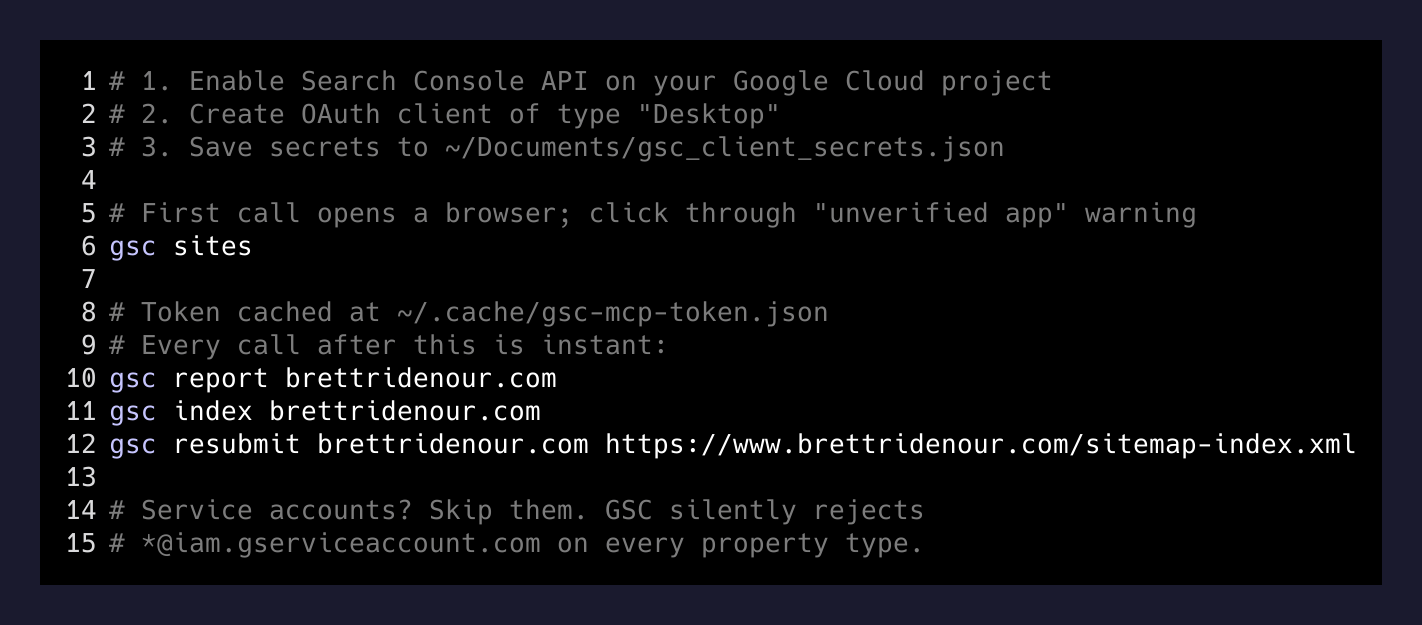
gsc sites                          # list every property I own
gsc report brettridenour.com       # 28-day clicks/impressions/queries/pages
gsc index brettridenour.com        # per-URL indexing status from the sitemap
gsc resubmit brettridenour.com <sitemap-url>
Not an MCP. Not a fancy server. A CLI. Agents are great at piping shell commands and reading their output, and a CLI works in cron, in a hook, in a Bash one-liner, anywhere.
Why service accounts don’t work
If you’ve wired anything else to Google APIs from a server — BigQuery, Drive, GA4 — you’ve probably done it with a service account. Create one in Google Cloud, download a JSON key, share the resource with the service account’s email, profit.
Search Console doesn’t accept that. The “Add user” field on a property — both URL-prefix properties and Domain properties — quietly rejects emails ending in iam.gserviceaccount.com. You get a generic “user not found” toast. The official docs hint at service-account access in some places and contradict it in others. The empirical truth: as of right now, you cannot grant a service account permission on a Search Console property through the UI.
I tried. I made gsc-mvp@pa-tasks.iam.gserviceaccount.com, downloaded the key, opened the property settings, pasted the email, hit add. Nothing. Tried both property types. Nothing. Tried granting at the Cloud project level (irrelevant — GSC permissions are per-property, not per-project). Nothing.
The service-account JSON key still sits on my disk. It is a paperweight.
What works: a Desktop OAuth client
The boring path is the right one. OAuth, “Desktop app” type, a refresh token cached on disk, your own Gmail as the resource owner.
Steps:
- In Google Cloud, Enable APIs & Services → Search Console API on the project you’ll use. I reused
pa-tasks, the project I already had wired for Google Tasks. One project, two APIs, one OAuth consent screen. Less to manage. - Credentials → Create Credentials → OAuth client ID → Desktop. Download the JSON, save it somewhere stable. Mine lives at
~/Documents/gsc_client_secrets.json. - First time you run anything that uses it, the Google library opens a browser, makes you click “Continue” past the unverified-app warning (it’s your app, on your account — you’re warning yourself), then drops a refresh token into a cache file. Mine is at
~/.cache/gsc-mcp-token.json. Every subsequent call uses that cache and never prompts again.
That’s it. The whole “service account” detour is a footgun the docs leave on the floor for you to find. Skip it.
The CLI on top
Once auth works, the API is genuinely small. Sites, search analytics, URL inspection, sitemaps. Five endpoints I care about. I wrote each one as a small Python script, pinned the deps in a venv, and wrapped the whole thing in a one-line shim at ~/.local/bin/gsc:
#!/bin/bash
exec ~/.local/share/gsc-helpers/.venv/bin/python \
     ~/.local/share/gsc-helpers/$1.py "${@:2}"
So gsc report brettridenour.com calls report.py. gsc index brettridenour.com calls index_status.py. The venv keeps google-api-python-client and google-auth-oauthlib from leaking into system Python.
One small ergonomic thing that mattered more than I expected: the CLI accepts brettridenour.com and silently rewrites it to sc-domain:brettridenour.com if the property is a Domain property. The official API requires the sc-domain: prefix, but I never want to type it.
What surfaced once I had it
I ran gsc report brettridenour.com for the first time and learned something I’d been lying to myself about. My top-clicked search query on this site is my own name. My second is "open claw" "nano claw", terms I have written about exactly once. The slide-deck post is doing all the impression heavy-lifting (37 of 125 in the last 28 days), and the homepage is converting (3 clicks on 16 impressions, ~19% CTR — small numbers, but the only ones that are clicking are the people who already wanted to find me).
The point of having the data in Claude is not the data. It’s that the next post I write can be informed by it without me having to leave the editor. “Here are the top 10 queries in the last 28 days. Suggest three angles for tomorrow’s post that aren’t already covered by published posts.” That prompt would be tedious to assemble by hand. With a CLI, it’s gsc report ... | claude ....
The gotchas worth knowing
A few things I wish someone had said out loud:
- “Discovered” is not “indexed.” The Search Console UI shows a “Discovered URLs” count that reads like an indexing count and is not. Use URL Inspection (one URL at a time, rate-limited, slow) to check actual indexing. My
gsc indexscript loops the sitemap and inspects each URL — slow but truthful. - Sitemap resubmit doesn’t force indexing. It puts URLs into Google’s queue. Decisions to crawl and index are separate, mostly driven by content quality and inbound links, not by your re-pinging. If your site isn’t being indexed, fix the page, not the sitemap.
- URL-prefix vs Domain property. If you have both registered, you may only own one. Mine: I only own the Domain version of brettridenour.com. The URL-prefix one is orphaned and 403s on me. Same hostname, two property types, two permission sets.
- IndexNow helps Bing. It does not, in practice, help Google. Google ignores the IndexNow ping and uses its own crawl signals. Worth running for Bing/Kagi/Yandex coverage; don’t expect Google miracles from it.
The takeaway
The interesting move wasn’t building the CLI. The CLI took an evening. The interesting move was realizing that giving an agent access to a small, opinionated tool — five subcommands, no flags to learn — is more useful than handing it a giant SDK and hoping it figures out the right call.
The agent doesn’t need every Search Console endpoint. It needs the four queries I actually run, exposed as four words it already knows how to type. Most of the AI-tooling ergonomics work in 2026 is going to be this: small CLIs, sharp interfaces, real auth that doesn’t break. The “MCP for everything” instinct is fine, but a Bash-friendly CLI is shorter, more debuggable, and runs anywhere — including in the cron job that’s about to run while your agent is asleep.
If you want a Search Console MCP, build the CLI first. The MCP is the same logic with a different mouth.