 AI Agents & Automation
A client said yes on the phone last night. Not a “send me a proposal” yes. A real one — terms discussed, scope agreed, handshake-over-Bluetooth yes. The kind where the next move is normally “I’ll send you something to sign this week” and then you spend a Saturday morning copy-pasting clauses out of an old MSA you found in a Dropbox folder.
I had the PDF in his inbox five minutes after we hung up.
Not because I’m a lawyer. Not because I have a contract template library. Because the contract workflow on my machine is now a single skill that turns a conversation into a signed-ready agreement, and the bottleneck has finally moved from “writing the doc” to “reading what I just said yes to.”
This is how it actually works.
The trigger
Phone call. About 18 minutes. We talked through the offer, the price, the kill switch, what happens if the account gets paused, who owns the ad creative when it’s over. Standard small-business service agreement stuff. The kind of conversation where you’re nodding and also mentally noting “that’s a clause, that’s a clause, that’s a clause.”
I hung up and opened a terminal.
- 6:12 PMCall endsVerbal agreement on scope, price, term, IP.
- 6:13 PMTranscript dropped into vaultiPhone call recording → Whisper → markdown in Inbox/.
- 6:14 PMSkill kicks offReads transcript, fills the agreement template, flags anything ambiguous in red.
- 6:16 PMHTML draft rendersOpen in browser, scan the red flags, fix two.
- 6:17 PMPDF in their inboxSent via Gmail with a one-line body.
The pieces
There are three pieces, and none of them are clever on their own. The leverage is in how they hand off.
1. The transcript. I record calls with consent on a normal voice memo app, drop the file into ~/Documents/Brett Omarchy/Inbox/, and a watcher pipes it through a local Whisper run. Out comes a timestamped markdown file. Nothing fancy — the whole point is that by the time I’m at my desk, the conversation is already text I can grep.
2. The agreement skeleton. This is the part most people get wrong. The template isn’t a Word doc full of boilerplate. It’s an HTML file with hand-written CSS that prints to a clean PDF, and the legal sections are short paragraphs I’ve actually read and agree with. No 14-page MSA. No “WHEREAS” anywhere. Service description, term, fee, payment schedule, IP ownership, termination, governing law, signature blocks. That’s it.
3. The skill. A Claude Code skill that reads the transcript, fills the template, and — this is the part I care about — flags every place where the conversation was ambiguous in red. Not “I’ll guess and you can fix it later.” Literally a red <span class="flag">[confirm — was this Net 15 or Net 30?]</span> inline in the document. The unknowns surface themselves.
The flag system
This is the bit worth stealing.
When the model fills the template, it’s allowed to confidently write anything the transcript explicitly says. But the moment it has to guess — because the call covered “we’ll handle the creative” without specifying who owns it after termination, say — it has to leave a red flag instead of inventing a clause.
The rule in the skill prompt is short and rude:
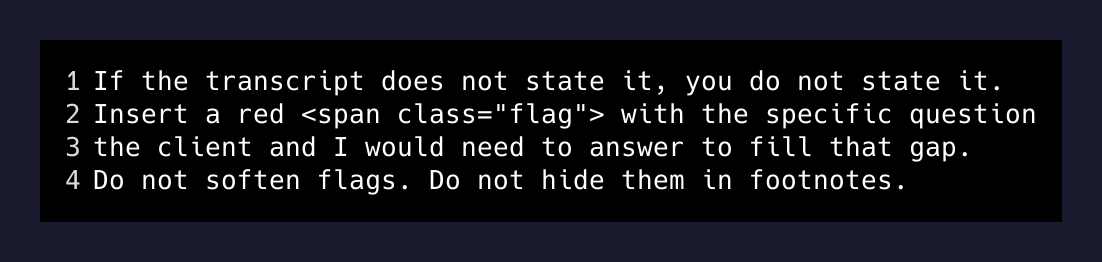
The result is a contract that’s 90% black text I can sign, and 10% red text that’s a direct todo list for the next two minutes of my life. I scan, I either know the answer (and edit it in), or I text the client one question and wait.
What the output actually looks like
The PDF that lands in the client’s inbox doesn’t look like an AI generated it. It looks like something a small Austin consultancy would send. Georgia serif, 760px content width, light gray section headers, signature blocks at the bottom. The whole stylesheet is maybe 20 lines.
<style>
  body { font-family: Georgia, serif; max-width: 760px;
         margin: 40px auto; line-height: 1.55; }
  h1   { font-size: 22px; text-align: center; }
  h2   { font-size: 15px; text-transform: uppercase;
         letter-spacing: 0.04em;
         border-bottom: 1px solid #ccc; }
  .parties { background: #f6f6f4; border: 1px solid #e2e2dd;
             border-radius: 6px; padding: 14px 18px; }
  .flag { color: #b00; }
</style>
That’s the entire visual identity of my legal stack. One stylesheet. The PDF render is a Chromium headless print to A4 — no LaTeX, no Word, no docx library, no third-party “contract platform.” A browser is a PDF generator if you let it be one.
The part I didn’t expect
I thought the win was going to be speed. It’s not. The speed is nice — five minutes from call to PDF is a fun party trick — but the actual change is that I now do contracts at all.
Before this, “I’ll send you something to sign” was a Saturday-morning task that got pushed to next Saturday, then the Saturday after that. Sometimes the client started work before the contract was signed because the contract never appeared. Sometimes the contract appeared three weeks later, after the relationship had already calcified into “we just work together now,” and the act of sending a formal agreement felt awkward.
When the contract leaves the same conversation it was promised in, the relationship starts inside the agreement, not retroactively wrapped in one. The client signs while the call is still echoing. There is no “do we even need this in writing?” drift.
The bottleneck was never the legal language. It was the friction between “we agreed” and “here’s the doc.”
— The actual lesson
What’s next
The obvious next move is to remove me from the loop entirely on small fixed-fee engagements. The skill already drafts the email body. The PDF is already deterministic. There’s no real reason a verbal agreement on a $1,249/mo management deal needs my hands on the keyboard at 6:14 PM — the rules for what’s negotiable and what isn’t are simple enough to encode.
But I’m not going to. The five minutes of me reading the flags is the entire quality gate. The day I let a contract send itself is the day a flag I should have answered gets quietly dropped, and a clause I would have caught goes out with my name on it. Speed is a feature. Self-driving is not.
The transcript becomes the document. The document becomes the signature. I stay in the loop just long enough to disagree with the model if I need to.
That’s the workflow. Nothing in it is novel on its own. The trick is admitting that the boring part — typing the contract — was the entire reason I was avoiding the contract.