 AI Agents & Automation
The problem with a good L10 meeting isn’t the meeting. It’s the twenty minutes after, when you’re staring at a page of scribbles that reads like a UN treaty — three To-Dos, one rock update, an IDS issue you promised to write down, two headlines nobody will remember by Friday. And it always looks like this by design: EOS meetings are dense on purpose. That’s the point.
The friction is the sorting. Where does the “get the invoice out by Wednesday” To-Do live? Which project does the rock update belong to? Is “we haven’t been logging referrals” an IDS issue, a rock, or a headline? By the time you’ve routed everything to the right places, you’ve spent longer on cleanup than on the meeting.
I got tired of it. Two weeks ago I closed the loop.
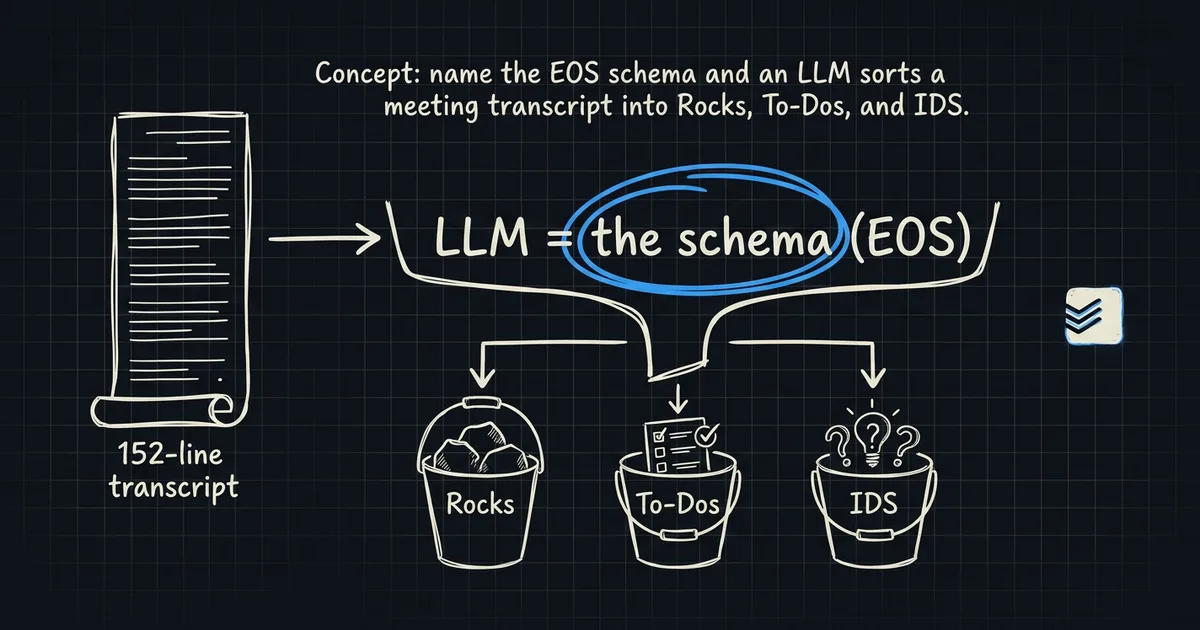
The trick is that EOS is a schema
Every L10 has the same slots. Segue, scorecard, rock review, headlines, To-Do list, IDS. If you ran L10s for a year and squinted at the shape, you’d say: this is a form. The meeting is just the process of filling in the form out loud.
That’s the whole insight. Once you name a schema, an LLM can extract to it. Not “summarize the meeting” — that’s the vague thing everyone does first and it’s worse than useless. Structured extraction. Give the model the schema, hand it the transcript, and get typed output back.
The meeting is just the process of filling in the form out loud.
— What I say to Claude at the top of every L10 processing session
The pipeline
From transcript to routed action in one Claude session. About thirty minutes end to end, of which maybe five are me reading the output.
The pipeline is boring on purpose. Nothing here is exotic — it’s Claude Code, the Todoist MCP, the Google Calendar MCP, and a folder in Obsidian. The prompt is the whole product.
The prompt (the part that matters)
The prompt has three jobs. Tell the model what an L10 is. Give it the routing map. Tell it what typed output to return.
You are processing an EOS/Level-10 meeting transcript.

An L10 contains these sections. Extract every item you find into
one of these buckets. If a line doesn't fit a bucket, drop it.

- rocks: 90-day priority commitments. Fields: owner, status
  (on-track / off-track / done), one-line update.
- todos: single-week action items. Fields: owner, due (default:
  next Wednesday), one-line description.
- ids_issues: things that came up but weren't solved in the meeting.
  Fields: raised_by, description, proposed_owner (if named).
- headlines: customer or team wins mentioned out loud. Keep verbatim.

Routing map (which Todoist project each type goes into):
- Rock updates for the [client] account → project "Freelance",
  section "[client]"
- To-Dos owned by me → project "Personal", section "This Week"
- IDS issues → vault file: Projects/[client]/IDS Log.md
- Headlines → vault file: Projects/[client]/Wins Log.md, prepend

For every to-do, generate a rich Todoist description with:
- Meeting date + one-line context of why the to-do was created
- Any linked people mentioned
- A link back to the meeting notes vault file

Return JSON matching this schema. No prose.
That’s it. The reason it works is that EOS gives me the ontology for free. I don’t have to teach the model what a rock is — the framework already did.
The routing map is where the smart lives
The prompt above shows two projects and one client — the real one has six. Rock updates for one client go to a different Todoist section than rock updates for another. Personal To-Dos land in “This Week.” IDS issues never touch Todoist because IDS is an accumulator, not a task list; it lives in a markdown file that I re-read every quarter.
The map is a config, not a prompt. It’s ten lines of YAML I keep in the vault:
routing:
  rocks:
    client_a: { project: "Freelance", section: "Client A" }
    client_b: { project: "Freelance", section: "Client B" }
    personal: { project: "Personal", section: "Rocks" }
  todos:
    default: { project: "Personal", section: "This Week" }
  ids:
    client_a: "Projects/Client A/IDS Log.md"
  wins:
    client_a: "Projects/Client A/Wins Log.md"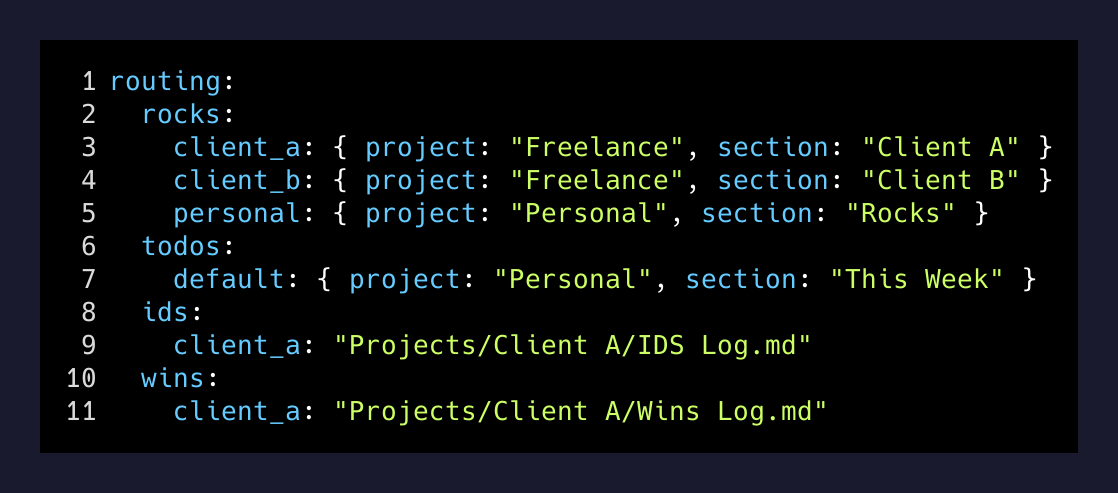
Adding a new client is one YAML entry. The prompt reads the map. The MCP call routes on it. Nothing else changes.
What actually happens when I run it
I paste the transcript into Claude, tell it to use the L10 processor, and go make coffee.
By the time I’m back, my Todoist has four new items in the right sections, each with a two-paragraph description explaining why the to-do exists and who’s waiting on it. My vault has a new entry appended to the IDS log with the three unsolved issues from the meeting. The wins log got two new lines. And there’s a draft email to the rock owner whose commitment slipped, with a proposed next check-in time and a one-paragraph “here’s what I heard, let me know if I misread it” opener.
The last part is the one that surprised me. I didn’t plan for the email drafts — I added them the second time I ran the pipeline because I noticed the follow-up was the part I was still doing manually. Now the prompt writes those too. I open Gmail, glance at the draft, hit send.
The insight worth stealing
If you use any framework at work — EOS, Scrum, KPT retros, whatever — the framework is a schema. Which means the framework is also a prompt.
Most people, when they first put AI on their meetings, ask for a summary. It’s the wrong first ask. Summaries are for reading; you already had the meeting. What you actually want is routing: this thing goes here, that thing goes there, the third thing goes in the graveyard. Structured extraction against a named schema does routing. Prose summarization doesn’t.
The move is worth ten minutes of prompt design. Look at your meeting notes template. Find the buckets. Type them into a prompt. Add the routing map. Watch the twenty-minute post-meeting sort collapse to thirty seconds of glancing at the output.
The meeting is still where the value is. Everything after the meeting should be free.