
The bathroom light in my unit has been doing a slow blink for a week. Not dead, not fine — the kind of half-broken that makes you forget about it until you’re brushing your teeth and the room strobes.
So I told Claude: “file a maintenance request for the bathroom light.”
It did. While I was at the gym.
That’s the post. But the interesting part is what had to be true for that one sentence to work.
The skill, before today
I have a /maintenance command that walks through filing a request at sullivan.loftliving.com (the Loft resident portal my apartment building uses). The flow is fiddly: email-first login at one domain, password autofill on a second domain (id.realpage.com), then a multi-step form with three nested combobox dropdowns — Category, Sub-category, Sub-sub-category — that only render after the previous one resolves.
The original version asked me to confirm details, paused at the login screen so I could click through, and generally treated the browser like a fragile partner. It worked, but it required me to be sitting at the desk.
That’s not a skill. That’s a tutorial wearing a costume.
What changed
Two upgrades today. Both small. Both important.
One: the bot logs itself in. Credentials live in .env. The portal autofills the password on the RealPage step, so the skill just clicks the submit buttons in sequence:
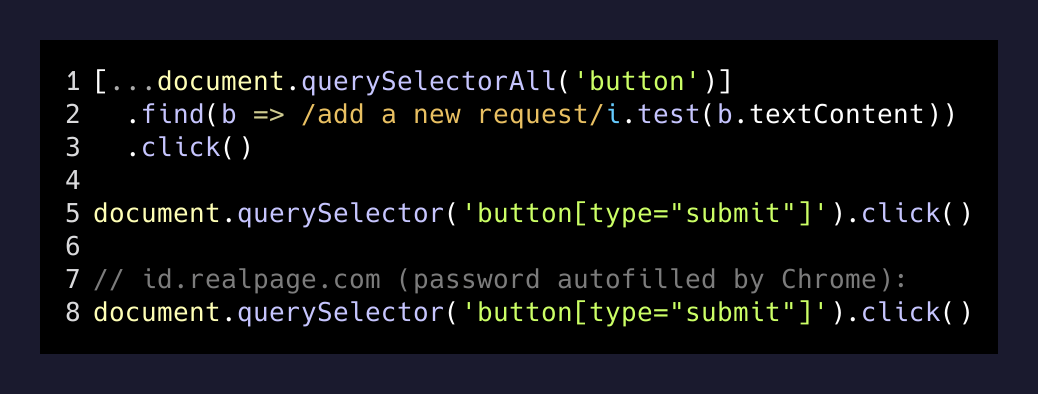
The trick at step two is that the password field is already filled by Chrome’s saved password — I just need to click. No password gets passed through the skill prompt. No secrets in the transcript. The browser already knows; the bot just nudges it forward.
Two: it stops asking. The skill used to confirm before submitting. I killed that. The new instruction is one line:
Go straight to submitting — do NOT ask for confirmation. Brett trusts you to get the details right from his description. Just fill it out and submit it.
The unit number and phone are pre-filled by the portal. Pets and entry permission default to “no pets” and “permission to enter” because that’s been true every time for two years. There’s nothing left to confirm.
Why “while the desktop is locked” matters
Most of the automation I’ve shipped this year only works when I’m watching. The whole point of an agent is that it works when you’re not.
The maintenance skill now runs in the same posture as my overnight job-application cron: a Claude-in-Chrome session that opens its own tab, logs itself in with stored creds, navigates to the form, fills it, submits it. No human clicks. No “are you sure?”
Which means I can wake up, see the strobing light, say “file a ticket for the bathroom light” while I’m pulling on shoes, and the request is in the queue before I’m out the door. Or — and this is the part I actually want — I can write a one-line cron that fires the skill from a voice memo or an iOS Shortcut and never sit at a keyboard at all.
The pattern, generalized
The reason I’m writing this down is that the same shape works for almost any vendor portal:
1. Stored creds in .env (never in the prompt)
2. Browser-saved password on the auth-provider redirect
3. JS click on the submit button instead of waiting for natural focus
4. Default the boring fields, ask for the one fact that matters
5. No confirmation step
That last one is the one most people get wrong. If the agent has to ask “are you sure?” before every action, you have a chatbot, not an assistant. You have to decide what the agent gets to do without checking.
The way I think about it: if I’d be willing to dictate the answer to a five-year-old over the phone — “yeah, no pets, yes they can come in, the bathroom light flickers” — the agent should just go.
The form-fill that almost broke it
One detail worth flagging because it cost me thirty minutes. The portal’s three-tier dropdown only renders the next tier after the previous one resolves a network call. If you fire form_input on all three at once, the second one targets a stale DOM ref and nothing happens.
The fix in the skill is sequential — set Category, wait for Sub-category to mount, set it, wait for Sub-sub-category, set it. And for the final Submit, I had to filter for visible buttons because the portal renders a hidden draft-Submit and a visible real-Submit at the same DOM level:
[...document.querySelectorAll('button')]
  .filter(b => b.textContent.trim() === 'Submit' && b.offsetParent !== null)[0]
  .click()
offsetParent !== null is the cleanest “is this thing actually visible” check I know in vanilla JS. Worth keeping in the toolkit.
What I keep learning
Every time I make one of these skills more autonomous, the same thing happens: the friction I notice next is describing the task, not doing it. Once “file a maintenance request” is a single sentence, I start wishing the apartment knew on its own. The bathroom light could tell the building it’s flickering. The dishwasher could file its own ticket when it throws an E:24.
That’s not a stretch. The portal has an API somewhere underneath the form. The form is just a polite UI for a POST request that a sensor could make directly.
The maintenance skill is a stepping stone to a building that fixes itself before anyone has to ask. For now, the bot files the ticket. Eventually, the light files its own.
I’ll take the strobing in the meantime.