
I ran a five-hour AI training this weekend. First pilot of a format I plan to run again. It went well. The thing that made it go well is the hour I spent on it the day before.
Over the last year I have taught Claude to a graphic designer, a lender, a church comms lead, a sales closer, a couple of founders, and a few friends who just wanted “that thing you do with your phone.” Every single session has taught me the same lesson. If you walk in cold on the day, you will burn the whole first hour on install, sign-in, captchas, and the Mac password prompt that shows no characters while they type.
I now call the day-before call Module Zero. It is not an introduction. It is a setup session that happens the day before the real one, and its entire job is to make sure that when we sit down together, there is nothing between the student and typing a prompt.
Here is what is in it.
The two Claudes problem
The single biggest source of confusion I see is that there are two Claudes on a laptop and they do not share connectors or memory.
The desktop app is the chat one. You add Gmail, Google Drive, Notion as connectors, and it reads them.
Claude Code is a terminal app. It can read every file on the computer, run commands, and edit things. It does not know about the connectors you added in the desktop app. They are different programs with the same name and the same login.
Almost every student assumes “I connected it once, I am done.” Then they hit a wall thirty minutes in because the thing they want Claude to do needs the other Claude. Module Zero gets both installed, both signed in, and spends two minutes explaining why there are two.
The install gauntlet
The install gauntlet on a fresh Mac is harder than it looks. Here is what I have watched eat an actual hour in a real session:
If any of these is going to blow up, I would rather it blow up the night before, while they are still at their desk with their coffee, than at minute 12 of a five-hour slot they cleared on their calendar.
No empty state
The second rule of Module Zero is: do not open Claude on an empty computer.
Opening Claude for the first time with no folder structure is like being handed a lightsaber in an empty parking lot. Impressive, nothing to cut. The first time I taught someone AI I just told them to “ask it anything.” They stared at the blinking cursor for twenty seconds and asked me what they should ask.
Now I pre-seed a folder on their desktop before the real session. The structure I steal from Ruben Hassid and keep using because it works is four folders:
ClaudeStarter/
├── ABOUT_ME/          # their bio, their role, their goals
├── PROJECTS/          # one folder per real thing they are working on
├── TEMPLATES/         # the kind of output they make (emails, decks, briefs)
└── OUTPUTS/           # where Claude saves what it makes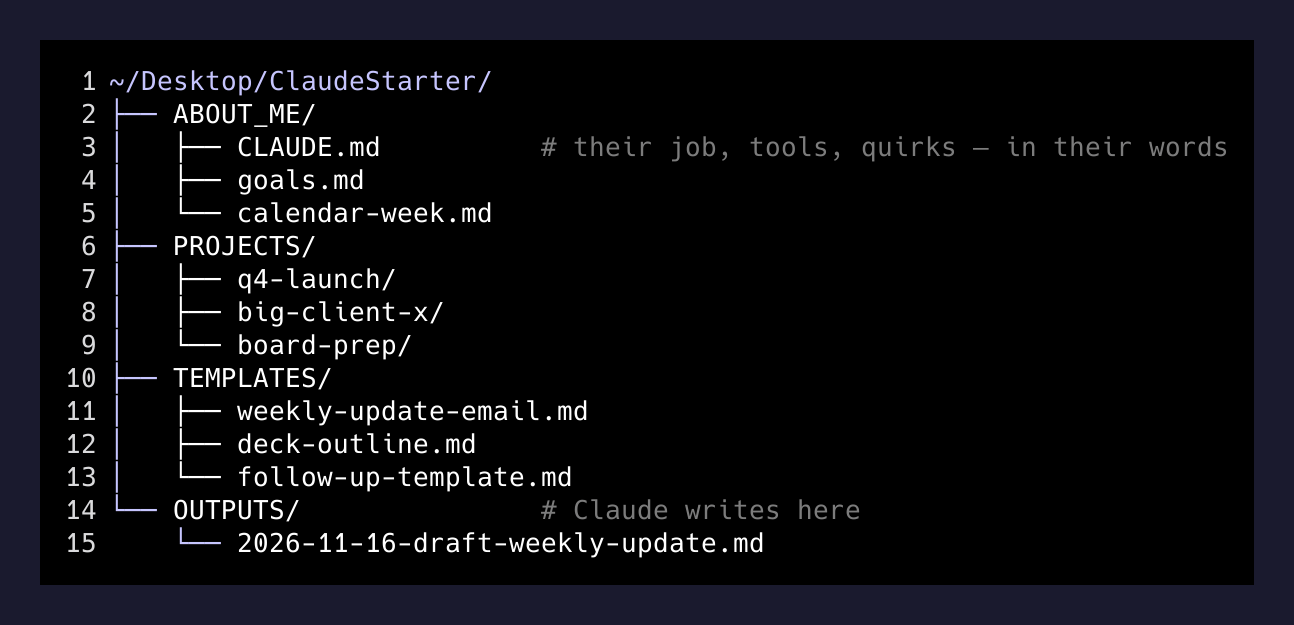
Inside ABOUT_ME/ I drop a CLAUDE.md with a few sentences I write from what they told me on the Module Zero call. Their job, their tools, their quirks. Three bullets of what they do all week. One line about what they wish they had more time for.
When they open Claude Code and run a command inside that folder, Claude reads the whole thing before saying hello. Which means the very first exchange is not “hi I am an AI assistant.” It is Claude already knowing what they do for a living. That shift is enormous. One person I taught said literally out loud, “wait, it is editing the software while we are using it.” That is the moment the training lands. It has to happen in the first ten minutes, not the last hour.
The one prompt they memorize
I used to try to teach five “good prompts.” Now I teach one. The one that works for almost every task they will ever hand this tool is a variant of what Ruben posts:
I want to [TASK] to [SUCCESS CRITERIA].
First, explore my folder.
Then ask me questions one at a time until you have everything you need.
Only then start.
This single template fixes most of the hallucination and most of the “it did the wrong thing” complaints. Because the AI is not allowed to start until it has read the folder you pre-seeded and interrogated them about what “done” means.
Options, not output. Drafts only. The human presses send.
— Teaching rule
That line is on the inside cover of the workbook I hand them. The AI drafts. The human picks. Nothing goes out the door without a human push. Calendar invites, Slack replies, emails, posts. You can relax that rule later if you want. You should not relax it in the first week.
The permission matrix
The last thing we settle on Module Zero is which categories of work the AI is allowed to touch on its own, which require a draft, and which it must never attempt. I draw three columns on a sheet of paper:
| Auto | Draft | Never |
|---|---|---|
| Rename files, clean Downloads, summarize meetings | Emails, Slack replies, calendar invites, posts | Payments, firing people, contracts, anything legal |
They decide what goes in which column. I just ask. By the end of Module Zero we have a one-page permission matrix taped to the fridge, metaphorically. On the day of, we honor it.
Why this exists
Every AI tutorial on YouTube is a demo. They show you the model doing something impressive. They do not show you the forty-five minutes of password prompts, authentication tabs, and empty folders that any real person has to go through before the model can do that same thing for them specifically.
The real skill in teaching AI to a new person is not knowing the prompts. It is building the ramp. And the ramp has to be mostly built before they walk in the room.
If you are going to teach someone AI, do the Module Zero. Fifteen minutes the day before. You will get your five hours back.