
The subject line is the kind of thing you archive without opening: “[Action required] Migrate your legacy user API keys.”
I opened mine this morning. The one key named in the email starts deactivating today. If I did nothing, the first thing to break would be a cron job that runs at 3am and nobody would notice until I checked the output two days later and found a stack trace about a 401.
The shift from user API keys to project API keys has been crawling along for about a year. OpenAI announced projects, told everyone to migrate, extended the deadline, and now the oldest tier of user keys is actually being pulled. Not a warning banner — a deactivation. If your automation lives on one of those keys, you want to know before 3am tomorrow, not after.
What’s actually changing
The old mental model: one developer, one API key, pasted everywhere. That key could spend any amount, call any model, hit any endpoint, and if it leaked, the only revocation path was “rotate it and update every project that uses it.”
The new model is scoped. A project is a billing + rate-limit + access-control boundary. A project API key belongs to that project only. You can create as many as you want, name them per use case, and revoke one without touching the others. Usage is reported per key, so the thing eating your tokens stops being a mystery.
The legacy user key — the one with no project attached, created back when the dashboard only had one tab — is what’s getting cut.
The migration itself — five minutes if you know where to look
- Open platform.openai.com/settings/organization/projects. If you’ve never been there, you’ll have one project called Default. That’s fine for now — you can split later.
- Open the project, go to API keys, click Create new secret key.
- Name it after the thing that will use it.
cron-blog-publish,local-dev-mac,pa-worker-sonnet. Future-you will thank present-you when the usage dashboard shows which key is burning tokens. - Scope it to the models and endpoints you actually need. “All” is the default. If you only use
gpt-5chat completions, pick that. A leaked narrow key is a smaller fire. - Copy the key. It’s shown exactly once. Store it somewhere you’ll remember — I keep mine in a
~/.config/<service>/api-keyfile with mode600instead of inlining them in.envfiles that get copied around. - Rotate every place the old key appears. Then and only then, delete the legacy key.
The order matters. Delete the old key before you’ve replaced every reference and you learn where the references live by watching things break.
Where the old key is probably hiding
This is the part most migration guides skip, and it’s the whole reason the email is scary. One key gets pasted into a lot of places over a year. From my own sweep:
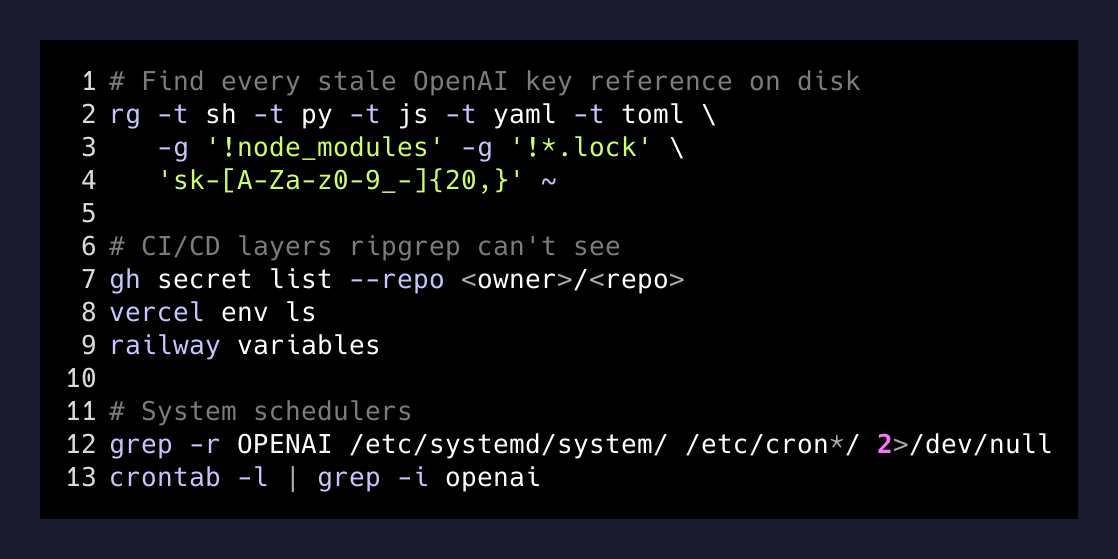
# What I actually ran to find every stale reference
rg -t sh -t py -t js -t yaml -t toml -g '!node_modules' \
   -g '!*.lock' 'sk-[A-Za-z0-9_-]{20,}' ~
The ripgrep call takes under a second and catches the obvious ones. It will not catch keys stored as base64, in a .env.encrypted, in a GitHub Actions secret, in a Vercel env variable, or in a 1Password item. Each of those is a separate pass:
- GitHub secrets:
gh secret list --repo <owner>/<repo>for every repo that calls OpenAI. The value isn’t visible but the name tells you if it exists. - Vercel/Railway/Fly env: check each project’s env tab. CI/CD env is the most forgotten layer because it was set once in a browser and never thought about again.
- Systemd units and cron:
grep -r OPENAI /etc/systemd/system/ /etc/cron*/ 2>/dev/nullandcrontab -l | grep -i openai. - Keychains and password managers: the only one you can’t grep. Open it, filter for “openai”, prune.
A key per concern, not a key per account
While you’re in there — the project model only pays off if you actually use it. The pattern that works for me:
# .env on five different machines
OPENAI_API_KEY=sk-xxxxxxxxxxxxxxxxxxxxxxxxxxx

# cron job
OPENAI_API_KEY=sk-xxxxxxxxxxxxxxxxxxxxxxxxxxx

# that one experiment from April
OPENAI_API_KEY=sk-xxxxxxxxxxxxxxxxxxxxxxxxxxx# ~/.config/openai/keys/
cron-publish # 5 req/min, gpt-5 only
local-dev-mac # my laptop, broad scope
pa-worker # per-day spend cap
experiments # throwaway, deleted monthlyFour keys, four knobs. The cron one has a 5 req/min limit so a runaway loop can’t drain the balance in an hour. The experiments one gets deleted and recreated every month so leaked notebook snippets stop being a liability. The dev one has broad scope because I’m the only user and I want to try new models the day they ship.
The migration is also a decent moment to do the thing you’ve been putting off: setting a hard monthly budget on the project. Projects → Limits → Monthly budget. Hit it and OpenAI stops serving you until next month. That’s a feature. The horror story of a leaked key racking up five figures overnight is almost always a key with no budget attached to it.
- 2024-10Projects launchedOpenAI introduces projects and project API keys. User keys still work.
- 2025Warnings startDashboard shows 'legacy' labels on user keys. Migration encouraged, not enforced.
- 2026-10Deactivation beginsThe oldest cohort of legacy user keys is actively turned off. This is the one you got the email about.
- FutureLegacy keys goneThe last user keys get pulled. By then everything you own should be running on project keys with scoped permissions.
What to actually do today
Three steps, in order:
- Grep your dotfiles, your repos, and your CI/CD for any string starting
sk-. You will find more than you expect. - Create one project API key per place that calls OpenAI. Name it. Scope it. Set a budget.
- Delete the legacy key only after everything’s switched. Watch for a day. Nothing errors? Good — the legacy key wasn’t the last line of defense you thought it was.
The deeper lesson under all this is older than OpenAI: a secret pasted in more than one place is a secret you no longer control. The whole industry is drifting toward narrow, named, revocable credentials — Google’s service accounts, GitHub’s fine-grained tokens, AWS’s role sessions. OpenAI finally caught up. Treating one key as one job is cheap to do now, and expensive to retrofit after an incident.
The email is boring. The 401 at 3am is not. Spend the five minutes.