
I’ve done a lot of software demos. The shape is always the same: I share my screen, I click through a happy path I’ve rehearsed, the other person nods, and somewhere around minute 11 they ask a question that doesn’t fit my click path. I say “great question” and either show it live (if it works) or flag it (if it doesn’t) and keep going.
Last month I started doing a different kind of demo. I’d been wiring an MCP server into Freebo — my booking platform for tour operators — and at some point the question stopped being “can I show them this feature?” and started being “can I let them drive?”
The answer turns out to be yes. And the call that comes out of it is a different shape than any software demo I’ve ever run.
What the old shape is
A classic SaaS demo is a monologue with checkpoints. I talk. They listen. I tee up a feature, I show it, I pause for the “any questions?” beat, I move on. If I’m good at it, the questions are small clarifications and the ending is a timeline for a trial. If I’m bad at it, we spend twenty minutes on a feature they’ll never use and the call dies politely.
The whole structure exists because the prospect can’t touch the product yet. A trial login takes IT time to set up. A sandbox is a half-built version of the real thing. The demo is the scaffolding between “they’ve never seen it” and “they have a login they can poke at next week.”
The MCP collapses that scaffolding into a single step on the call itself.
What an MCP demo actually looks like
I ask whether they have Claude installed. Most people doing B2B research right now do. If they don’t, we use mine. I generate a read-only API key for their account — scoped so the agent can’t book, charge, refund, or edit anything — and I give it to them with one line of setup for their MCP client.
Thirty seconds later their Claude has nine tools: list the products, check availability, quote a price, list hot leads, pull reservations, open a specific reservation by ID, get a reports summary, add an internal note. From that point on, I shut up.
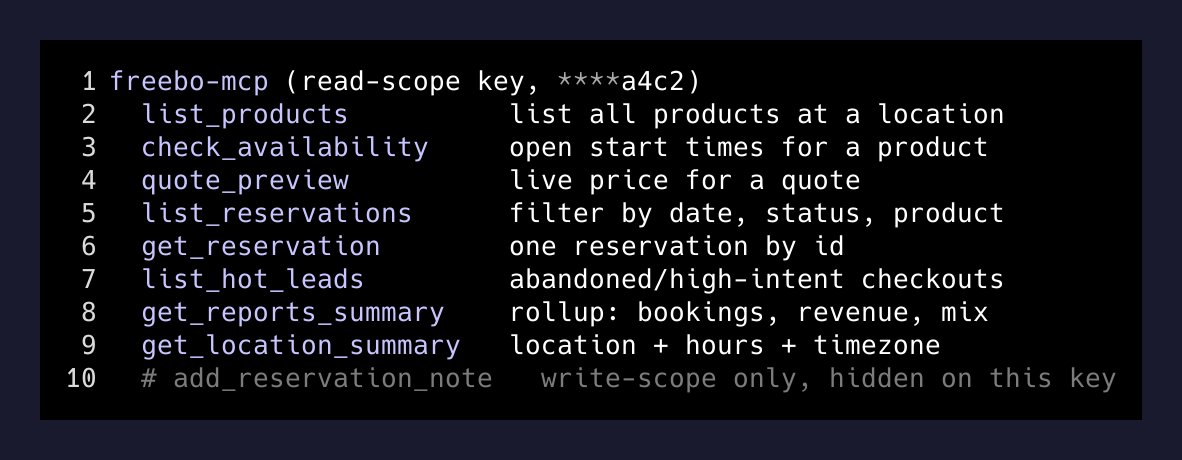
What happens next is the thing nobody prepares you for. They don’t ask about features. They ask about their business. “What would my November look like if I’d been using this?” “Can you tell me how many of my hot leads converted?” “What time slot sold out fastest on Saturdays last month?” The agent calls the tools, the tools hit the same HTTP surface the public checkout uses, and an answer comes back in their language, with their data.
The talk track goes away
I don’t have a script in an MCP demo. There’s nothing to click. I’m not driving. I sit there and watch someone poke at my product with their own vocabulary, in whatever order their questions come to them, and I only speak when they ask me a direct question or hit a tool boundary.
The thing that lands hardest, every time, is a question I hadn’t thought to show. One operator asked something I’d never have put in a demo click-path — a cross-cut of two things I didn’t think belonged together. The agent handled it. It called two tools in sequence and gave a correct answer. The operator paused, said “huh,” and typed another one. That “huh” is worth ten minutes of my talking.
The demo isn’t a feature tour anymore. It’s twenty minutes of them finding out whether their questions have shapes my product can answer.
— Me, trying to figure out why these calls feel different
The test-login handoff disappears too
The old-shape follow-up to a good demo is “I’ll set you up with a trial login and we’ll meet next week.” That gap is where deals die — it’s four to seven days of them forgetting why they were excited.
With the MCP, the key I handed them during the call is the trial. They walk away with Claude still configured. Over the next few days they ask it questions I’ll never see. They’ll either come back with sharper questions, or they’ll churn in silence, but either way I don’t have to stage a second call just to prove the product can do a real thing.
I thought this would be a downside — fewer touchpoints means fewer excuses to re-engage. In practice the opposite is true. The prospects who come back to a follow-up call come back with questions I couldn’t have invented for them, and the call is thirty seconds of social lubricant and twenty minutes of pricing.
What makes this work
Three things, and they’re all boring:
The tools do what the UI does. Not a shadow version. The MCP’s check_availability hits the same endpoint the public booking page hits. “The agent” and “the customer” see the same rules. If the demo’s answer is right, the production answer is right.
The scopes are gated by the key. Their key is read-only. They can look at anything; they can change nothing. A write-scoped key unlocks exactly one verb (adding an internal note) and nothing else. There is no “trust me not to break it” conversation.
The tools’ descriptions are addressed to the model, not to a dev. When the agent doesn’t know what to do, the tool itself tells it what to try next — “for a price, use quote_preview”; “for hourly products, pass duration_minutes”. The prospect never sees a dead end that isn’t self-recovering.
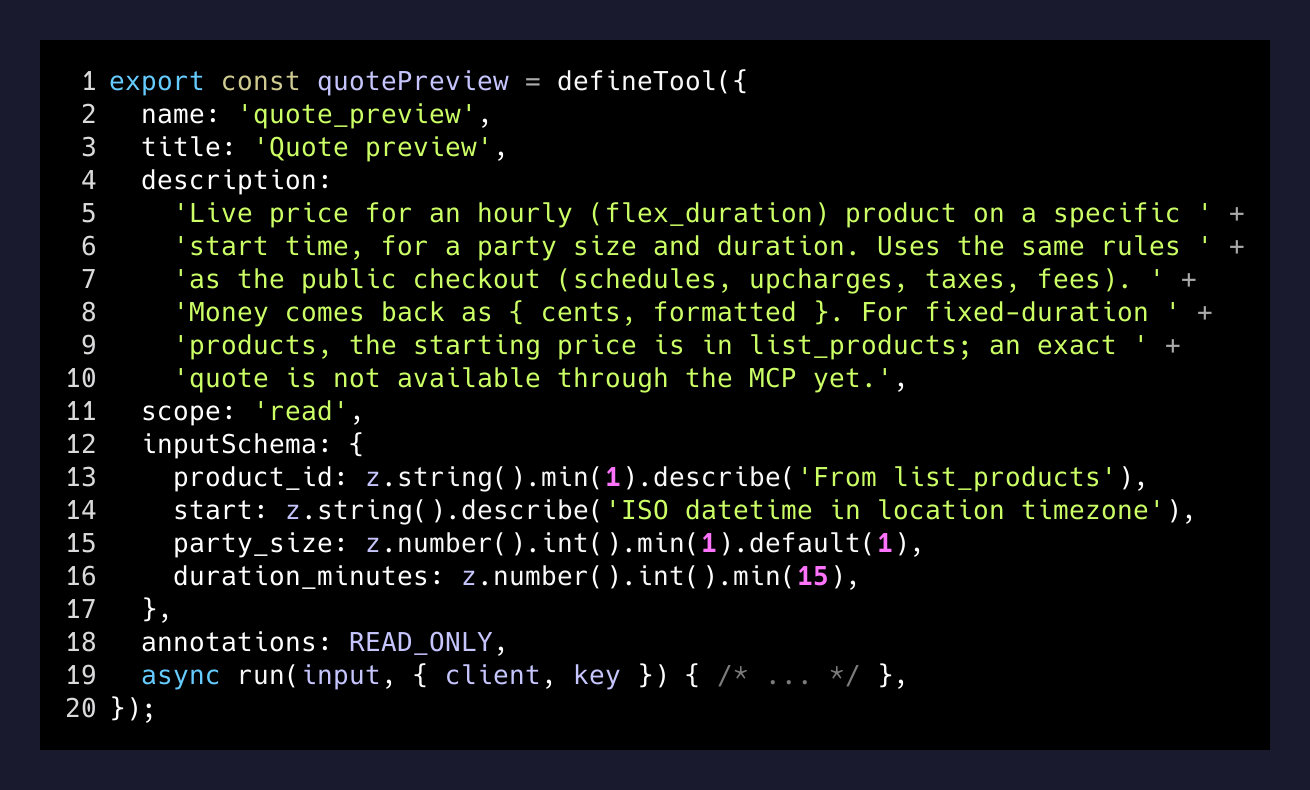
The result: a 30-minute call where the prospect does 70% of the talking, asks questions I never would’ve demoed, and walks away with the same tools in their own Claude that they just watched work on a live call.
The takeaway
Most “AI integrations” are a chat widget glued onto a sidebar. That’s not what this is. An MCP is a different thing — it’s your product’s business logic exposed as a set of verbs the prospect’s agent can speak. The demo changes shape because the control changes hands.
If you sell a SaaS and you haven’t tried this yet, the question isn’t “should I add an MCP to my product?” The question is: on your next sales call, could you just stop talking? If no, you probably know what’s missing.