
My inbox had become a feed. Not a feed I subscribed to on purpose — a feed of the residue of every webinar, real estate alert, retailer, and SaaS trial I’d ever clicked once. The morning briefing script that surfaces actionable email was working fine. The problem was everything not actionable was still arriving, still using real bytes, still costing me a half-second of pattern matching every time I opened Gmail.
So I sat down for ten minutes and got rid of about 60 of them. Here’s the shape of it, because it generalized into a pattern I’ll use again.
The wrong way (and why)
The obvious move is to ask Claude to “unsubscribe from all the newsletters.” That fails for two related reasons.
First, the agent can read your mailbox, but it can’t do anything in a browser by default. Every unsubscribe link is its own little JavaScript adventure — a landing page, a checkbox, a confirmation. A general-purpose agent loop on top of a headless browser would work, and would also take an hour and break on the first CAPTCHA.
Second, the agent doesn’t know which senders you actually want to keep. Substack writers you read. The two real estate alerts that are real. The Stripe receipts. A blanket “unsubscribe from everything noisy” without a human gate is how you delete the one email you needed.
The fix for both problems is the same: do less, but use the right primitive.
RFC 8058 is the whole trick
Every well-behaved bulk sender now embeds a List-Unsubscribe header on their messages. It looks like this:
List-Unsubscribe: <mailto:unsub@sender.com>, <https://sender.com/u/abc123>
List-Unsubscribe-Post: List-Unsubscribe=One-Click
That second header is the RFC 8058 part. It’s a contract: if you POST to the https:// URL with the body List-Unsubscribe=One-Click, the sender is required to take you off the list immediately. No landing page. No confirmation email. No CAPTCHA. It’s the same primitive Gmail and Apple Mail use when you click their built-in “Unsubscribe” link at the top of a marketing email.
You don’t need a browser. You need a fetch call.
The two scripts
I wrote these into my Gmail MCP server folder because that’s where my OAuth tokens already live. They’re small on purpose.
unsub-scan.ts takes a list of Gmail search queries and returns the unsubscribe metadata for the most recent message from each sender:
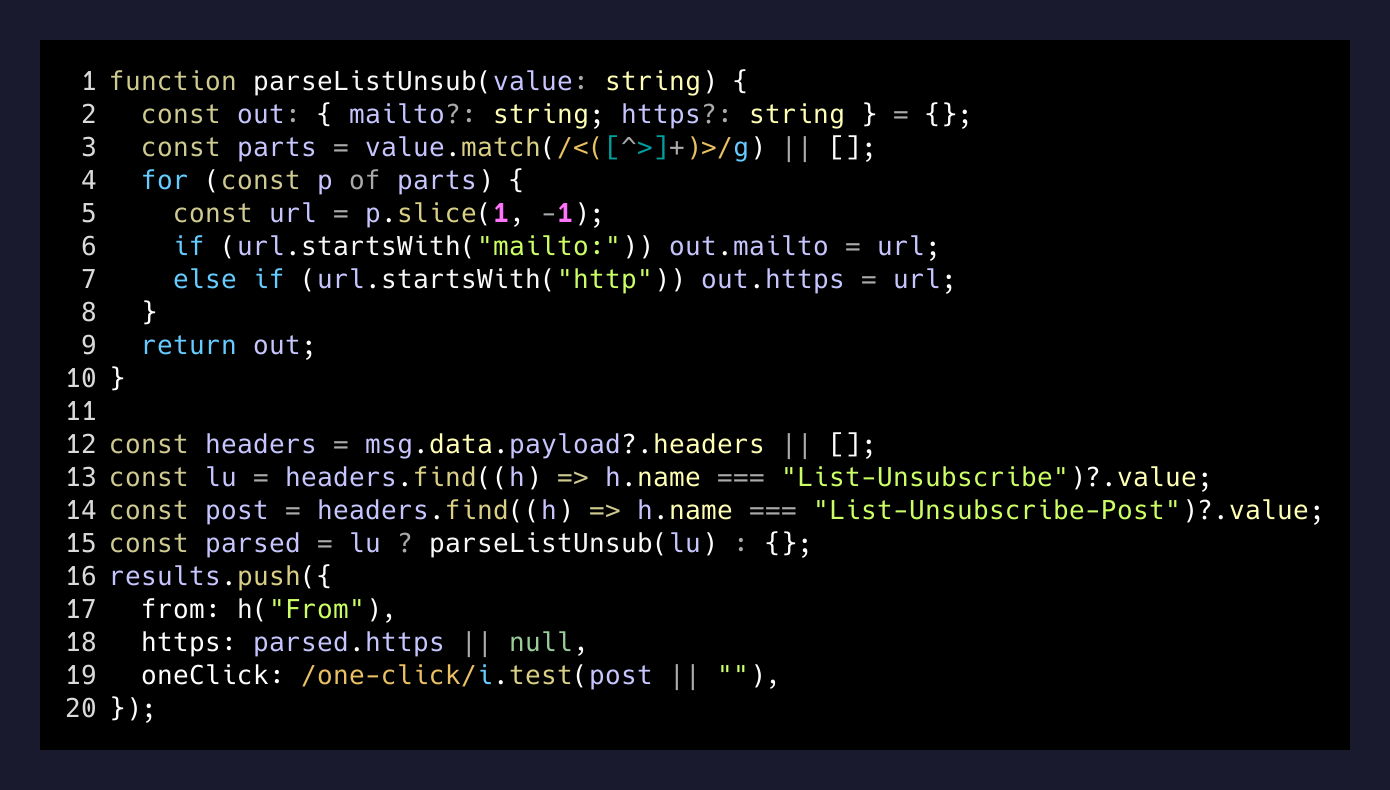
The key bit is the header parse. The List-Unsubscribe value contains one or two URLs in angle brackets. You pull them out, classify them as mailto: or https://, and check whether List-Unsubscribe-Post says One-Click. That’s the whole detection step.
unsub-exec.ts takes the JSON the scanner produced and posts to each https URL with the RFC 8058 body. It also takes a list of substrings to skip, which is the human gate:
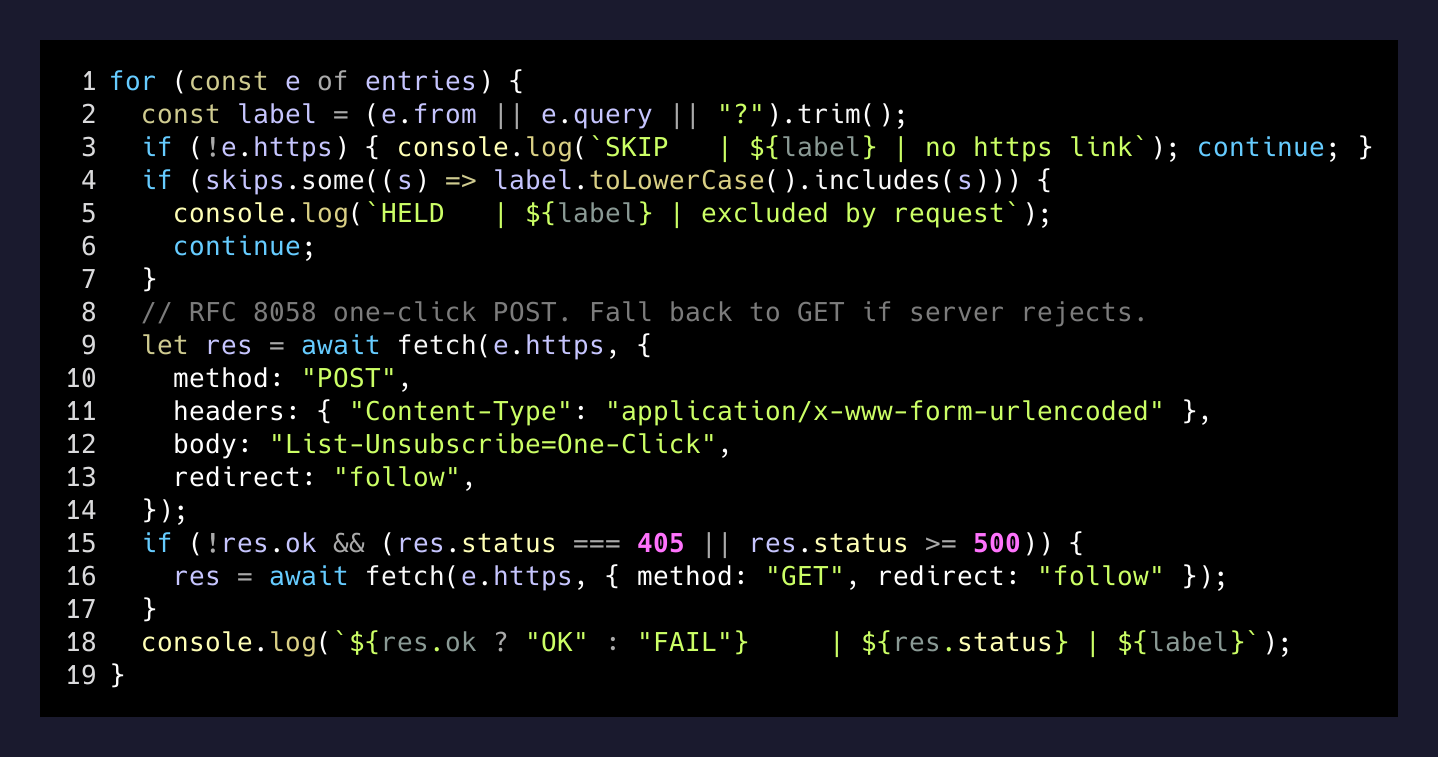
That SKIP / HELD / OK / FAIL log is the part I actually look at. Every sender is one line. If a sender doesn’t expose the header at all, it gets SKIP. If a sender matched a substring I asked to keep, it gets HELD. If the POST 200s, it’s OK. If the server is grumpy and rejects POST, the code falls back to GET, because some senders are still on the 2018 version of the spec.
How Claude fits in
The agent never touches the network. Its job is the part I’m bad at: looking at 500 messages and grouping them by sender.
The ranking step is where the model earns its keep. It already knows that noreply@notifications.linkedin.com is a different beast than paul@somesubstack.com, even though they’re both technically “newsletters.” It looks at how often I open each sender, whether I’ve ever replied, and how long since the last meaningful interaction. The output is a ranked list with a one-line “why” next to each entry.
Then I read the list. Strike a few. Hand back the skip-list. Run scan, run exec.
What I actually got back
The exec log was, in order: a lot of OK 200, a few OK 204, two FAIL 405 that succeeded on the GET fallback, and a handful of SKIP | no https unsubscribe link for the senders still living in 2012.
The senders I expected to fight me — the ones with the obnoxious “Are you sure?” landing pages — those never even loaded a page. The RFC 8058 endpoint is a separate URL from the marketing landing page. The big senders comply with the spec because Gmail and Apple ding their deliverability if they don’t. The little senders without the header are the ones that take 45 seconds of clicking, and there’s no shortcut for them — but there were maybe a dozen of those out of sixty, and they’re the obvious ones I just left for a rainy afternoon.
Ten minutes. Zero browser tabs. Three substrings of human judgment.
— The actual cost
The pattern
This is the third time in a month I’ve solved something that felt like an agent-needs-a-browser problem by finding the spec underneath the browser. Search Console had a structured API that I’d been reading as a screenshot. Calendar invites have an .ics mimetype I’d been clicking through a UI for. And now this one — an RFC from 2018 that turned a “send Claude into a maze of unsubscribe pages” task into a fetch loop and a 30-line script.
If you’re about to ask an agent to drive a browser through a tedious thing, stop for a minute and check whether the tedious thing has a header. Often it does. The agent’s real job isn’t the clicking. It’s the part you didn’t want to do: looking at 500 things and telling you which forty deserve to go.