
NotebookLM’s Audio Overview is the feature I keep telling people about. You drop sources into a notebook, click a button, and two synthetic hosts produce a 10-to-30-minute deep-dive episode about whatever’s in there. It is genuinely good. It is also, by default, three or four manual clicks per source and a dialog where you cross your fingers and accept whatever the hosts decide is interesting.
I wanted something more pointed. Not “here’s a notebook, go riff.” More like: “here are seventeen things I’ve written about myself in the last month, here’s the question I want answered, render me a podcast I can listen to at the gym in forty minutes.”
Turns out the plumbing for that exists. There’s a CLI called nlm that drives NotebookLM from your terminal, plus an MCP server that lets Claude Code drive the CLI. Once both are wired up, an episode is one orchestrated command away — and you can prep the sources by uploading whole folders out of your Obsidian vault instead of dragging files into a browser.
Here’s how the workflow actually goes.
The CLI
nlm is a Python CLI that talks to NotebookLM directly. Install it, run nlm login in a browser flow, and you get the feature surface as subcommands:
nlm notebook create "My Notebook"
nlm source add <notebook-id> --file ~/Documents/something.pdf
nlm source add <notebook-id> --text "raw text content"
nlm audio create <notebook-id> --confirm
nlm studio status <notebook-id>
nlm download audio <notebook-id> --output ./episode.mp3
The version I’m running is 0.6.1. The auth token caches under ~/.cache/, so subsequent calls are instant.
There’s also nlm setup add claude-code, which registers a NotebookLM MCP server with Claude Code. That’s the part that turns “I drive the CLI” into “Claude drives the CLI for me.” The MCP exposes the same surface as tools — notebook_create, source_add, studio_create, studio_status, download_artifact — and Claude can chain them.
The actual run
I had a question I wanted a real opinion on. I’d been writing about my projects in fragments for weeks — Freebo, Reel Repurposer, a few client engagements, a Fiverr gig list, a fractional-CMO doc — and I wanted a synthesized take. Not “summarize your notes” (Claude can do that in chat). I wanted two voices arguing about my own data while I lifted weights.
So I made a notebook and started loading sources. Eight Markdown files from my Obsidian vault, including Profile Bank.md, Ideas/Fiverr Gigs.md, Blog/Published Posts.md, Projects/Fractional CMO.md, and Projects/_Active.md — the documents that explain who I am, what I’ve shipped, and what I claim I’m working on. Plus a handful of older PDFs of long-form writing I’d done about myself, for tone.
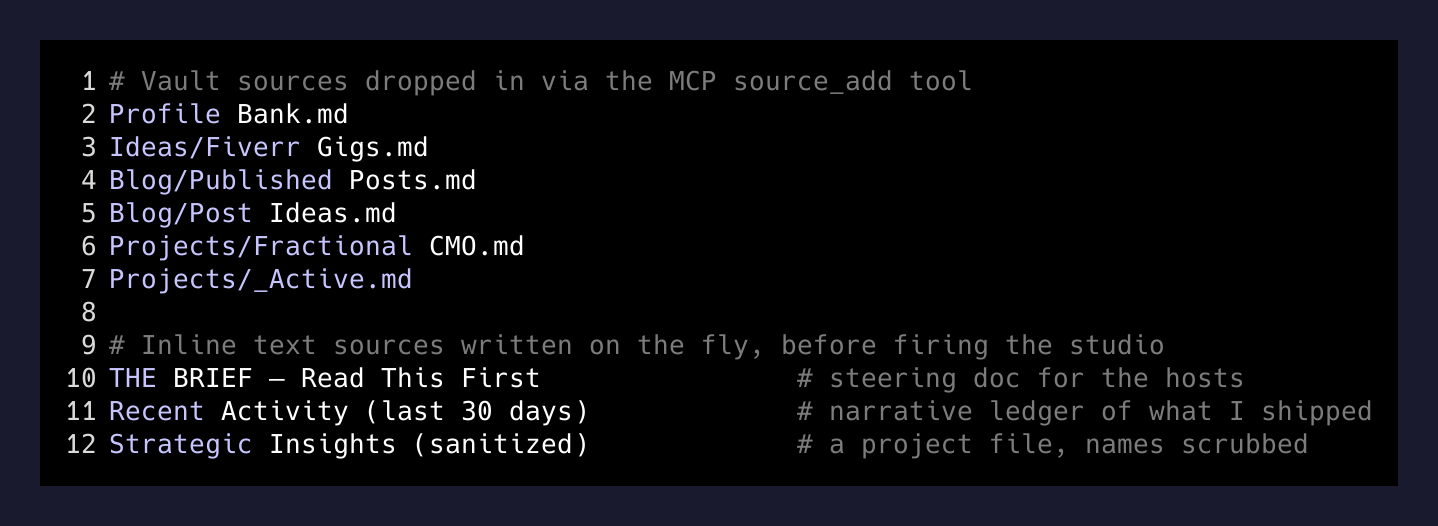
Then three sources I wrote inline, as text, just before firing the studio:
THE BRIEF — Read This First— a one-page instruction to the synthetic hosts. What I want them to focus on. What to skip. What tensions to surface. What kind of recommendation to land.Recent Activity (last 30 days)— a hand-crafted ledger of what I’d actually shipped, since the vault has the artifacts but not the throughline.- A third source on a long-running project, with the sensitive bits scrubbed. Anonymized names, no financials, just the strategic shape.
The inline-text source is the move I want to call out. The default Audio Overview reads everything democratically — the third file in your notebook gets as much weight as the first. A “BRIEF” source as the first thing you upload is how you steer the hosts without having to fight the UI.
The studio call
The interesting flags live on the audio creation. Defaults give you a chatty 8-minute episode. To get the long-form thing I actually wanted:
audio_format: "deep_dive"
audio_length: "long"
focus_prompt: "<your steering prompt here>"
confirm: true
focus_prompt is the one most people don’t realize exists. It’s a separate channel from the source content — instructions about how to handle the sources, distinct from the sources themselves. Mine was a few hundred words long and named six “critical tensions” I wanted the hosts to argue through, plus a hard requirement that the episode end with a concrete action list for the next morning.

End-to-end orchestration time, from “create the notebook” to “audio is rendering”: about 14 minutes, most of which was upload. The audio itself takes another 5 to 10 minutes server-side. Poll studio status until it’s done, then download the MP3 and Taildrop it to the phone.
Stuff that surprised me
A few things worth flagging before you try this.
nlm artifact is not a thing. A reasonable guess for “do something with the audio file the studio just made” is nlm artifact whatever. Wrong namespace. The CLI splits it: nlm audio create to make it, nlm studio status to poll it, nlm download audio to pull the file. Three different command groups, same underlying object. Memorize.
Two audio jobs can queue silently. If you fire studio_create and the response feels slow and you re-fire it, you’ll get two episodes in the queue and one of them will be the one you wanted minus a few hundred tokens of focus prompt because the agent re-derived it. Always check studio status before re-firing.
The “long” deep-dive is roughly 28–35 minutes. Long enough for a real workout. Short enough that you’re not making the hosts vamp. There’s no audio_length: "extra-long" (or if there is, I haven’t found it).
Source quality matters more than source quantity. I uploaded 17 things. The brief, the activity ledger, and the active-projects table did 80% of the steering. The PDFs and the older project notes were filler the hosts politely cited and moved past. If you do this, write the inline brief first, then add real sources.
Why this is different from “ask Claude to summarize”
Two voices arguing about your data, in your ears, while you do something else, is a different cognitive surface than reading a summary. I notice things in the audio that I gloss over in text — a host pushing back on an assumption I’d made, a tone of “wait, is that actually right?” that nudges me to revisit something I’d marked as decided.
The bigger point is what kind of input the system accepts. NotebookLM is one of the few places where uploading your own raw context — not a clean prompt, not a sanitized summary, the actual messy stack of notes you’ve been keeping — produces a useful output. Most LLM tools want you to compose a clean question. NotebookLM wants you to dump your second brain in and steer with a brief.
I’m going to keep using it like this. Weekly retros from my journal. Project post-mortems from a project folder. The next version of an essay I’ve been writing in fragments, with the hosts arguing about which fragments are actually load-bearing. Each one is a fifteen-minute setup and a forty-minute listen.
If you’ve been a NotebookLM tourist — a few notebooks made, a few episodes generated, mildly impressed — try the CLI version with a focus prompt and see how the output changes. The button-clicker version is the demo. The CLI version is the product.