
I woke up to 81 emails. All from the same n8n workflow. All saying the same thing: n8n-local (http://host.docker.internal:5678/healthz) → timeout of 10000ms exceeded.
n8n was up. I’d been using it the night before. curl localhost:5678/healthz from the host returned {"status":"ok"} in 1.2 milliseconds. But the workflow — running inside the n8n container itself — couldn’t reach itself through host.docker.internal:5678, and the retry every ten minutes had stacked up overnight into a small mountain of false alarms.
The bug isn’t n8n. The bug is a Docker hostname that does three different things depending on which platform you’re on, and a workflow that was written assuming the wrong one.
What host.docker.internal actually is
host.docker.internal is a special DNS name that Docker provides so containers can reach services running on the host machine. The classic use case: your app runs in a container, your Postgres runs on the host, and inside the container you want a connection string that points at the host without hardcoding an IP.
It is not localhost. From inside a container, localhost (and 127.0.0.1) refers to the container itself, not the host. That’s the whole point of containers having their own network namespace.
Here’s where it gets interesting:
- Docker Desktop (Mac, Windows):
host.docker.internalworks out of the box. Always. The VM that runs Docker injects it for every container automatically. - Linux Docker Engine (no Desktop): It does not resolve by default. You have to opt in with
--add-host=host.docker.internal:host-gatewayon thedocker runcommand, orextra_hosts:in a compose file. Without that flag, the name doesn’t resolve — your container gets a DNS failure or, more annoyingly, a long TCP timeout if something else picks up the lookup. - WSL2: It depends on which networking mode WSL is in. Sometimes works, sometimes points at the wrong interface.
Three platforms, three behaviors, same hostname. A workflow that worked perfectly on a developer’s MacBook will sit there silently failing on a Linux server.
The actual misfire
My setup is Linux Docker Engine on Arch. The n8n container does have the --add-host flag configured:
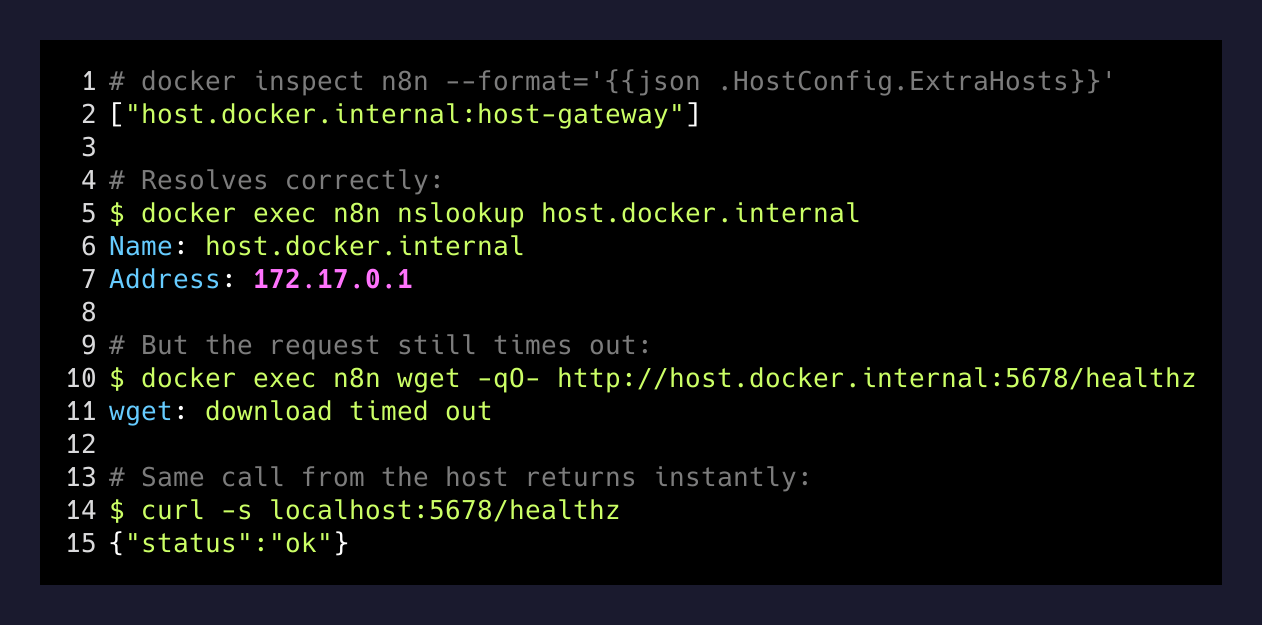
So host.docker.internal does resolve — it points at 172.17.0.1, the bridge gateway. Good. But then the workflow tries to reach 172.17.0.1:5678 from inside the n8n container, and that fails with a timeout instead of the immediate connection refused you’d expect if nothing were listening.
The reason: the n8n service on the host is the container. Port 5678 is published from the n8n container back to the host. When the container tries to call its own published port through the bridge gateway, the packet has to leave the container’s namespace, hit the host’s docker-proxy, and route back into the same container. Depending on iptables rules, that loop either resolves or just sits there until the 10-second timeout fires.
So the workflow was effectively asking: “Hey container, can you reach yourself by going out the front door, around the block, and ringing your own doorbell?” And the answer was: sometimes no, here’s a timeout.
The fix is three characters
The workflow has a single HTTP Request node. The URL field was http://host.docker.internal:5678/healthz. I changed it to http://localhost:5678/healthz.
Because the n8n workflow is already running inside the n8n container, localhost:5678 is exactly the right thing to hit. It’s the same process answering the request. No bridge, no NAT, no DNS, no external routing. Just a loopback call.
# From inside the n8n container:
# WRONG (depends on Docker platform, may timeout):
http://host.docker.internal:5678/healthz

# RIGHT (n8n calling itself):
http://localhost:5678/healthz
That’s it. 81 alerts went to zero. The check now passes in single-digit milliseconds.
The three rules I now use for in-container HTTP
After this, I rewrote my mental model for any URL that lives inside a containerized workflow. There are exactly three cases:
1. The target is the same container. Use localhost or 127.0.0.1. Loopback inside the container talks to the container’s own processes. No DNS, no bridge.
2. The target is a sibling container on the same Docker network. Use the container name as a hostname (http://postgres:5432, http://redis:6379). Docker’s embedded DNS resolves container names on user-defined networks. This is the cleanest and most portable option.
3. The target is a service running on the host that is not in Docker. This is the only case where host.docker.internal is the right answer — and only if you’ve configured it correctly for your platform. On Linux, add extra_hosts: ["host.docker.internal:host-gateway"] to your compose file.
If the workflow you’re writing doesn’t fit one of those three shapes, your URL is wrong. The Linux gotcha specifically: if you’re on a server (not a dev laptop), assume host.docker.internal does nothing unless you wired it up yourself.
Why this gets missed
The error message in the n8n execution log says timeout of 10000ms exceeded. That’s a TCP-level message. It doesn’t say “DNS failed” or “the hostname you used is platform-specific” or “you wrote a workflow that works on a Mac and broke on Linux.” It says: the other end didn’t answer in ten seconds.
That timeout is what gives the bug a long tail. If the lookup had failed fast with an NXDOMAIN, I’d have known within thirty seconds the first night. Instead it failed slow, succeeded enough of the time on retry to feel like a real flaky outage, and only after a full night of accumulated alerts did the pattern become obvious.
If you’re self-hosting anything in Docker and the workflow is also in Docker, the address you use to talk between them is part of the design, not an afterthought. The right answer is almost never host.docker.internal.
The bigger lesson
Most “my Docker setup is broken” stories aren’t about Docker. They’re about the model of the network that the person writing the workflow has in their head. Containers feel like little localhost-shaped boxes. They aren’t. They’re machines with their own network stack, their own loopback, their own DNS view. A hostname like host.docker.internal is a small abstraction that papers over a real network boundary — and abstractions that paper over real network boundaries leak the moment you change platforms.
When the leak happens, it doesn’t usually announce itself as a DNS failure. It announces itself as 81 emails at 6 AM.