
I spent part of this week wiring analytics onto a Bitcoin pool and block explorer site. One of the earliest tickets on the list reads, more or less, “set up analytics,” and that’s the kind of task that looks small on the whiteboard and multiplies into a decision tree the moment you sit down to actually do it.
GA4 or PostHog? Both? If both, how do they not step on each other? If one, which one?
I ended up shipping both. The feature lists overlap by about eighty percent, which makes the default move look like a mistake. It isn’t. Once you actually try to answer real questions with them, the overlap disappears and you’re staring at two different tools that happen to look alike in a comparison table.
The overlap that makes you think you only need one
Here’s what both do out of the box, with a single script tag, no custom code:
| Feature | Capability | GA4 | PostHog |
|---|---|---|---|
| Pageviews | ✓ | ✓ | |
| Session tracking | ✓ | ✓ | |
| Referrer / UTM parsing | ✓ | ✓ | |
| Device + geo breakdown | ✓ | ✓ | |
| Custom events | ✓ | ✓ | |
| Funnels + retention | ✓ | ✓ | |
| Free tier for small sites | ✓ | ✓ | |
| Dashboards you can share | ✓ | ✓ |
If you squint at that table and ask “why would I ever run both?”, the answer is nowhere in the table. It’s in the questions each tool was actually built to answer.
The sliver that matters
GA4 is a marketing analytics tool wearing a product analytics suit. It was built so Google can sell ads. The thing that is only true of GA4, that nothing else does without duct tape, is this: it is the only analytics product on Earth that Search Console will natively talk to. If you want to see which organic query brought in the user who then converted, that pipe exists exactly once, in GA4, free. The same goes for audience sharing with Google Ads — a GA4 audience is a Google Ads audience with one click.
PostHog is a product analytics tool wearing a marketing analytics suit. The thing that is only true of PostHog is depth. GA4 samples and aggregates and delays, which is fine when the question is “how many people visited yesterday?” but useless when the question is “what did user abc123 click right before they rage-quit?” PostHog stores the raw event stream. You can query it with SQL. You can replay the session. You can tie an event to a feature flag you’re rolling out. You can autocapture every click, which GA4 can’t do without a tag manager and a lot of patience.
GA4 tells you who is coming to your site. PostHog tells you what happens after they arrive.
— The actual difference
For a pure marketing site, GA4 is enough. For a pure product with no SEO story, PostHog is enough. For a site that has to be both a marketing surface and a product — a thing people land on from Google, and then poke around inside — you need both answers, so you install both tools.
A crypto pool explorer is exactly that shape. The homepage, the “how to mine” guide, and the pool stats page have to earn Google rankings. The explorer itself is a product with lookups, forms, and a dashboard. Marketing and product in one domain, split roughly where the login button sits.
The practical setup
Each tool is one <script> tag in the shared layout. On the Astro build, both live in the base layout component so every route gets them without me having to remember.
<!-- GA4 -->
<script async src="https://www.googletagmanager.com/gtag/js?id=G-XXXXXXX"></script>
<script>
  window.dataLayer = window.dataLayer || [];
  function gtag(){dataLayer.push(arguments);}
  gtag('js', new Date());
  gtag('config', 'G-XXXXXXX');
</script>

<!-- PostHog -->
<script>
  !function(t,e){var o,n,p,r;e.__SV||(window.posthog=e,e._i=[],e.init=function(i,s,a){
    /* standard PostHog loader */
  })}(document,window.posthog||[]);
  posthog.init('phc_XXXXXXX', { api_host: 'https://us.i.posthog.com' });
</script>
GA4 auto-captures page_view. PostHog auto-captures $pageview and every click, with element metadata. For most pages, you ship this and never touch it again.
The place I spent real effort was on shared custom events — a “signup,” a “copy address,” a “share referral link.” I didn’t want to fire those twice with two different schemas, so there’s a thin wrapper I drop into every page’s inline script bundle:
function track(name, props = {}) {
  // GA4 wants snake_case names, flat property objects
  if (window.gtag) {
    gtag('event', name, props);
  }
  // PostHog is happy with anything
  if (window.posthog) {
    posthog.capture(name, props);
  }
}

// usage anywhere in the app
track('copy_address', { source: 'explorer_detail' });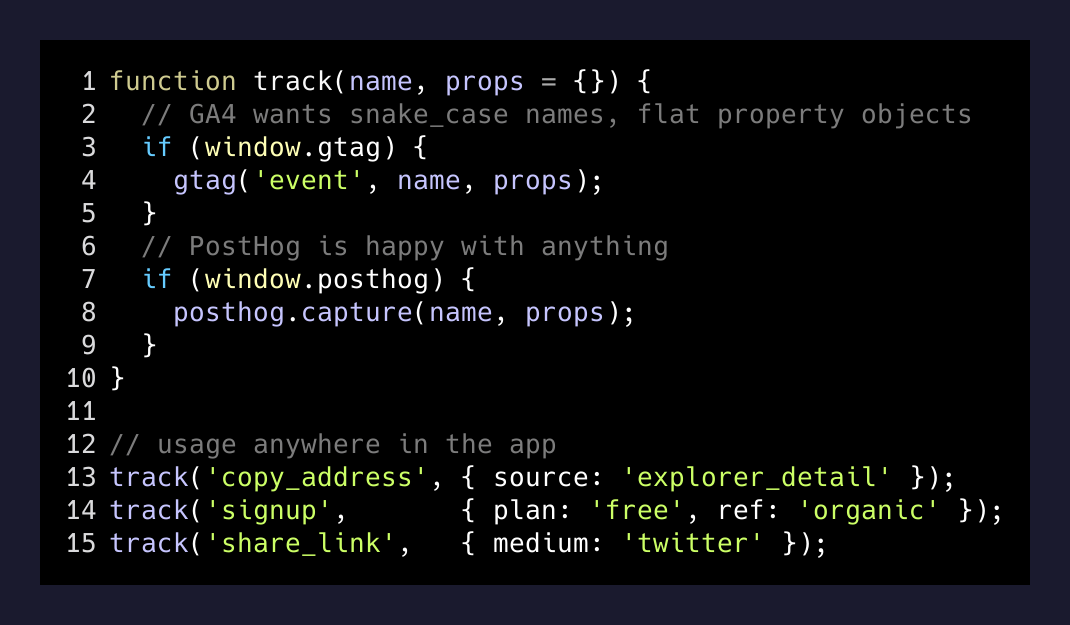
It’s not clever. It’s thirty lines, no dependencies, and it stops the schemas from diverging. When I open GA4 I see copy_address as a conversion I can hook into an ad audience. When I open PostHog I see the same event, plus the four auto-captured clicks that happened right before it, plus the full session replay if I want it.
The privacy angle, briefly
A piece that matters more on a crypto site than on a SaaS marketing page: PostHog is self-hostable. GA4 is not. If part of the pitch of your product is “we don’t ship your usage to Google,” you can turn off GA4 on the authenticated side of the app and keep PostHog, pointed at an instance you own, on both sides. GA4 still earns its keep on the public marketing pages where the trade-off is “see which organic query converted” versus “a few bytes of data sent to Mountain View.” That’s a different trade on / than it is on /dashboard.
The takeaway
“Pick one tool” is normally great advice. It’s great advice when the tools in question are actually competing — when they’re on the same side of the same wall, fighting for the same job.
GA4 and PostHog aren’t on the same side of any wall. One is the on-ramp to Google’s ad network. The other is the on-ramp to a product’s own data. The overlap in their feature lists is the price each paid to stay credible as “an analytics tool.” The real work they do is on opposite sides of a divide that doesn’t show up in a bullet-point comparison.
The cost of running both is a few milliseconds of script load, a thin track() wrapper, and five minutes of setup per site. The cost of picking only one is being unable to answer half of what you’ll inevitably want to ask.
I’d rather pay the five minutes.