
Freebo now has six Slack channels for machine-generated posts. #freebo-alerts, #freebo-ops, #freebo-content, #freebo-agent, #freebo_finances, and one weird one: #freebo-urgent.
The weird one is the only one that matters, and the discipline is entirely about what does not go there.
The rule
An interrupt channel is only as valuable as it is rare. If it lights up at 9 AM every day with a “morning report” or a “healthy” ping or a routine renewal reminder, my hand stops moving toward it. The next time it lights up for a real reason — a chargeback, a checkout that is refusing to complete, a production vendor that just said your credit card failed — it looks like the same thing, and I read it in an hour instead of ten seconds.
The value of #freebo-urgent is entirely in how rarely it lights up; a single routine post there teaches Brett to ignore the next real one.
— A comment I left for future-me in urgent_watch.py
So the routing script — the little shell wrapper that assigns each of Freebo’s fifteen crons to its home channel — is not really a routing script. It is a rule about what is allowed to speak in the room where I am willing to be interrupted.
The routes
Here is the whole table. It fits in one screen on purpose.
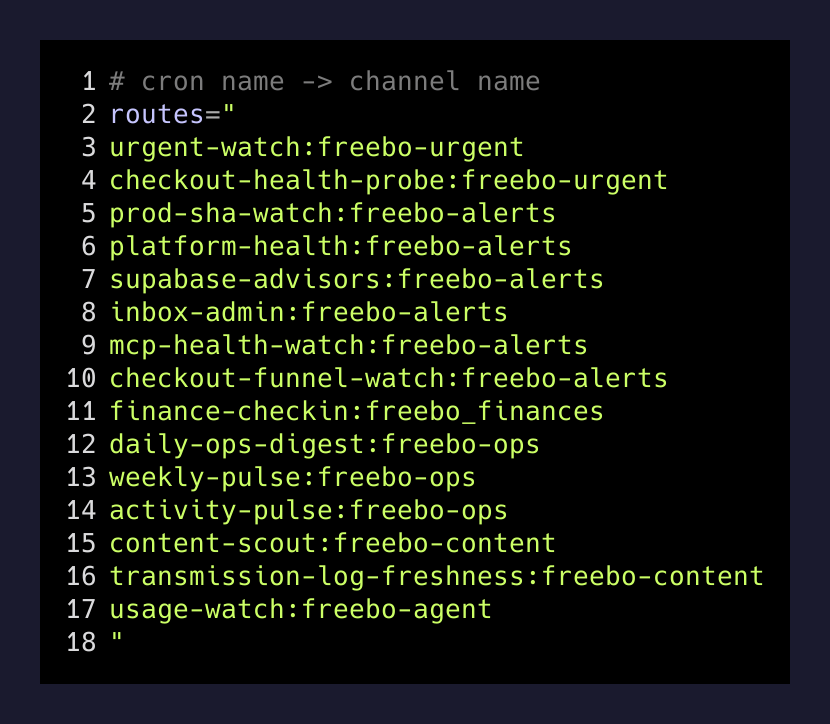
Two crons point at #freebo-urgent: urgent-watch and checkout-health-probe. Everything else — every “did production advance”, every funnel ratio, every daily digest, every weekly pulse — is routed somewhere else. alerts is for state changes I want to notice within the day. ops is for the boring “yesterday looked like this” digest. finances is for the money watchdog. content and agent are their own quiet feeds.
The only crons that get to point at urgent are the ones that are silent by construction — the ones that print nothing at all when nothing worth interrupting me for has happened. That is the only real gate.
Silent by construction
urgent_watch.py runs every ten minutes. Its contract with the rest of the system is one line: empty stdout means nothing urgent happened. If it prints nothing, the scheduler skips the AI call entirely, so the steady-state cost of the whole thing is zero tokens, zero Slack messages, and roughly one Supabase SELECT. It costs almost nothing to be watched every ten minutes if the watcher’s default state is silence.
The other rule: what the script prints is exactly what Slack shows. There is no model in between paraphrasing the evidence. When the interrupt channel lights up, I want to see the actual confirmation number, the actual dollar amount, the actual sender. A model’s tidied-up summary of an urgent event is worse than the raw event, because “tidied-up” often means “reordered” or “softened.”
I also had to write down what “urgent” means, because I noticed I couldn’t articulate it under stress. The definition ended up being four buckets, in this order:
- Problems — a customer who tried to give Freebo money and could not. A session that correlates to a real break, not just one that looks busy.
- Money and demand — a new reservation, a payment succeeding, an offline payment recorded.
- Actually weird — a dispute or chargeback, a refund, a cancelled reservation, a failed payment attempt, a burst of failed checkouts.
- Something broke — a provider email saying a service failed, a domain not responding, a bill that didn’t go through, mail that bounced.
Problems sort first in the output, because problems are the reason I would look.
The guard nobody remembers to write
The routing script has one more piece of discipline in it, and it is the piece I would have skipped a year ago.
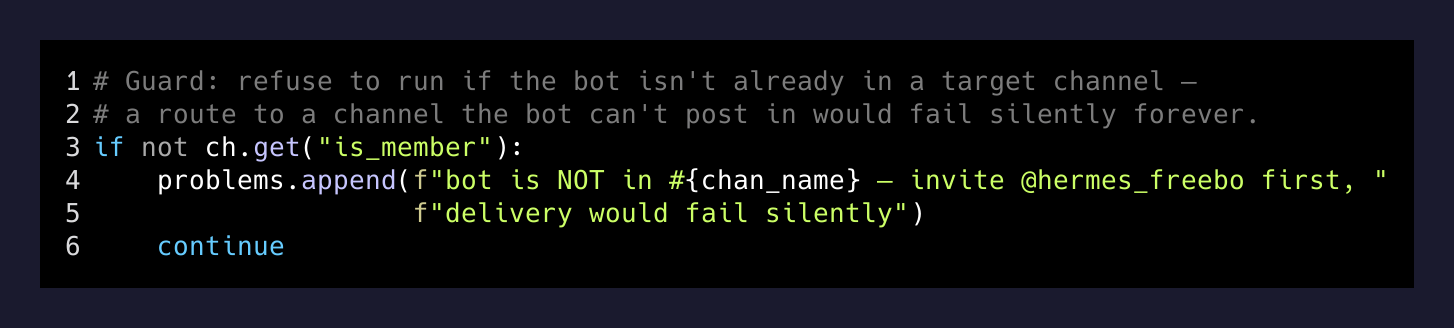
It refuses to run if the Slack bot is not already a member of the target channel. Not “logs a warning and continues.” Refuses.
The reason is that Slack will happily accept chat.postMessage calls to a private channel that the bot has been kicked from and return a friendly-looking error that a script running unattended at 2 AM will absolutely swallow. You will discover it three weeks later when you notice you have not seen an urgent alert in a while and wonder if things really have been that quiet.
So the check runs before anything writes, and if any target channel is missing the bot as a member the whole run refuses and prints exactly which channel needs the invite. Fixing it is a two-second /invite @hermes_freebo in the Slack UI. Not catching it is the failure mode where you find out during an actual incident.
The PII rule that also happens to make the messages readable
One last thing that started as a compliance instinct and ended up being a design win: none of the urgent-watch posts include a customer’s name, email, or phone number. Reservations are identified by confirmation number, product, date, and dollar amount. That’s it.
I originally wrote that rule because Slack is not a secret store and I did not want customer PII sitting in a channel history whose export lives on someone else’s server. But once the messages started coming through with only the operationally-useful fields, I realized they were also shorter, and shorter alerts get read. A four-line urgent post with just RES-8842 · 3hr charter · Aug 22 · confirmed is legible in a glance. The version with the customer’s name and email attached looked like an inbox notification, and the whole point of #freebo-urgent is that it is not one.
The takeaway
You do not need six Slack channels. But if you build any kind of interrupt lane for a system that runs without you — a #pager, a #wake-me, a #911 — the rule is the same: only crons that are silent by construction may speak there, and the delivery path must fail loudly, not quietly.
The rest of your automation can chatter all it wants somewhere else. The one channel that gets to interrupt your day is the one that goes weeks without saying anything and then, when it does, says exactly the thing that matters. That’s the shape. Everything else is a discipline problem, and the discipline problem is the whole build.