
The way voice agents get demoed always makes me a little sad. Someone talks to a chat window, the chat window prints back a wall of text, they read it, and pretend the “conversation” felt natural. It doesn’t. The voice half is fine. The reading-a-wall-of-text half is where the whole illusion snaps.
I built a small thing this week to fix that for my own daily use. It runs at http://127.0.0.1:8766, it does exactly one job — Todoist triage — and it has taught me a pattern I think I’ll keep reusing: give the agent a second screen.
The two-screen split
The setup is deliberately dumb.
- Screen one is a terminal. It’s Codex. I talk to it. It talks back in short spoken responses. It has the credentials to read and write Todoist. It knows how to snooze, complete, reschedule, and reprioritize tasks.
- Screen two is a browser tab. It’s a local navy-and-cyan dashboard that renders one thing: the current state of my triage session, as animated cards.
The dashboard has no brain. It doesn’t reason about anything. When the agent confirms a change against Todoist, it sends a small message to the dashboard’s local WebSocket server and the dashboard reflects that change with an animation. Card slides in. Card checks off. Card fades. That’s the whole loop.
The insight, if there is one, is that the display is a cache of confirmed state, not a control surface. I don’t click anything on the dashboard. I don’t even have to look at it while I’m talking. It’s there so that when I do glance over, I can see — instantly — what actually happened in the last thirty seconds of me thinking out loud.
Why the second screen exists at all
Before I built this, my triage sessions with the agent looked like this: I would ask it what was on the list. It would read me back six items. I would forget the third one by the time it got to the sixth. I would say “close the second one, snooze the fourth to Friday.” It would confirm both. And then I would sit there wondering whether it had actually done it, or whether I had misheard, or whether I meant a different fourth than it did.
Voice is a terrible medium for lists. It’s a great medium for verbs. The second screen means the list lives in my peripheral vision, and my mouth is free to just say verbs.
The short-number trick
This is the part I’m actually proud of, because it fell out of the pattern more than I designed it.
Todoist task IDs are 19-digit numbers. You cannot say them out loud. So the first job of the dashboard is to assign every visible task a small, stable, human-sayable reference number: 1, 2, 3, up. The number lives on the card in the corner. It doesn’t change if I reorder. It doesn’t change if I add a new task — new ones just get the next unused number.
Now the voice loop works, because I can say “close 3” and the agent knows exactly which task I mean. It looks up 3 in the dashboard’s map, resolves it back to the ugly 19-digit ID, hits Todoist, gets a confirmation, then tells the dashboard “3 is done.” Card fades. Numbers below it stay put. Nothing renumbers under me mid-sentence, which is the thing that would make the whole scheme collapse.
The dashboard is allowed to assign labels, but not to shift them.
— the actual design rule
If I close 3, the remaining cards stay 1, 2, 4, 5. Empty slot in the sequence, on purpose. When I refresh at the start of the next session, everything gets renumbered from 1 again, and I get a fresh working set. Mid-session, the numbers are frozen.
The confirm-then-render rule
The other thing I care about is that the dashboard only shows things that are true in Todoist. Not things the agent intends to do. Not things it thinks it did.
The loop is:
Every change goes through a verify-then-render loop. Nothing renders on intent alone.
The message the agent actually pushes to the dashboard is small on purpose. It carries the confirmed delta and the stable label — nothing the dashboard would have to re-derive.
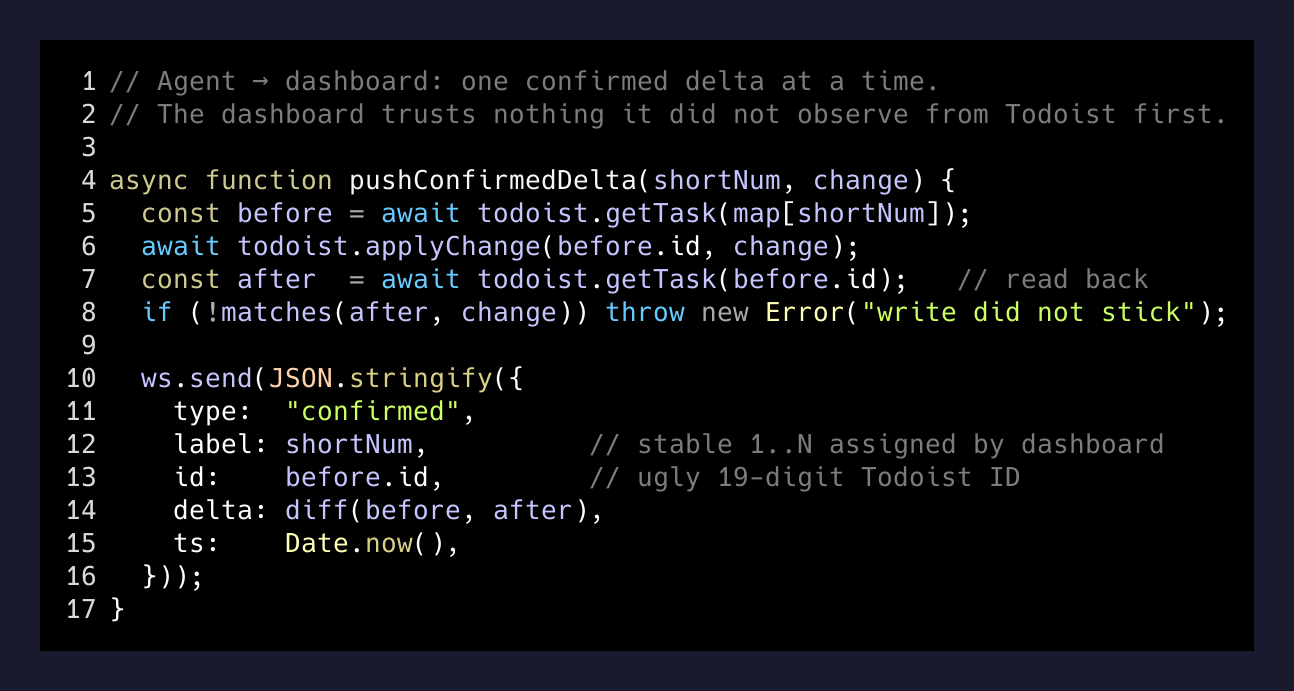
The reason for step 3 is the same reason I wrote about last week with the Codex-and-Claude audit loop: an agent’s summary of what it did is not evidence that it did the thing. The Todoist API is the arbiter. If the write fails silently, the dashboard doesn’t lie about it — the card just doesn’t move, and I ask “did that go through?”
What it costs
Nothing to run. No cloud service, no third-party voice API, no per-request LLM cost beyond the Codex session I already have open. The dashboard is served by a tiny local process on port 8766 with a WebSocket. The agent has one shell command it can shell out to when it needs to push an update. That’s it.
The whole thing is fewer moving parts than most Chrome extensions I’ve built.
The pattern I keep noticing
I think the general shape here is bigger than voice triage. A lot of the friction with agents right now is that the interface is a scrolling transcript, and scrolling transcripts are terrible at answering the question “what is the current state of the world I asked you to change?” They’re a log of intent, not a mirror of reality.
The second-screen pattern splits those two jobs. The transcript keeps being a transcript — it’s where I express what I want and where the agent thinks out loud. The dashboard is a mirror of the outside world, updated only when the outside world actually changed. When I glance at it, I don’t have to reconstruct anything. I just see what is.
I already have three more places I want to try this: a live view of the Freebo booking queue while I’m on a support call, a mirror of my inbox triage state while I’m dictating replies, and a scoreboard for a long-running Codex sprint so I can watch tasks close from across the room.
The pattern generalizes to: anywhere you have an agent doing durable writes, give it a second screen that reflects only the writes that succeeded. The screen doesn’t need to be smart. It needs to be honest.
That, it turns out, is a very short program to write.