
I had a live demo yesterday. Went well. Hung up, and instead of doing what I used to do — flip to my Mac, skim the transcript, retype the action items into Todoist, paste the summary into Obsidian, half-forget the third bullet — I typed one thing into Claude Code on my Linux desktop:
Pull the last note from Granola, extract action items into Todoist under Freebo, and drop the summary into today’s daily note.
Two minutes later the tasks were filed and the note was in the vault. I hadn’t touched my Mac.
This post is the wiring behind that two minutes, because it’s about six moving parts and none of them are Granola’s official Obsidian export. That’s kind of the point.
The problem with the “official” way
Granola is an AI note-taker. It runs on my Mac because that’s where the meetings happen (Google Meet, Zoom, whatever). It writes decent summaries. It has an official Obsidian export.
The official export dumps a markdown file into a folder. It does not know which project the call was about. It does not know that “Brett will send the pricing doc” needs to become a Todoist task in the Freelance project with a due date. It does not know that the demo I just ran belongs in today’s daily note, not a separate Meetings/ folder I’ll never open again.
The AI part of the AI note-taker stops at the summary. Everything downstream — routing, filing, follow-through — is still my problem.
What I actually wanted: a Claude Code session that can reason about the transcript. Read it as data, decide which parts are tasks, which parts are context, which parts are notes I’ll want to search for six months from now. That means Granola needs to be a tool the agent can call, not a folder the agent has to parse.
Granola has a public API. So: MCP server.
The wiring
Call ends on the Mac, filed on Linux, ~2 minutes end-to-end.
Granola’s public API lives at https://public-api.granola.ai/v1. Bearer auth, three endpoints I care about: /notes (list), /notes/{id} (get one, optionally with the transcript), and pagination via cursor. That’s the whole surface area I need.
The MCP server that wraps it is about 200 lines of TypeScript in ~/Projects/granola-mcp. Three tools: list_notes, get_note, get_transcript. Backoff on 429s and 5xx. Retry-After honored. That’s it.
The interesting file is the .mcp.json in whichever project directory I want Granola available in:
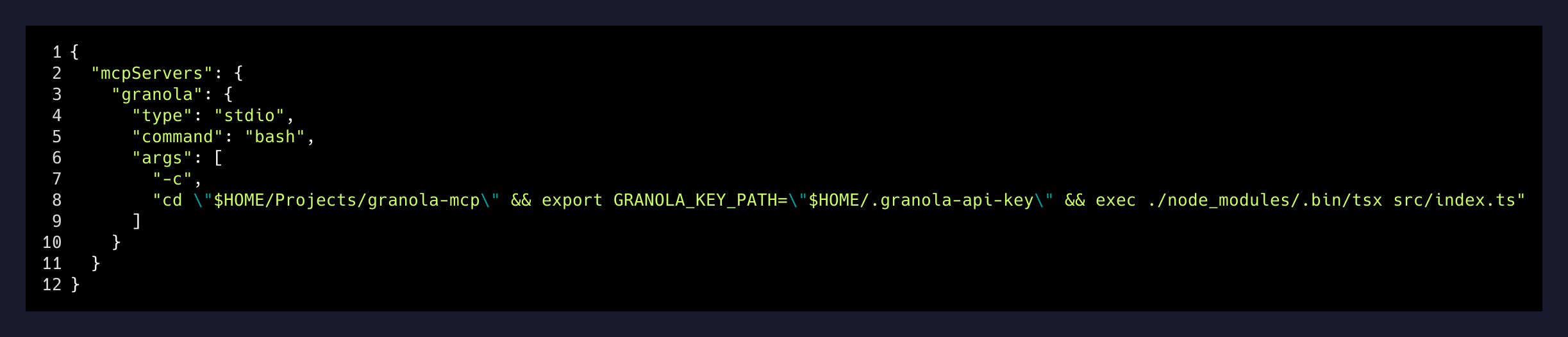
Project-scoped, not global. I don’t want Granola showing up in every Claude Code session — only in the vault and in the two client project directories where post-call filing actually matters. The -c bash wrapper is there because I want to force GRANOLA_KEY_PATH before execing into the server, and doing that inline keeps the config self-documenting: “here’s where the key lives, here’s what runs.”
What Tailscale is actually doing
This is the part people miss. Granola’s API is public, so technically the MCP server on my Linux box could talk to Granola without Tailscale at all. The Tailscale story is about the next step, the one I’m going to build out over the next few weeks: getting the Granola desktop app on the Mac to trigger the pipeline the moment a call ends, without me typing anything.
For that I need my Linux desktop to be reachable from my Mac as if they were the same machine. Tailscale gives me exactly that. My Mac (bretts-macbook-pro) and my Linux box (brett) sit on the same tailnet. SSH between them is a one-word alias in either direction. Taildrop drops files from Mac into ~/Documents/Brett Omarchy/Inbox/ on Linux, auto-received by a systemd user service that runs tailscale file get --loop --conflict=rename.
Today the trigger is me typing a prompt. Tomorrow it’s the Mac dropping a “call ended, id=not_abc123” trigger into the Linux inbox, a file-watcher noticing, and the same Claude Code session running unattended. Same pipeline, same MCP tools, no keystroke.
The point isn’t that Tailscale is cool. The point is that when your workflow spans two operating systems — a Mac because that’s where meetings happen, and Linux because that’s where the agent lives — you need one flat network. Tailscale is the cheapest way to get it.
The three gotchas
What actually happened yesterday
- 20:34Call endsClosed the Meet tab on the Mac.
- 20:35Granola API has the noteSummary generated, transcript diarized (poorly).
- 20:35Typed the prompt on LinuxOne sentence, no note-id — the agent figured it out via list_notes.
- 20:36Todoist writesThree tasks created in the right project, one with a due date pulled from a phrase in the transcript.
- 20:37Vault writeSummary dropped into today's daily note under a "Meetings" heading, wikilinked to the project page.
That’s two minutes. About one minute of it is Granola’s own processing time — I have no leverage over that. The other minute is the round trip: list_notes (one call), get_note with include=transcript (one call), Claude parses, Claude fires three Todoist writes and one vault write. Four MCP calls, five network round-trips, done.
The takeaway
The unlock isn’t Granola. Granola is a good AI note-taker with a mediocre downstream story. The unlock is that “downstream” is a solved problem the second the transcript is available as structured data the agent can reason over. MCP is the plug; the API just has to exist.
If your meeting tool has a public API, you’re maybe an afternoon away from never re-typing an action item again. If it doesn’t — and a lot of them don’t, or they gate it behind a Business seat — that’s a real signal about who they think their customer is. Granola gated it behind Business. I paid. It’s the cheapest ongoing subscription I have that pays for itself weekly, because the alternative is my brain trying to remember what someone said 40 minutes ago while I’m doing something else.
Two minutes between hanging up and the notes being filed. That’s the number that matters. Everything else in this stack is in service of that number.