
I spent a Sunday wiring up conversion tracking for a small business running on Wix. Two hours, two Wix sites, two Google Ads accounts, two GA4 properties. By the end I had a checklist short enough to fit on a Post-it and one finding worth a whole blog post.
Wix already fires the conversion event you want. GA4 already receives it. The thing nobody can find is the toggle that makes Google Ads count it as a conversion. It is hidden behind a three-dot menu on a row inside a table that does not exist until 24 to 48 hours after the form is first submitted.
That is the whole problem. Most “Wix conversion tracking is broken” tickets are not broken Wix and not broken GA4. They are a missed toggle on a row that did not exist when the operator went looking for it.
The path, in one breath
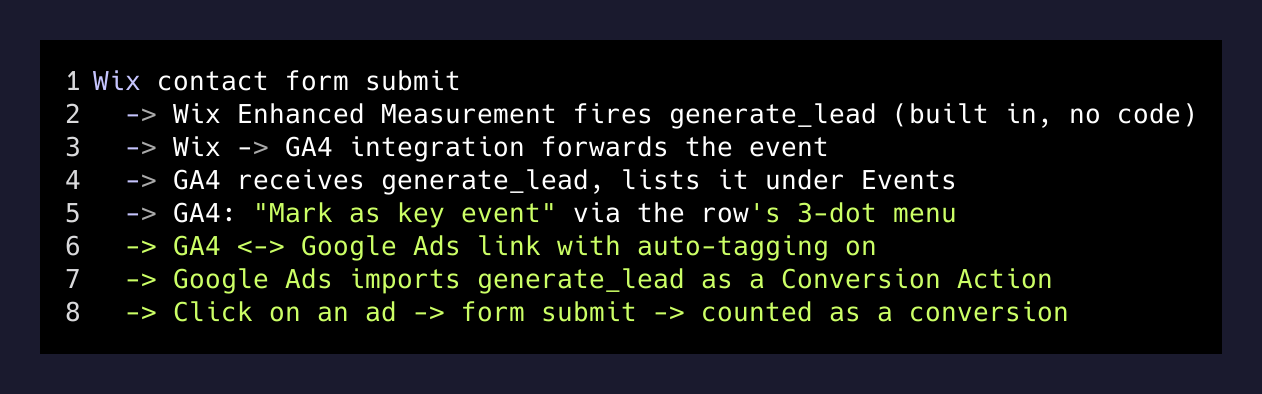
Here is the full chain that has to be intact for a Wix contact form to show up as a converting click in Google Ads:
Wix contact form submit
  → Wix Enhanced Measurement fires `generate_lead` (built in, no code)
  → Wix → GA4 integration forwards the event
  → GA4 receives `generate_lead`, lists it under Events
  → GA4 → "Mark as key event" via the row's 3-dot menu
  → GA4 ↔ Google Ads link with auto-tagging on
  → Google Ads imports `generate_lead` as a Conversion Action
  → Click on an ad → form submit → counted as a conversion
Eight steps. Six of them are visible, obvious, or one-click. Step five is the entire failure mode.
The part Wix already does for you
If you turn on Enhanced Measurement when you connect a GA4 property to a Wix site through the Marketing & SEO panel, Wix fires a handful of events automatically. The two that matter for a lead-gen site:
form_start— fires the first time a visitor focuses any field in a Wix Forms element on the page.generate_lead— fires when a Wix Forms submission succeeds.
You do not have to write a single line of GTM. You do not have to put a thank-you page redirect in place to trigger a pageview-based conversion. You do not have to fight with Wix’s Velo code editor. The event is already in your GA4 stream the next time someone submits the form.
This was the first surprise of the weekend. I had assumed I would be spending an hour in Google Tag Manager. Wix had already done the hard part. The job turned out to be wiring, not plumbing.
The part GA4 hides
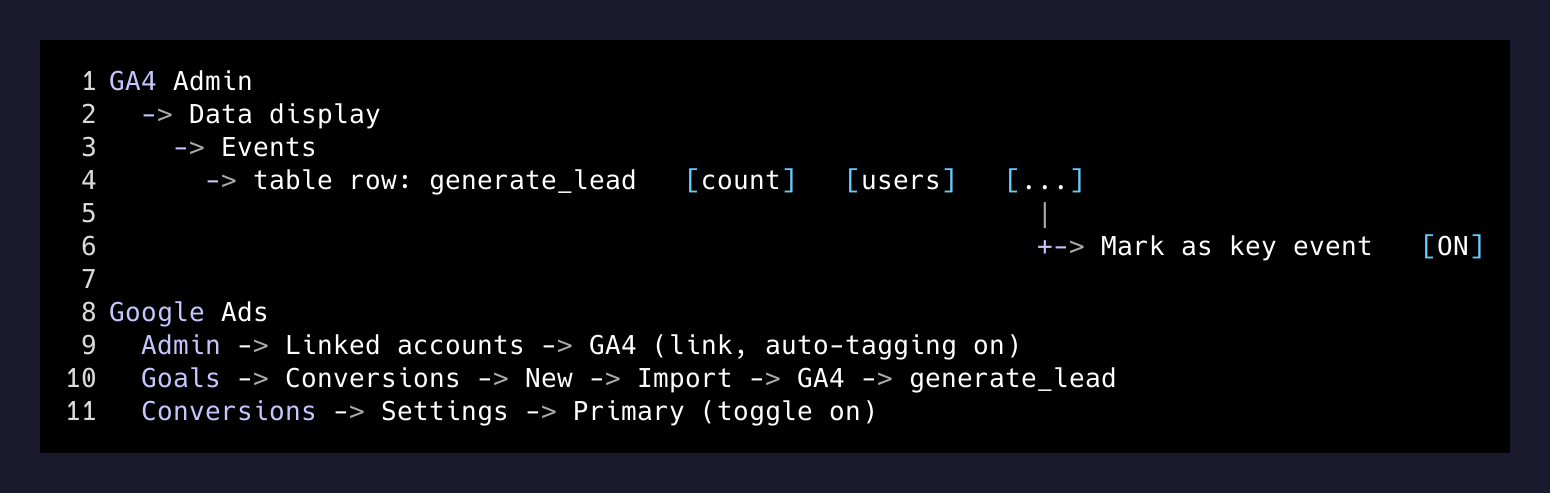
Open GA4. Admin → Data display → Events. You see a table. The columns are Event name, Count, Users, Mark as key event.
When you set up a brand new property, that table is empty for a while. GA4 does not list an event until it has actually received that event from your site. So if you connect GA4 today and look immediately, you see nothing. Reasonable.
But here is the catch: even after the event starts firing, the table aggregates with a delay. On both sites I worked on, generate_lead did not appear in the Events table for somewhere between 24 and 48 hours after the first form submission. The realtime panel showed the event live. The historical table did not.
That delay is fine if you know about it. It is a vertigo trap if you do not. The first time it happens to you, you assume your Wix integration is broken. So you click around. You re-paste the Measurement ID. You break things that were working.
When the row finally appears, you have to click the three-dot menu on its right side. That opens “Mark as key event.” Toggle it on. It is one click — but it is one click hidden in a popover off a row in a table that exists in a corner of an admin panel, gated by a multi-hour data lag.
This is the click everyone misses.
Then Google Ads has to know about it
Once generate_lead is a Key Event in GA4, you go to Google Ads → Admin → Linked accounts → Google Analytics (GA4) and link the two. Two settings to verify:
- Auto-tagging is on in Ads (so the
gclidrides along on every ad click). - Personalized advertising is on in the GA4 link (so Ads can read GA4’s audiences and events).
Then in Ads, Goals → Conversions → Summary → New conversion action → Import → Google Analytics 4 properties. Pick generate_lead. Save. Set it as the Primary action for your account.
That last step matters. Google Ads will happily import a conversion action and then ignore it for bidding because it is not marked Primary. Smart Bidding only optimizes for Primary conversion actions. If you skip this, your “Maximize Conversions” campaign is maximizing nothing.
Google Ads
  Admin → Linked accounts → GA4 (link, auto-tagging on)
  Goals → Conversions → New → Import → GA4 → generate_lead
  Conversions → Settings → Primary (toggle on)
If you have done all of the above, the chain is intact. Click an ad. Submit the form. Wait a few hours for attribution to flow back. You should see one conversion show up under that campaign.
What I actually built on Sunday
I will not name the client, but the shape of the engagement is worth saying out loud because the same shape probably applies to your local plumber, electrician, charter operator, or wedding photographer.
- One business, two Wix sites, two Google Ads accounts.
- One site had a stale GA4 property that had never been linked to Ads. The other had no GA4 at all.
- The campaigns had been running for weeks. Spend was real. Conversion data was zero.
- The fix on both sites was the same six clicks, plus the three-dot toggle on each.
The campaigns were not the problem. The ad copy was not the problem. The keyword list was not the problem. The pipe to Google Ads was disconnected at a single point on each site. Once the pipe was connected, the existing campaigns started reporting conversions within hours.
This is the most common, most invisible, most fixable category of paid-search waste I have seen at this scale: campaigns that look fine and bid like they cannot see.
A checklist short enough for a Post-it
If you run a Wix site and you are spending any money on Google Ads, the audit is fast:
- Is GA4 connected via Wix Marketing & SEO with Enhanced Measurement on?
- Have you submitted the form yourself, in an incognito window, in the last 48 hours?
- Does
generate_leadappear in GA4 → Admin → Events? - Is the Mark as key event toggle on for that row?
- Are GA4 and Google Ads linked, with auto-tagging on?
- Is
generate_leadimported in Ads as a conversion, and marked Primary?
If any one of those is no, the chain is broken and Smart Bidding is flying blind.
The takeaway
A lot of “this thing is broken” in marketing tools is not a code problem and not a strategy problem. It is a one-toggle problem on a row that is hard to find. The platforms have made the happy path almost free — and then buried the last step in a menu that requires you to know it exists.
The leverage move is to know where every platform hides its last step. Wix hides it behind the three-dot menu in the GA4 Events table. Once you have seen the toggle, you will never miss it again. Until then, your campaigns are paying for clicks the bidding model cannot learn from.
Find the toggle. Click the toggle. Wait two days for the data to start telling the truth. Then go change the part of the funnel that actually needs fixing.